Posted in Uncategorized

It’s Almost a New Year! Time to Clean Up Your Email Inbox

I write this post on December 28th, 2021 reflecting on the past year and gearing up for the next. And it’s time to clean up your email inbox. I love the fact that January 1st provides a set date to start over, but the truth is, you can do this at any time. So, if you’re reading this at a different point throughout the year, the advice and tips still apply.

If you’re anything like me, your email and phone notifications and inboxes are just filled to the brim. Now, I do my best to maintain a zero inbox and minimize any notifications that will disrupt my thought process. However, things sneak up over time and it’s important to do a reboot of your process if necessary. For me, it’s time to get my email back in order.

Why I’m Feeling This Way

Now, I only have a few emails in my inbox at the moment so you might think that I’m doing a great job at managing emails. However, over the past year, I have joined different newsletters and applied to various jobs. That means that the volume of emails I’m receiving is still pretty high. So even though I’m wading through them, it takes more time than I would prefer.

It’s also a reflective time of year that makes me evaluate all my systems as I think about the goals I want to achieve for the upcoming year. And one of my continuous life goals is to be more reflectively productive. Not just productive for productive’s sake, but being truthful with myself about what’s working, what’s not working, and what causes extra unnecessary tasks.

So, before you jump into overhauling your email inbox, make sure it’s a priority that will help you. I listened to Ali Abdaal’s recent YouTube video on how much money he spent and he made a point about the money he spends ordering takeout. Cooking is not a priority so time isn’t invested in doing it or learning how to do it better. Make sure to invest time in the things that are a priority for you.

time to clean up your inbox
Photo by Torsten Dettlaff on Pexels.com

Time to clean up your email inbox: Strategies to help you

  • Review any emails that come through a subscription
    • I often sign up for new things not realizing how many times per day or week the organization will email me.
    • Sometimes I change the settings to once a week
    • Other times I just decide not to get that newsletter anymore because it’s no longer helpful. Use the auto unsubscribe feature in GMAIL or go through the organization’s system.
  • Create filters
    • Not every email has to clog up the inbox upon arrival. You can create filters to send emails to folders. Or, have it enter with a label based on a specific sender.
    • Filters help create visual clues about important emails upon arrival. For example, you may have a client or boss that demands immediate responses. Create a filter so it stands out when you are glancing at your emails throughout the day.
    • You can also set up notifications so that it only interrupts your workflow if it is from certain people.
  • Archive old emails
    • If you want to get started with an inbox zero, then archiving everything is a way to start. If you are not sure how to get started, then follow this guide.
    • My personal email account had tens of thousands of emails before I started doing this. I signed up for it in 2005 and since it is my name, I have kept it ever since.
    • No one has the time to review thousands of emails so simply archive all of them and start doing inbox zero moving forward. They will still be accessible through search so nothing is actually deleted.
  • Set boundaries
    • Decide how often you plan to check your email.
    • Decide what devices you will keep your email on.
    • Decide if you will get notifications via a sound alert or banner.
    • Set personal time aside where you will not check your emails at all – perhaps even for a day or two.

Now, these are all suggestions I have incorporated into my own routines over the last few years. As with life, my process and systems ebb and flow to match my current endeavors and productivity needs.

Comment below with any helpful email tips to start the new year!

Posted in Goal

How to Be Productive After Time Off

How to be productive after time off is a big question. We all deserve our time to unplug, destress, and spend time with ourselves or our family. Whether that is to take a vacation or much-needed self-care time, it can be hard to get back into the swing of things.

I built a vacation into my arrival to Norway, with many months of preparation leading to this point. I felt guilty at first, but then I remembered how much time I put into getting my permit, online orientations, building out workshops, etc. So, if they said I should get my bearings before diving in, who was I to argue?

However, now that I know my way around the city a bit, I am ready to start my new job. Last Wednesday was my first day at the office picking up the iPad and phone that I will use as I travel.

I am finally somewhat adjusted to the time change, and tried my best to follow my previous morning routine with breakfast, affirmations, and planning time for the last several days.

how to be productive after time off

Now, it is Monday of a brand new week and I am going forward with getting back into “normal” work weeks. While I will occasionally have travel on the weekends, my hope is to prioritize working during the week. Then, rest on the weekends.

How to be productive: Here is what I am doing to get my productivity energy back:

  1. Get back on track with a morning routine, even if it’s just a few things. For example, today, I got up, stretched, made coffee, and wrote out my affirmations. Tomorrow, I will make my bed and spend some time in silence. I hope to add running back in to the mornings before work time.
  2. Create a healthy balance of work and personal time. I started emailing and to-do lists around 8:30am this morning. Now, I am about to break for lunch and go on a walk. I have to teach tonight from 6:30pm – 8:00pm so I don’t feel guilty about taking a long break in the middle of the day.
  3. Be forgiving with myself if I’m not on my “A” game right away. So, I did hit snooze this morning (a terrible habit I have been trying to break this whole year). I am disappointed that I reverted back, but I am not going to dwell on the mistakes of today when I can plan for success tomorrow.
  4. Re-start check-ins with my accountability partner. When I tell you that checking in weekly with someone is a game-changer, I mean it. For 2 years, I meet weekly with an accountability partner. We go over our weekly goals, our long term goals, time and scheduling challenges. Additionally, we provide much needed advice and encouragement.
  5. Sync Google calendar on all my devices. Because I picked up my new work technology, I need to sync everything so that all my calendars match up. I prefer using Google Calendar to track meetings and appointments. On my iPhone, I link my google account to the Apple calendar.

So, that is my recommended start to easing back into productivity. Most importantly, not trying to do everything all at once!

Posted in Uncategorized

10 Items to Spruce up Your Home Office: Amazing Amazon Finds

I’m always on the lookout for good Amazon finds.

It seems like the work from home options are here to stay long-term. Even before the pandemic, remote work was gaining popularity from both employers and employees. With streamlined communication and proper procedures, it can be a great way for companies to allow workers more flexibility in managing their time.

In this post, I wanted to share some of the products that I find to be helpful in my home office. These are in no particular order and I’m happy to share more if this list is helpful!

white bluetooth speaker on silver laptop computer. Amazon finds
Photo by Jessica Lewis Creative on Pexels.com

10 Home Office Amazon Finds

  1. 1. Waterproof desk mat

2. Atomic Habits by James Clear

3. Electric cup warmer

4. Ergonomic mouse pad

5. Power strip with USB port

6. Mini vacuum for keyboard and crumbs

7. Motivational desk plants

8. Monitor message board and phone holder

9. Desk organizer for stationary

10. Alexa as a virtual assistant


Best Sellers in Office Products
Posted in Goal

Consistency in Blogging is Important: My Efforts to Improve

Am I the most consistent blogger? No. Would I like to be better? Absolutely. Consistency in blogging is important. Many of the blog advice gurus emphasize how important consistency is for getting your blog going and maintaining the content (by the way, the article linked here is an easy read on 4 simple ways to come up with content for your blog).

Readers expect to see articles from you on a regular basis, whether it’s several times a week, once a week, or twice a month. As the writer, you get to set the tone and precedent to manage those expectations. If you’ve subscribed with me for a few months now, you might notice that I’ll post a lot for a few weeks, then kind of disappear, and then start posting again.

Even when I’m not posting, I still use the draft mode to collect my ideas as inspiration strikes me. However, because blogging is not my primary source of income (yet!), I do sometimes have to pivot to the things that take priority in my life, such as family or paying current bills.

In the spring, it was maintaining my two part-time jobs while finishing up my dissertation. This summer, it was helping my family move halfway across the country and then working full time at a customer service job to make ends meet while I waited for the green light to leave the country.

consistency in blogging
Photo by Ivan Samkov on Pexels.com

Consistency in blogging: Monitoring statistics

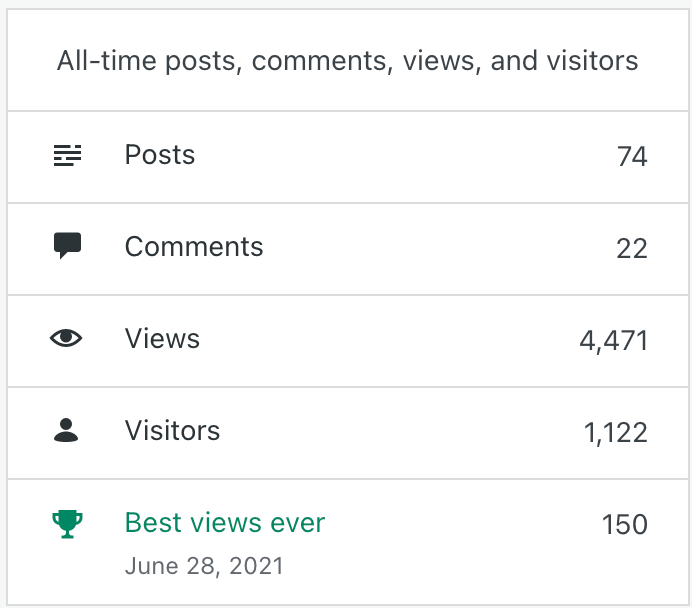
I recently shared my blogging statistics for the first 6 months or so of this endeavor. When I look at the chart of views, my best months were when I was consistently posting content 2-4 times a week. There was a month or so where I did post quite a bit, but I did it all at once with a long break in between. What this tells me, is that I should utilize the schedule post feature more often.

Even if I get a bunch of ideas that strike me and I get the urge to post 2 times in one day, it seems to be better if I draft it and then schedule it to post in another day or two. That way, there is some time in between the posts.

Now, I just decided to Google how often I should post and it seems that my observations are in line with the recommendations. It is best to post 2-4 times per week, with an average of 11 posts per month in order to see the best traffic. In my own data, I can see that I need at least 10 posts per month to keep my views growing.

So, my commitment from October through December to finish out 2021 is to write at least 11 new blog posts per month. As I currently have 75 blog posts, that would put me over 100 for the year, which is an attainable and realistic goal. And would help my consistency in blogging.

I will use data and inspiration to choose content by monitoring posts that seem to do well. For instance, the blog posts with the most likes seem to be about time management, money, or technology. But, it would be very helpful if you comment below on any articles you would like to see me write more about!

Posted in Goal, Manifestation

Blogging in 2021 – Sharing My Blog Stats 6 Months In

Here is a post of my 6- month blog stats.

Well, I know blogging is not a get rich quick method and it takes time, patience, and strategy to truly develop a quality blog that people trust and go to for tips and advice. I’ve also researched the importance of developing a niche that helps Google give you domain authority over that niche. However, my blog is more of an opportunity to share my voice and things I’ve learned with others. It also gives me an outlet to write about the things on my mind and almost use it as a journal of sorts.

I wanted to share some of the stats I have had since February 2021 when I first started publishing posts on this blog. Although I have been working on learning Search Engine Optimization (SEO), I still have so far to go. I know many bloggers get exceptional returns through the wonderful world of Pinterest marketing, but I have not mastered that yet either. I am proud of how far I have come in this process considering I was finishing grad school and working 2 part-time jobs when I started. In the last 6 weeks, I have been working at least full time in one job and consulting still with the other.

Now that I have an upcoming new adventure with a ten day quarantine, I feel like this is the perfect time to reflect on what is working and try to amp up the posts and marketing even more. I can use the time for self care and get one step closer to reaching my ultimate goals. Also, consider this an encouragement for any of you out there still blogging away waiting for those page views to go up.

Blog stats: page view and visitor insights:

blog stats

As you can see from the green shading in the chart, May and June were the months with the most page views. I even hit 1,000 in May, which was amazing. At that time, I was gaining steam in posting consistently about 10 times a month or so. As you can see in August, the posts took a dip as did the page views. At the time of this current blog post, I have 210 people following my blog (THANK YOU FOR STICKING WITH ME!).

In theory, that means if I posted 10 times a month now, and every person clicked on each post (not just in the reader view, but actually click on my blog post), then I should be reaching 2,000 views for the month. And that doesn’t include all the people who may find the post and then not subscribe to the blog itself.

Now, onto the money side of things with Word Ads. I do have that enabled, but you don’t actually get paid from WordPress until you earn $100. Additionally, I can’t apply for other ad programs like MediaVine until I have many more page views. It’s a goal, so I will report back when I do reach that milestone.

Blog stats: income

So far, my total earnings from blogging in 2021through August are $6.67. My best month was June, when my average CPM was $0.54. This is great for me now, but once I’m able to partner with bigger advertisers, that will be in the $7-$30 range hopefully.

I’m still going to continue to develop and find my niche, but for now, I enjoy what I’m learning and sharing it with you all in the process!

Posted in Uncategorized

Dealing With Anxiety in the Workplace: Advice?

Do you struggle with anxiety in the workplace?

Well, I write this post almost three weeks into my new job. It’s full-time and something I have never done before. I enjoy talking to people and it’s very much customer service related, so I thought it wouldn’t be so bad.

However, what makes it challenging is the lack of staff and training to be successful at what we do. Everyone is truly doing their best, but we are still behind in tasks and not getting to serve people in the way that I wish we could all the time.

So, this blog post is more of a reflection on my part seeking advice from readers who may have experienced similar situations. I do struggle with anxiety and one of the benefits of working from home was that I could manage it much easier.

I could take a break or engage in mindfulness when I needed to rather than working on my feet for 8 hours in a high stress environment with low pay. I think that is part of it, too. My mindset is such that this is a means to an end so I just need to suck it up.

I am truly trying to see this as an opportunity for growth and learning because it is always humbling and helpful to be in new situations and experiences that you may never have had before. When I had previous bouts with anxiety in the workplace I sought the advice of mentors, took time away, and focused on my goals and priorities to help see me through.

In this environment, the workplace dynamic is completely different. And it’s hard for me to take any time off because I just started and I need the incentive pay being offered at the moment. Furthermore, the schedule is always changing and I don’t have control over when I can take a break or step away. I do have nice coworkers who are patient with me and help by answering questions I have about the job or circumstance.

anxiety in the workplace
Photo by Yan Krukov on Pexels.com

At the same time, I’m not able to step away always when needed, so I have to develop other coping mechanisms for the moment. Breathing is helpful and getting outside for fresh air if possible. But I’m curious … what do you do? How do you take time for yourself in a busy workday to make sure you are properly taking care of yourself for the long run? How do you handle anxiety in the workplace?

I do know that when I take the time to complete my daily affirmations, my days go much smoother and my mind is more at ease. Share in the comments, any advice you have – it would be much appreciated by not just me, but many other readers!

Posted in Uncategorized

3 Helpful Communication Tips and Suggestions for Virtual and Remote Teams

Since the pandemic began in March 2020, many teams had to switch to a virtual work setting with little to no time to prepare. Helpful communication tips are a must. What have we learned since then? How can teams communicate effectively when they are not in the same place?

Truthfully, I believe that the future of work is hybrid with CHOICE. Some people work better in an office. Some work better at home. Some, like myself, need to mix it up. I enjoy being in the office for the socialization piece of getting to know my colleagues. However, I do enjoy the freedom and flexibility of working from home and getting to dictate my own schedule and work without interruptions I choose to do so.

As I’ve worked with several organizations over the last several years, here are my top 3 tips for positive communication within virtual teams:

Helpful Communication Tips:
Set clear guidelines and expectations

It is important to know how frequently you should hear back from a colleague and when it is necessary to send reminders. Sharing calendars can be a great way to know when others are free or busy. You don’t have to share all of the details of your calendar with colleagues. It is even helpful to block out specific quiet work time on your calendar and then others will see that you are busy.

If people take personal time, respect that. I think now more than ever, we are understanding the value of family and health taking priority over the work, work, work culture. However, also be sure to know when it is appropriate to email, phone, or text. Cell phones have become part of the workplace culture, but unless it belongs to the company, I try to keep mine primarily for personal use whenever possible.

Think about as a team the problems you may run into if someone doesn’t respond. How will you get a hold of them? How long should it take for a response? Can you set up away messages on Slack or email when you’ve stepped aside for some time? These are all things that your team can discuss and come to common expectations.

helpful communication tips
Photo by Jack Sparrow on Pexels.com

Helpful communication tips:
Leverage technology to automate and collaborate

Many organizations use virtual communication tools such as Slack or Microsoft Teams. It is an easy way to send messages and let people know when you are away from your computer. I work strange hours to get my stuff done, but I don’t always want people to know I’m working late at night.

So, I will often use the schedule send feature of Gmail to send emails out around 8:00 am in the morning. If someone sees I’m on and working at 9:00 pm, they may start to message me or expect a quick email response. I personally am trying to establish clear work and personal boundaries by automating what I can.

Other great ways to utilize technology would be to share project management systems like Trello or Monday.com. These platforms offer a space to visualize shared projects and create deadlines and notes.

Helpful communication tips:
Keep running meeting notes in Google Docs or Microsoft Sharepoint

One strategy that my team used this past year and a half was to keep running notes on a Google Doc for our weekly check-in meeting. We would go over the agenda items from the previous week, see what was new on our to-do list, and use the assign task feature to automate emails to the team on who was going to do what. We then had a recurring Google Calendar invite that included the Zoom link and Google Docs notes that we could all access.

It was clear and kept us all organized and on the same page as we prepared for events and programs.


Now, every team and group has its own dynamics and energy. It is important to listen to one another’s ideas, try new things, and be mindful of what just is not working. Perhaps the team leader can even put together an anonymous suggestion line where staff could come up with some solutions to communication issues that the team is having.

*Affiliate link* Check out Speechelo to turn text into voice overs!

Posted in Uncategorized

3 Ways to Respectfully Say No to New Projects or Commitments When You Want to Say Yes

So you want to say no to new projects. Do you feel guilty saying no when someone asks you to do something at work or a favor from a friend? Do you say yes even when you don’t want to so you won’t let someone down? It’s easy to say yes because you feel like you have to, but true reflection is necessary to decide which things are worth saying yes to. And sometimes you may think you’re saying no to something, but your message comes across as ambivalent and you feel it’s too late to back out at that point.

I was just having a conversation today with a friend who thought she said no to something, but still got an excited email about continuing to be part of a project. I had her read me the initial message she sent and let her know that it indeed did not come across as a no as she intended. She ran her response by me to check that it was clear and the new tone of the message was still friendly and encouraging, yet set a clear boundary on participation in the project.

Now, this blog post will focus on generic ways to respectfully say no, but I’m happy to write new posts catering to both professional and personal life boundaries. Before saying flat out “no” to an opportunity, gathering, meeting, or project, it is okay to ask clarifying questions. For example, about 6 months ago I was asked to take on a 4-5 month consulting project. It would have been an awesome learning opportunity for me, but I already had 2 part-time commitments and was completing my final semester of grad school. Part of my response included:


I feel confident in my abilities to meet the requirements of the position, but I want to make sure I have a clear understanding of the expectations and relative time commitment.

After the response became clear that this would be a 20-30 hour per week commitment, I knew that I could not add that to my workload. I really wanted to say yes and do it, but I also wanted to make sure that I could carry out the responsibilities to the level of competence I wish to display. And this comes from previous experiences where I did overload myself and not perform to the best of my abilities.

Discerning when and how to say yes and no to opportunities is a lifelong practice of finding balance in your life. There is not necessarily a one size fits all method to this. I was listening in to a conversation on Clubhouse last night and someone said that it’s easier to start with no and change to yes later than to say yes to everything and have to eventually say no.

Here are 3 ways to respectfully say no to new projects and manage your time effectively.


Say no to new projects: Ask them to check in at a later time

This strategy works if the ask is something you’re possibly interested in saying yes to, but just don’t have the time at the moment to commit or to learn more about it. Your schedule is packed and you just can’t imagine taking on one new thing. Say you are not available at this time, but they can check back in with you in XX number of weeks or months. And if the person follows up and it comes back around and you still cannot commit, clearly state that unfortunately, you will not be able to take on this project or endeavor. Here is a sample of what I would say:

Thank you so much for reaching out to me about this opportunity. I am interested in this possible partnership, but unfortunately cannot commit at this time. Will you check back with me in 3 months if you are still interested in collaborating?

say no to new projects
Photo by fauxels on Pexels.com

2.Express support in other ways

Now, this is the response that my friend used to make her no clear to the people in the email thread. She was truly excited about the project idea, which was expressed in the initial communications. However, she didn’t want to be one of the main people involved in the idea creation and the day to day of the project. This was a time she needed to say no to new projects.

So she sent a nice message back stating she was fully cheering them on in this opportunity, but could not take an active role. However, she left room for them to check back in if they had a specific task related to her area of expertise. Therefore, she was not committed in any way, but could offer support on very specific items if time permits later and there is a need.

3. Suggest an alternative

This is a great comprise “no” answer. Perhaps you don’t have the time or capacity to take something on, but you know someone who is. Check with that other person and then make the recommendation or connection. Personally, I like to check in with my contact before sending the other person to them that way I know if they are truly interested in the opportunity. It also creates a more positive interaction for everyone involved.

Maybe you want to say yes, but you can’t commit to 2 hour weekly check-in meetings. Clearly define your boundaries and say that you would be available to meet every other week or once a month. It is much better to set those boundaries up front from an overly cautious time commitment and then later decide to become move involved if you are able to do so.

In order to properly provide an alternative to whatever the ask is, it’s important to continue to build up your social and professional network. Take advantage of opportunities to meet with others in your field and areas of expertise. This way when you say no to new projects, there is a shared understanding and respect.

At the end of the day, if something is a definite no for you, make that clear in your response and wish the person well. You don’t necessarily owe an explanation and this is something I’m working on. I feel the need to justify my time by saying “oh, I already have this commitment and this commitment”, but the reality is simply saying no so you have time to take a break and protect your mental health is just as important.

Posted in Work From Home

The Importance of Eye Health When Working From Home

Eye health is something to maintain an eye on – haha, get it?

After working on the computer and being on video calls throughout the day, do your eyes feel more fatigued than ever? I know I am often more tired than I used to be when I could actually have face to face conversations with people. And it doesn’t seem to just be me. My friends and coworkers are all saying the same thing.

In a study conducted during the beginning of the Covid-19 pandemic, researchers sent a questionnaire to over 1000 participants about their computer use and eye strain (Ganne et al., 2020). They found that digital eye strain was highest among students taking online classes, followed by teachers teaching online. Additionally, eye strain was highest among those who were younger, had increased screen time, and poor habits of not taking breaks (Ganne et al., 2020).

Those of us working from home need to come up with strategies to give our eyes a break. It’s just as important as stretching or standing to combat back and neck problems from sitting for long periods of time. Here are some of the things that I use to help keep my eyes as refreshed as possible in the digital world of work.

eye health
Photo by Tima Miroshnichenko on Pexels.com


Strategies to combat eye fatigue and help keep good eye health

  1. 20/20/20 rule

Originally suggested by Dr. Jeffrey Anshel, the 20-20-20 rule was developed as a way to reduce digital eye strain as computers began the rise in popularity for work and home. With the onset of the pandemic, this rule gained new momentum as a recommendation for anyone staring at their computer screens for long periods of time. Essentially, the rule states that you should look away from your screen every 20 minutes for 20 seconds at something that is 20 feet away. Well, I don’t work in a 20 foot long office, so I try to look out the window to get my distance in. I use Alexa as my timer to help make sure I remember to follow this rule.

Additionally, it’s important to make sure that the computer screen is eye level so you’re not craning your neck and that the brightness is set to a comfortable level.

2. Blue light blocking glasses

I have heard the recommendation to not look at screens anywhere from 30 minutes to 2 hours before sleeping because it can disrupt the sleep patterns. However, the research is mixed on whether blue light actually contributes to digital eye strain. Personally, I have found fewer headaches and fatigue when I do wear my blue light blocking glasses. If you already wear glasses, it can now be added in to your lenses in many eye doctor’s offices.

3. Take breaks

Simply stepping away is a great strategy to give your eyes a break from the screen. In addition to the 20-20-20, make sure to step away from the screen multiple times throughout the day for extended periods of time. It’s easy to wake up and immediately grab our cell phones because they are right next to us. In order to remove the temptation of using my phone first thing in the day, I bought an actual alarm clock that I use. I try to be intentional about taking a lunch break where I’m outside away from technology whenever I can.

Other strategies to help combat eye fatigue and maintain good eye health include making sure the computer is at the right height and using a laptop stand if needed, making sure you have proper lighting in the room you are working in, and changing the brightness or glare on the display you are working on.

Whatever you do, practice being mindful of how you are feeling and take steps to care of yourself!

Sources:

Ganne, P., Najeeb, S., Chaitanya, G., Sharma, A., & Krishnappa, N. C. (2020). Digital Eye Strain Epidemic amid COVID-19 Pandemic–A Cross-sectional Survey. Ophthalmic epidemiology, 1-8.

Posted in Uncategorized

Does Every Meeting Really Need to be a Video Meeting?

Video meetings all day are tiring. After over a year of pandemic working, I think we can safely assume that many people are burned out from Zoom. A recent article, citing research by Dr. Jeremy Bailenson, explained why Zoom is in fact so much more tiring than meeting in person or just simply having a conference call.

I encourage you to read the article, but the short version is that we have lots of close-up eye contact, looking at ourselves more, higher cognitive load, and that mobility is reduced. The article linked above offers some solutions to these issues.

Meetings take up so much time in our work schedule, and the reality is, does everything really need to be a video meeting? The default was Zoom this past year, which grew from 4 million in revenue in 2018 to 21.7 million in 2020. And now it almost seems like people have forgotten the phone since we aren’t necessarily walking to our coworkers office.

Now the question becomes how many people are planning to go back to the office? What does the future of work look like? And if people continue to work from home, do we need to continue video meetings all the time?

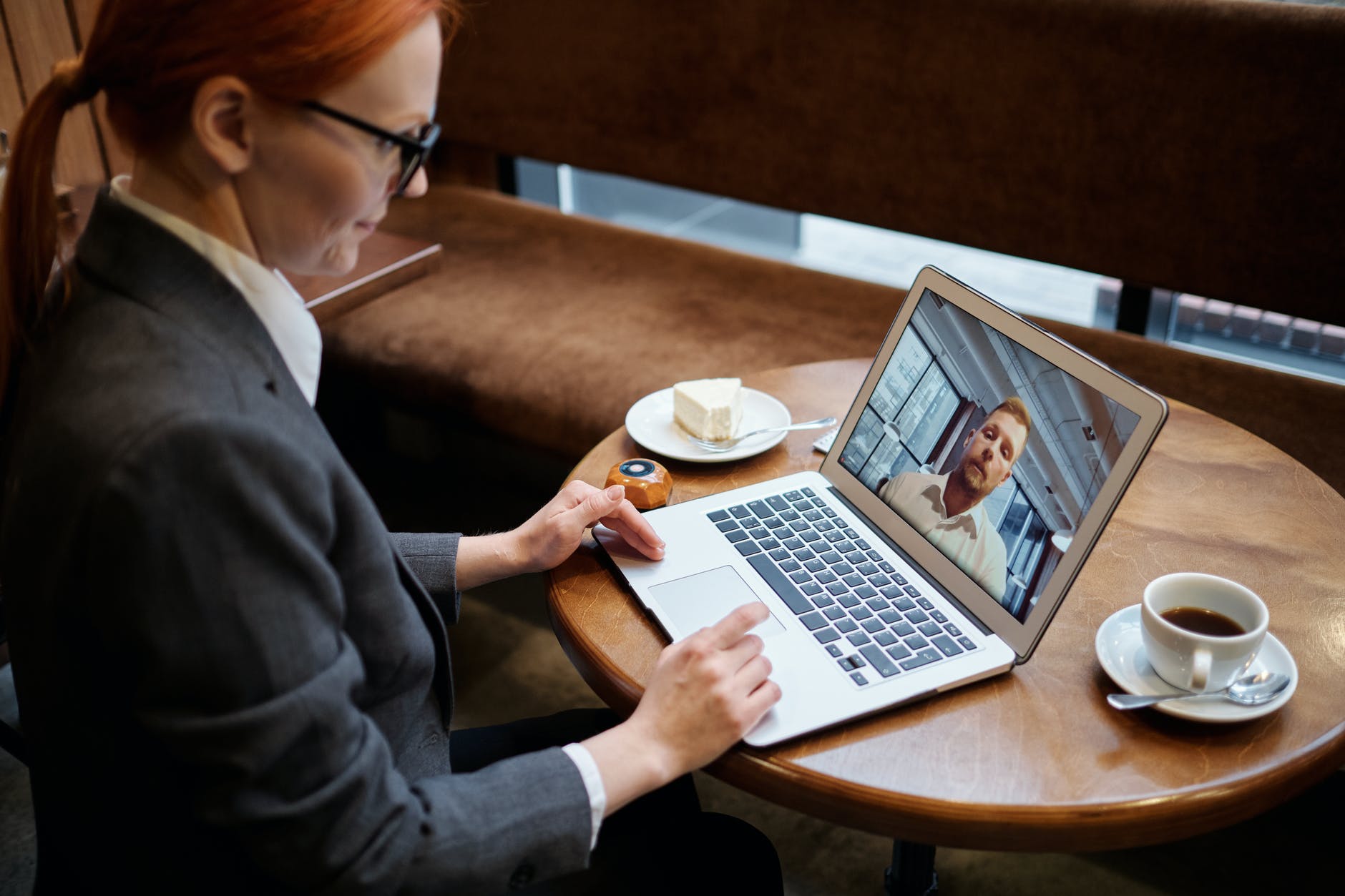
Personally, I have started to ask for a phone whenever a video isn’t necessary for the communication piece. Yes, a lot of communication is nonverbal, but quick check-ins can be much more expedient through a phone call rather than waiting for everyone to log into Zoom because inevitably someone will talk and forget they are still on mute and then have to repeat themselves anyway.

Video meeting as the default

I admit, my default this past year has also been to just initiate a Zoom meeting from the get go. However, I’ve started to ask people what they prefer when scheduling meetings. A little over a month ago, someone asked for phone and it got me thinking about how automatic my response is these days to schedule a Zoom.

So now I like to give people the choice. I have found that even if you are sharing documents, you can actually do so by using Google Drive products and just use your full screen to view the shared document while having the phone on speaker.

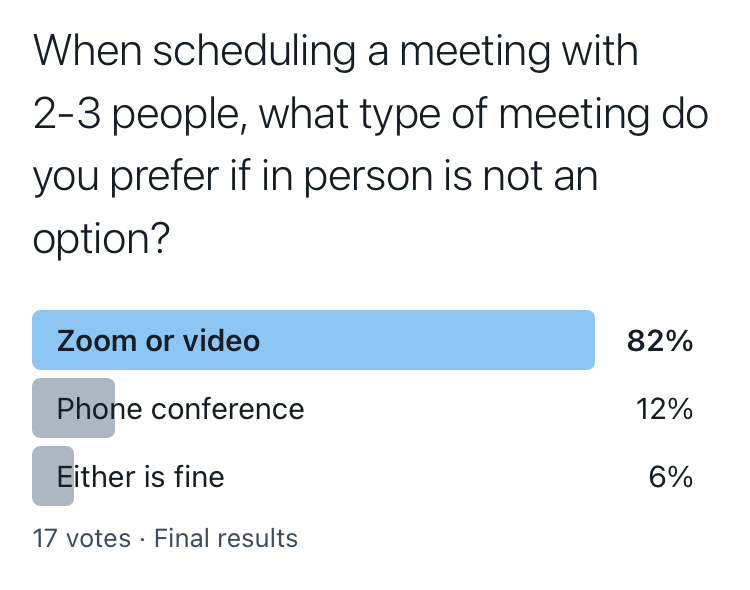
However, my very informal Twitter poll is informing me that 82% of the people voting (of my tiny sample size), do in fact still want Zoom for a meeting with 2-3 people, and someone even commented that they prefer phone for 2 people, but Zoom for 3. So perhaps there’s an advantage to Zoom with the more people you have on the call. It’s certainly easier to tell who is speaking when you can see their little square light up.

For me, I’m going to start scaling back on the video and upping my phone usage, or maybe just declining meetings in general. Perhaps it just needs to be an email. Check out this post for some email tips and this post for video tips.


Pro tip: When scheduling meetings, be empathetic to the people you’re asking to be on video. Ask them if phone would be easier. Maybe they need to do the dishes on the conference call or maybe, just maybe, like me, they are Zoomed out.