Posted in Goal

Are you a Hybrid Worker? 5 Powerful Tips For Making The Most Of Your Time

Hybrid workers are the current reality and immediate future of work. They are the bridge from the time when we had no choice but to work remotely, to the new era of blended work environments.

Time management can be one of the biggest challenges faced by digital nomads and hybrid workers, who may have a harder time than many at staying on top of business tasks and responsibilities. In this article I share five tips from my own experience, to help save you time and stay productive as a remote worker or location-independent business owner or worker.

Timebox your tasks

Timeboxing is a technique to limit the amount of time you spend on a task. When you work with a timebox, you set a timer for a specific amount of time. When the timer goes off, it’s time to move on to something else.

For example, if you have an hour block of time and have three tasks to do, set the timer for 20 minutes and then focus on one task until the timer goes off. Then set it for another 20 minutes and focus on another task until the timer goes off again. Then set it for another 10 minutes and focus on the last task until the timer goes off.

You’ll get more done in less time this way because your brain isn’t flooded with too many distractions at once or getting bored with one task before moving on to another one.

Set Up Your Workspace(s) as a Hybrid Worker

If you’re working from home or from an office space, set up your workspace so that you have everything you need within arm’s reach. This includes your laptop, files and other documents, headphones (if you need them), water bottle and more. If there are certain items that you use every day (like a stapler or scissors), put those closer to your desk than others that are used only occasionally (like paper clips). This will help keep everything in its place so that it’s easy for you to find when needed and avoid wasting time looking for misplaced items.

turned on gray laptop computer on table. hybrid worker
Photo by Flo Dahm on Pexels.com

Be Honest About Boundaries

As a hybrid worker, you might still have the same responsibilities at home as other people do. You might have a family who needs your attention and need to be home for certain events throughout the week. Don’t try to push yourself too hard. Take time off when you need it, and let your clients know what those times are so they can make adjustments accordingly.

If you know that you have trouble working without a break, make sure that you schedule one or two breaks during the day when you’ll get up and move around. If you find yourself going through periods where you can’t focus on work and need to get away from your desk, schedule them into your calendar so they don’t sneak up on you. If you need more than one break in a day, don’t feel bad about taking them!

Automate Where You Can

If there is something that you do regularly, like sending invoices or scheduling meetings, automate it wherever possible so that you don’t spend hours doing it manually each week. For example, if you use Slack for communication within your team then set up automatic reminders so that everyone knows when they should check their email or Slack for important messages. If you use Google Apps for Business then set up automatic reminders for upcoming meetings so that no one misses them!

Work Around Your Inflection Points

If you’re not familiar with inflection points, I’ll explain a bit here. Essentially, they refer to times in our day when we have more energy than usual — whether because we just woke up or because it’s lunchtime or because we just finished exercising. These moments are great opportunities to get things done during the day or even take on new projects.

five bulb lights. hybrid worker
Photo by Rodolfo Clix on Pexels.com

When You Have More Energy Than Usual, Use It To Get Things Done!

The key to making the most of your time as a hybrid worker is to work around your inflection points. There are times in your day when you need to be actively engaged with your work, such as when you are on calls or in meetings.

If you’re working from home, for example, try setting an alarm for 30 minutes before the start of each inflection point so that you can get ready for the call or meeting ahead of time. This way, when it comes time for the call or meeting, you won’t be scrambling around trying to find something to wear or rushing around looking for your notes or computer charger. You’ll be ready to go right away!

Another smart thing to do is schedule out your day so that some tasks are completed before others begin. For example, if there’s a big project due at noon but an important call at 10:00 AM, make sure that at least some of the steps required for completing the project are completed before 9:00 AM so that they don’t distract you during important calls later in the day.

Takeaway: Being a hybrid worker presents new challenges, but you can succeed.

If you have a hybrid role, consider tailoring your schedule to your specific needs. Work at odd hours if that’s the most convenient time for you to get things done. Remember that strong work-life balance is crucial if you want to succeed in both worlds, and don’t be afraid to ask for help if things are feeling too chaotic. Put your full focus on work when you’re on the clock, but also dedicate some time each day where you can recharge your batteries.

Your mind and body will thank you for it!

Posted in Goal, productivity

How Many Emails Should I Have in my Inbox? Important Advice

“How many emails should I have in my inbox?” is difficult to answer, but I have some advice. You see, there isn’t a single answer—the answer depends on your business and how many emails you send and receive each day.

When I ask people what their email box quota should be, they say “zero.” I guess that makes sense, right? Well, it really depends on what kind of marketing you’re doing. So here’s my answer to “How Many Emails Should I Have in my Inbox?”

A clean inbox is a manageable inbox

A clean inbox is a manageable inbox.

If you’re not sure how many emails you should have in your inbox, the answer is “less than you have now.”

If you’re looking for an INITIAL number to shoot for, try aiming for less than 50 unread messages at any given time. That may seem like a lot of emails, but if you’re using software like Gmail with its search functionality and folders, it’s actually pretty easy to stay under that number.

If you’re like most people, your email inbox is probably a source of stress. You know it’s full, but you don’t know what to do about it.

You have hundreds of unread messages, some important and some not so important. Some emails are stuck in the “Drafts” folder because you don’t have time to respond now, but you don’t want to lose track of them either. Others are buried in subfolders because they were sent by someone who isn’t in your address book and can’t be found with a search query. And so you continue to ask yourself: How Many Emails Should I Have in my Inbox?

The first step toward curbing the chaos is to get rid of as many unnecessary emails as possible — both those that don’t require action and those that aren’t worth keeping in your inbox at all. Once that’s done, focus on processing messages one at a time until everything is done or read.

black and gray digital device. How Many Emails Should I Have in my Inbox?
Photo by Torsten Dettlaff on Pexels.com

Your email inbox should have as few emails in it as possible

How many emails should I have in my inbox?

That’s a question that has perplexed inbox zero enthusiasts for years.

The answer is: as few as possible.

If you have a lot of emails in your inbox, you’re wasting time. You need to be able to scan quickly through your inbox and identify the important stuff — the stuff that requires action from you — and get rid of everything else.

Your email inbox should have as few emails in it as possible. This means that you are either deleting the emails that you don’t need, or moving them somewhere else.

If you have a lot of emails in your inbox, it’s time to clean things up. When I started my business, I had over 20,000 emails in my Gmail account. It was overwhelming and made me feel like I was drowning. I needed to change this!!

The magic number is 0

The magic number is 0 – for me. And if you’re like me, you should have no emails in your inbox.

You might be thinking, “How can I get my inbox to zero?” It’s not easy, and it’s not realistic for most people. But it’s a great goal to work toward.

For some people, if their inbox is full of hundreds of emails, they feel like they’re drowning in work that needs to be done. But if you can get your inbox down to zero (or close to it), then you’ve reached a place where you have control over your email and you know everything that’s going on. You don’t have to worry about missing an important message because it’s buried under piles of clutter.

You don’t have to worry about making decisions without all the information because other messages haven’t been read yet. And you don’t have to feel guilty about not responding quickly enough because there aren’t any messages in your inbox!

A clean inbox helps reduce stress and anxiety

A clean inbox is a happy inbox. It helps reduce stress and anxiety, which can improve your productivity and focus. This is why you often have the question: How Many Emails Should I Have in my Inbox?

The truth is that we’re all busy, but we’re also human beings who need to take care of ourselves and our mental health. And a clean inbox helps reduce stress and anxiety by making it easier to focus on what’s important when you need to focus on it.

When you have a clean inbox, you don’t need to worry about missing something important because there won’t be anything important left for you to miss!

The trick to keeping an empty inbox is deciding what to do with each email when it arrives

It’s easy to get an empty inbox, but it takes a little more effort to keep it that way. The trick is deciding what to do with each email when it arrives so you don’t have to keep asking the question: How Many Emails Should I Have in my Inbox?

Some people choose to delete all emails that are not work-related or personal. Others file emails in folders and delete only those they are sure they will never need again. Still others use the “flag” function on their email programs to place messages in a “to be dealt with later” category.

No matter how you choose to handle your incoming messages, there are some general guidelines that can help you maintain an empty inbox:

1) Do not spend time deleting emails unless they are spam or unwanted solicitations. If you have a legitimate reason for deleting an email, but do not know what category it fits into, leave it in your inbox until you decide what action is needed on your part.

2) Use filters on your email program so that certain kinds of messages automatically go into a particular folder without making you look at them first every time they arrive.

3) Choose one day each week (or even one day each month) when you will sit down at your computer and deal with any outstanding items in your inbox by filing them or deleting them permanently. Perhaps even daily if you receive a lot!

person holding a smartphone. How Many Emails Should I Have in my Inbox?
Photo by Solen Feyissa on Pexels.com

The more you stick with this practice, the more natural it will become!

If you’re still wondering: How Many Emails Should I Have in my Inbox? Fear not!

The more you stick with this practice, the more natural it will become!

You’ll find that when you’re at work, you’re not thinking about what’s in your inbox or what’s coming next. Instead, you’re focused on the task at hand.

If you have an email account with a lot of messages in it, it can take some time to get through them all and respond to them. This is where tools like email scheduling and email reminders can help.

Conclusion: How Many Emails Should I have in my Inbox?

Truth: The number of emails in your inbox is only important if it’s impairing your ability to do your job. It probably won’t kill you to have an overflowing inbox full of emails, but you’d definitely benefit from trying to get back down to somewhere between 0-50 emails in any given inbox.

Ultimately, the key to maintaining a clean inbox is setting realistic expectations and revisiting your inbox at frequent intervals. If you can do this, you should be able to keep your inbox in tip-top shape. By no means is it a perfect system, but it’s the best way to ensure that your emails are never overwhelming.

Posted in productivity

5 Simple Steps To Zero Inbox Life

Zero inbox life is possible. But, it takes organization, effort, and consistency.

Are you looking for a way to reduce the amount of time you spend on email? In this post, I am going to list 5 actionable steps you can take in order to reach that elusive mythical “Zero Inbox Life”.

The most important thing to remember is that it’s a process. You can’t just set up a system and expect it to work perfectly from day one. It will take some time to get used to, but once you do, boy does it make all the difference.

black and gray digital device.
Photo by Torsten Dettlaff on Pexels.com

1. Create an Actionable Inbox

If your inbox is full of emails that are not actionable (or even ones that are), you will never get to zero inbox. Unsubscribe from newsletters and social media feeds that don’t provide value for you or your business. Delete any emails that aren’t important (such as notifications from apps). Delegate tasks and projects to other people in your company or team (if applicable) so they can handle them instead of you.

2. Create rules

Once you’ve organized your inbox, create rules for any automated messages coming in that need immediate attention, such as receipts from online purchases or updates from social media accounts.

For example, if you receive an email from Amazon about a recent purchase, you can create a rule that automatically adds it to a folder called “Amazon Receipts” so that it doesn’t clutter up your main inbox view and alerts you when new messages arrive without having to check each time.

3. Create a To-do Folder

Create a “To Review” folder for each account where you’ll put mail that requires action from you later on (this is where most people end up dumping their messages).

Or, leave emails that need to be answered or followed up on directly in the inbox. And make sure those are the only ones there so you can move them to the proper folder when it’s completed.

4. Schedule Time To Process Your Emails

It’s tempting to just open up your inbox and start checking emails right away, but this can cause stress and overwhelm if there are too many emails waiting for you at once. Instead, schedule 30 minutes each day when you know there will be no distractions so you can focus on processing your inbox.

This way, you won’t feel like it’s taking over your life and affecting productivity levels throughout the day because it won’t be constantly pulling at your attention while you’re working on other things

Young woman making serious face while trying to create a zero inbox on laptop.
Photo by Andrea Piacquadio on Pexels.com

5. Move all emails from one folder to another folder (or archive)

You can move all emails from one folder to another folder by either using the ‘Bulk Move’ feature in Gmail or ‘Move to Folder’ feature in Outlook. This will help you declutter your inbox and organize your emails into folders according to their subject matter so that you can easily find what you are looking for later on if needed.

So close to Zero Inbox Life

You now have a system to follow. You know what works. Once you get started, you’ll immediately notice how much simpler (and faster) your online routine is. Pretty soon, getting to zero inbox will just be part of your normal routine. And, once that happens, life is bound to get a lot simpler.

Posted in Mindset

How to Deal With Change in Life to Get the Best Out of It

When new things happen in our lives sometimes we wonder how to deal with change.

Life is full of change — we love it and hate it in the same way. Some changes are for the worse, some for the better, and many are ambiguous. There are times when you can choose to embrace change and other times when you have no choice but to adapt to survive. Here’s how to deal with change and get the best out of it, at all stages of your life.

Realize that change happens whether you want it to or not

Change is a constant. It happens whether you want it to or not. The only thing you can control is how you react to change, so here are three tips for dealing with change in life:

1) Embrace the unknown and be curious about what’s coming next

2) Accept that change is inevitable, but also know that you can control how you respond to it

3) Don’t get so attached to your current situation that you refuse to adjust when necessary

Keep a journal to help you process your emotions

One of the most important things you can do on your journey of how to deal with change in life is to keep a journal. Journaling can help you process your emotions and find meaning in your experiences, which will help you cope with the changes that have occurred and prepare yourself for future ones.

To begin journaling, simply write down your thoughts and feelings about what happened—how it made you feel, what memories it brought up for you, and so on. You might also want to write down how this experience has changed your perspective on life or relationships.

Journaling doesn’t have to be long or formal; just write whatever comes to mind as you’re thinking about what happened and how it affected you.

closeup photo of journal book and pencils. How to deal with change.
Photo by Jess Bailey Designs on Pexels.com

How to deal with change by making a plan

The first step to dealing with change is to make a plan. Change is inevitable, and you can’t control it. Instead, you need to prepare yourself for the changes ahead so that they don’t catch you off guard.

You may feel like there’s nothing you can do about it, but that’s not true! There are several ways to prepare for change in your life:

-Make sure you have enough energy stores. If your body is tired and low on energy, it will be harder for it to adapt to new situations. It’s important to eat healthy food and get plenty of sleep before starting a new venture.

-Figure out what your goals are—and then write them down! You’ll be able to see how much progress you’ve made towards reaching those goals once things start changing around you.

-Reach out for help if necessary. Sometimes there are things in life that are too much for one person alone; sometimes we need other people’s perspectives or advice so that we can keep ourselves grounded through difficult times.

Learn to Adapt

The ability to adapt is one of the most important skills you can develop. It’s especially important when you’re figuring out how to deal with change in your life. You might be moving from one city to another, going through a divorce, or losing a loved one. All of these changes will require you to learn how to adapt, which means learning how to cope with change and move forward with your life.

A key part of adapting is being open-minded and flexible. If you’re too rigid in your thinking, then it will be difficult for you to accept new ideas and situations that come up every day. If you’re too rigid, then it will also be hard for others around you to know what they can expect from their interactions with you. Learn how to be open-minded so that you can take advantage of opportunities when they arise!

person in black pants and black shoes sitting on brown wooden chair. how to deal with change.
Photo by cottonbro on Pexels.com

Seek professional help if needed. There is no shame in that and the sooner you do, the better!

If you’re struggling with a change that’s happened in your life, it’s important to seek professional help as soon as possible. You are not alone, and your mental health is worth protecting.

If you feel like there’s no one who can help you with the situation, consider reaching out to a friend or family member for support. If this isn’t an option either (for example, if the person who changed is a loved one), try reaching out to a therapist. They will be able to help you explore what’s going on and provide support through difficult times.

Posted in Goal

How can setting goals help you in the long term? 5 things to consider now

You may have wondered, how can setting goals help you in the long term? I use goal-setting methods for my own life in every setting. It allows me to have my goals in front of me throughout the year, so I can see what steps I need to take next, and provides an outline to follow if I change my goals.  

Goal setting also allows me to reexamine what I am doing and make changes if something isn’t working.  The year is long enough to get a lot of things done, so let’s look at some ways you can use goal setting throughout the year and beyond!

Clarifying what you want brings clarity to your life

How can setting goals help you in the long term when it comes to gaining clarity?

This is the first step in setting goals. It is a process of defining, refining and prioritizing what you want. This clarification process can be done alone or with a friend or coach. It is important that you are honest and objective with yourself during this process, as it will help you achieve the results that you desire.

The second step is setting specific, measurable, achievable and timely goals. These goals should be tied to your vision statement and be SMART: Specific, Measurable, Attainable, Realistic (and) Time-bound.

The third step is creating an action plan that includes steps to achieve each goal with dates/time frames for completion. For example: “By March 1st I will have successfully completed my first fitness test at boot camp (specific).”

How can setting goals help you in the long term?
Photo by Polina Zimmerman on Pexels.com

Goals help you to find purpose and meaning in your work and life

How can setting goals help you in the long term when it comes to finding purpose and meaning?

When people talk about goals, they often think of them in terms of productivity and achievement. But there’s another way to think about them: as a way to find direction and purpose in life. This is especially true for people who feel that their work is meaningless or unfulfilling.

Goals can help you find purpose and meaning in your work and life because they make it easier for you to understand what success means to you. Once you know what success looks like, then it becomes easier to make decisions about how you spend your time and effort.

This doesn’t mean that everyone should set goals — sometimes it’s better not to have any particular destination in mind when doing something. But if it works for you, then setting goals can be an important tool for finding fulfillment in your work

You’ll challenge yourself to grow as you pursue goals

How can setting goals help you in the long term and help you grow?

Setting goals is one of the most powerful tools we have to shape our lives and make them more meaningful. They can help us reach our full potential, achieve greater success, and feel more fulfilled in our lives.

When you set goals, you’re telling yourself that “this is what I want.” And by doing so, you’re giving yourself permission to move towards it. You’re giving yourself permission to take action on what matters most to you in life.

But if you don’t know where you’re going, how will anyone else?

Setting goals leads to more success

Have you ever wondered why some people seem to accomplish more than others? It’s not because they’re smarter, have more money or are better at hiding their flaws.

The answer lies in their approach to life. They have a habit of setting goals and achieving them.

Setting goals is one of the most important habits you can develop if you want to succeed in any area of life, whether it’s career, health or finances.

Having a specific goal helps you focus on what matters most, instead of getting overwhelmed by all the things that you could be doing.

black and white dartboard. how can setting goals help you in the long term
Photo by Engin Akyurt on Pexels.com

Goals can keep you motivated

How can setting goals help you in the long term when it comes to motivation?

Setting goals is a great way to stay motivated. Progressing towards a goal provides a sense of accomplishment, and it shows you what areas of your life need improvement. If you set a goal that is too big and hard to reach, it can actually be counterproductive because it will just cause you to feel overwhelmed. It’s important to set realistic goals that you can achieve with time and effort. You should also set short-term goals so that you have something to work towards in the short run as well as long-term ones for the future.

So, how can setting goals help you in the long term?

If you want to achieve something in life, setting goals and working towards them is the first step. If you really want something bad enough, go after it. Don’t give up easily. Be hard-working and diligent, but most of all, do the research and don’t be afraid to ask for help. And maintain this mindset because your goals will change over time.

Setting reasonable goals and working towards them can help you stay motivated and see your long-term vision in a clearer, more structured light. Setting goals forces you to be organized, systematic, and analytical in a way that isn’t always natural—but it’s also worth the effort.

Posted in Goal

When to use Google Sheets? Important ways to organize your life

When to use Google Sheets you ask? Over the years, I have tried so many techniques and apps to mange my time, tasks, and productivity. There are some pretty great digital apps, but lately my fall back solution is to use Google Sheets. And I’m loving it!

Sometimes simpler truly is better. Some of the features I love about Google Sheets is that I can create checkboxes, color code different categories, easily copy and paste from one area to the other, and create links between sheets to further organize a goal or task. So let’s break it down into the ways I use Google Sheets to organize my life and keep me motivated.

when to use google sheets for Health and Fitness Goals

First, let’s talk about health and fitness. Right now I don’t have access to a scale, which honestly is probably a good thing. I am walking a ton in Norway where I call home at the moment. So before that, I tracked my weight every week in a Google Sheet.

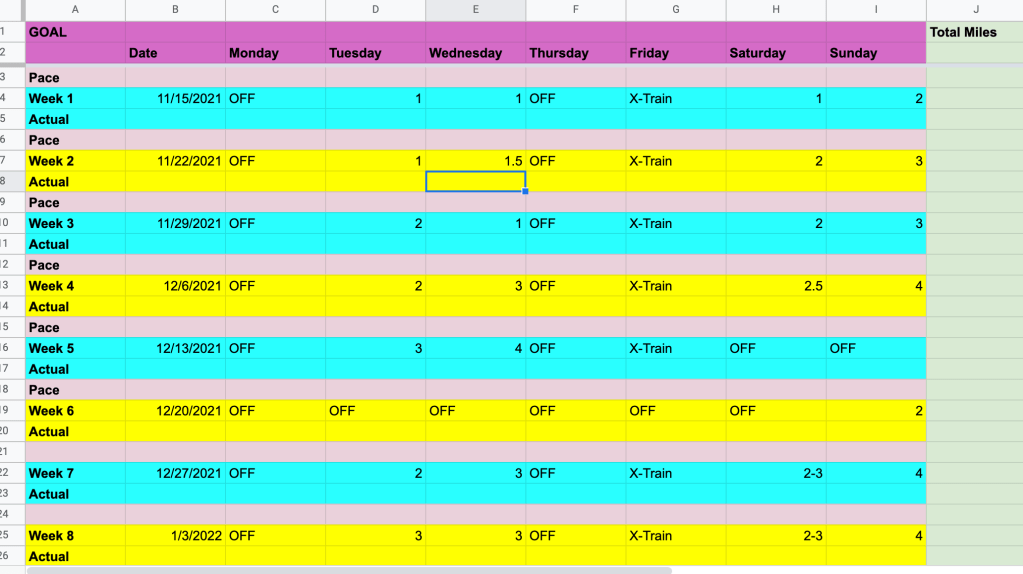
However, one of the most productive things I’ve done is create a training guide to complete a half marathon.

when to use google sheets

That method worked for me! At that time, I was already pretty in shape so I was able to start my first week with 2-3 miles.

Since it has been 5 years since I ran that race and I let running go, despite it being an excellent stress reliever, I have decided to do another one! I am planning to run the Bergen City Half Marathon at the end of April 2022.

So, of course, what did I do? I created a 20-week training plan with Google Sheets for myself! I will be on a European adventure trip for 8 days in December, so I just went ahead and blocked that week off so I don’t have to worry about being “disappointed” if I don’t meet my goals for that week. I will probably be walking a ton anyway. And since I am starting way more out of shape than last time, I’m giving myself a few slower weeks to ease back into running.

when to use google sheets

When to use google sheets for budgeting

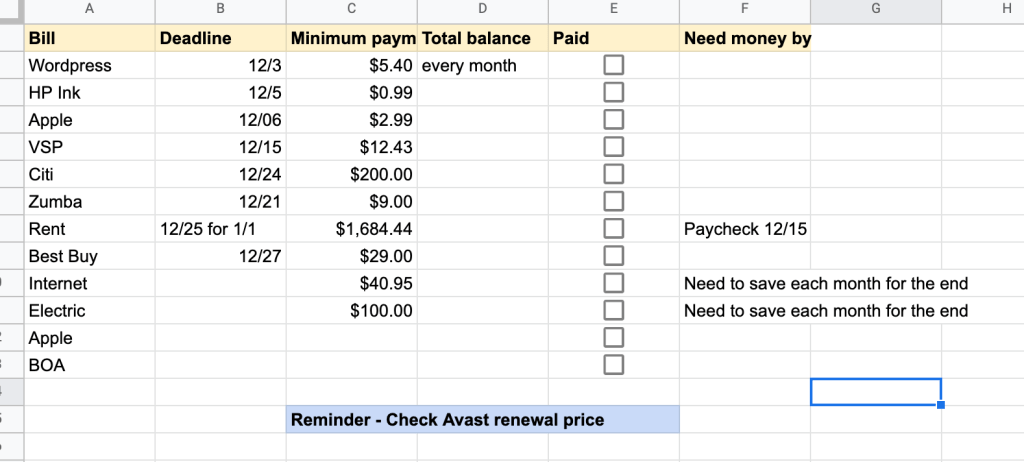
I do not have a fancy or detailed budgeting system. I mainly use Google Sheets just to make sure that all my bills are paid on time each month. It also helps remind me to have enough money in my account for automatic withdrawals.

when to use google sheets

I should probably call this a bill system and not a budget system because you can see that I don’t account for food or miscellaneous expenses. This is my checklist for December. Some of the amounts change depending on renewals and you see I also put reminders when I know annual subscriptions are coming up. You don’t see car insurance on my December bills list because I am only paying about $40 every 6 months while I am in Norway and my car is just sitting in the U.S.

I am a licensed Zumba instructor, but I just don’t have the time right now to continue classes. And most of the people that attended my virtual classes previously were in a different time zone. So, I am paying a monthly hold fee so I don’t have to redo the whole licensing process when I get back to the U.S.

when to use google sheets for Daily and Weekly Tasks

I have tried all sorts of methods of tracking daily to do lists. Now, I just simply type my tasks out in the day I would like to complete it during the week it needs to be done. I can work several weeks ahead so that reminders go in and I don’t forget about important things. Then, when the week has passed, I just hide the sheet so the current week is first. If I don’t get it done, I just cut and paste it into the next day. I go through my action items for the week every Sunday night.

when to use google sheets

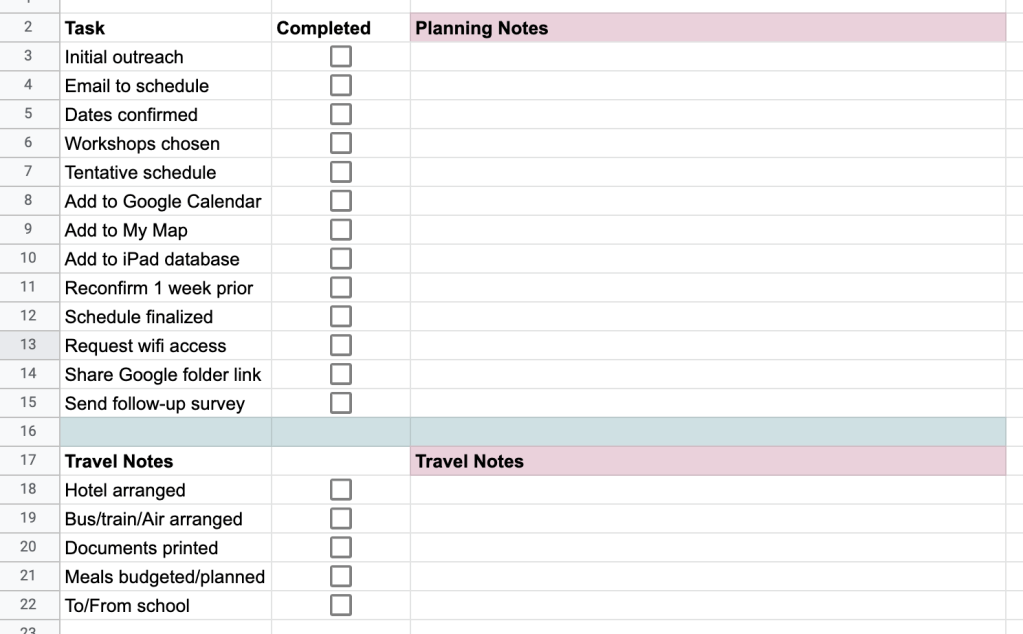
For my current job in Norway I have a lot of details to manage. I have to create a schedule for the year of places that I’m going to give workshops. Then, I have to make sure I do a bunch of things during that communication. So I created one giant Google Sheet that has the weeks of the school year listed. I put the main details in that sheet and then link to a checklist for each school visit. All the checklists are on individual tabs in a separate Google Sheet document.

when to use google sheets

when to use google sheets as a Habit Tracker

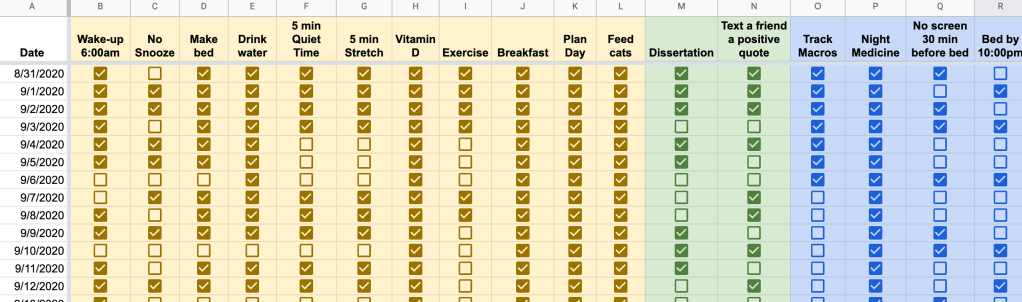
Another way I use Google Sheets to organize my life is a habit tracker. Again, I’ve tried different forms of this, and I even have a PDF habit tracker for free here on my site. Here is a screenshot of how I used it in the past. Obviously, I was still in the process of building the habits then. Now, I don’t have to think about all of them quite so much. I used this when I was trying to build a solid morning routine.

when to use google sheets

Final Thoughts for Today

There are many different ways you can use Google Sheets to organize your life. These are just some of the examples that I use to keep myself focused and organized. I’m sure if I went back through my whole Google Drive I would find even more examples. Share in the comments how you use Google Sheets for organization!

Posted in Goal

4 Tips to Master the Power of Effective Scheduling

Effective scheduling is key. Some people say that I’m a planner. Others say I’m calendar-oriented. Really, I just like to make sure that my time, tasks, and priorities are all reflected in my schedule. When someone asks me to do something and I agree (also power in saying no), I immediately add it to my Google Calendar, which can be accessed on my phone, iPad, and laptop. No matter where I am I have access to it.

If it is a work or professional meeting, I copy the Zoom or webinar link from the email and paste it directly into the calendar event that I create so that I do not have to search for the email when it’s time to log in.

effective scheduling
Photo by RODNAE Productions on Pexels.com

Effective scheduling: Clarify your goals

It is important to know what you want to accomplish with your time. You cannot create an effective schedule if you don’t know what you are aiming for. I wrote a post on mini-goals here. Get specific on the main areas of your life and figure out the chunks of time that need to be spent on each.

Effective scheduling: Prioritize your tasks

When you sit down to work, or even at the beginning of every day, take a look at everything that needs to be accomplished. What is that one thing that can’t be put off? Do that first, in the morning if you can. For longer term projects, break it down into smaller deadlines and place those on your calendar. If you’re not sure how to prioritize, consider using a strategy like the Eisenhower Matrix.


Effective scheduling: Utilize a digital calendar like Google Calendar

Keep a calendar that can be accessed from all of your digital devices: laptop, phone, iPad, etc. That way, you always have access to what you need in the moment if someone asks to schedule something. Personally, because I work several part time jobs and manage my own schedule, I keep one Google Calendar for everything and color code by activity, including my personal commitments. For example, if a friend texts me and says, “hey, we should catch up on the phone Thursday around 8pm.” If I’m free, I actually confirm and add that to my calendar so I don’t forget to call or accidentally make plans to do something else because I forgot we were going to chat.

At work, I utilize my email kind of like a to-do list. I try to check my email at certain points throughout the day, but if something comes on that I need to take care of that day or later in the week, I also add it to my calendar and include the reference email.

Effective scheduling: Learn to Say “Let Me Get Back to You”

If you’re a kind-hearted person who wants to follow through with helping people or do a good job, you’ll be tempted to say yes to everyone and everything. That is not a realistic way to manage a schedule because you will quickly become overwhelmed. However, instead of saying no right away, give yourself some think time when someone asks you to do something or for another meeting or a favor. Evaluate if it fits with your goals and priorities or fits in any extra time you have available for leisure. If not, perhaps you may have to decline or ask the person to check in with you at a later date.

These are just some of the strategies that I use on a regular basis to maintain my schedule. Please leave a comment if you’d like to hear more about any of them!

Posted in Uncategorized

3 Helpful Strategies to Organize Your Email Inbox Today

Organize your email inbox: A little over three years ago I made the switch to a zero inbox and it was the best thing I ever did for my organizational skills. At that time I had had my personal Gmail account since about 2005 with thousands and thousands of emails. Instead of taking time putting everything into folders, I simply decided to archive it all and start from that day forward. Since I started a new job, I was able to keep my work email at zero inbox from day one.

Table of Contents

    Organize your email inbox: Here’s how I manage emails now to keep my inbox as close to zero as possible:

    1. Check email first thing each morning (after affirmations and to-do list) and before I close my computer from work for the day. By doing this, I can deal with any emails that came in before I started my workday for all the early birds who start before me, and then I can create a plan for everything left over at the end of the day.
    2. Check email at set times throughout the day. Now, I don’t always follow this rule perfectly because it depends on what I’m working on. If I need to focus on a project or task and I don’t want to be disturbed by emails, I close the tab and set my timer to check it once per hour or every 2 hours so as to still be responsive to the needs of coworkers, but not be interrupted by constant flows of incoming emails.
    3. I use the two-minute rule when dealing with emails as I go through them. This idea comes from the Getting Things Done method by David Allen. If it’s something I can respond to right away, I quickly send a reply and then file that email in a folder. If it doesn’t need a response, I file it right away. If it’s informational and a deadline is attached, but it’s not immediate, I use the snooze feature to send it back to me when it needs to be completed or responded to. If it is going to take a bit longer, I work on it during an email response period during the day.

    organize your email inbox
    Photo by Oleg Magni on Pexels.com

    Gmail tips

    So by the end of the day everything should either be snoozed, responded to, or filed in a folder. I rarely delete emails because I do frequently have to refer back to old emails for information and it’s very easy to find when they are in folders. I also use the search function in Gmail to find the emails that I need. For newsletters and subscriptions, I create filters that send the emails directly to folders so it doesn’t even have to come to my inbox. These are great ways to organize your email inbox.

    My personal favorite Gmail settings are to use the compact view with conversation view off. I like to see all my emails individually and conversation view confuses me a bit. Because I see all messages individually, I sometimes will only keep the most recent email in a thread and delete the rest because it’s not needed.

    And, to save me a little time, I have smart reply turned on so it auto-detects what I might want to say. It’s kind of scary how accurate it is. I also use Grammarly to check my spelling, tone, and grammar as I go.

    Organize your email inbox: Keeping my email organized and efficient has helped me to save time and communicate effectively!

    Posted in Goal, productivity

    6 Ways To Increase Productivity In Your Employees and Reduce Stress

    How to increase productivity in your employees? This is an important question that requires a level of empathy and understanding. Business leaders around the world are constantly looking for ways to increase the productivity of their employees.

    Whether it be by implementing new strategies, systems, or working conditions, improving the productivity of your team is an important priority, even during these tough economic times. So how exactly can that be accomplished while making sure to respect the human aspect of your employee?

    Make sure that tasks are clearly assigned

    Stress comes from uncertainty and confusion over what needs to be done and how it should be done. If you want to reduce the amount of stress in your workplace and increase productivity in your employees, make sure that each employee understands what his or her responsibilities are. When you give employees clear instructions and expectations, they know what they need to do and how they should go about doing it. This will help eliminate the kind of ambiguity that causes stress in the first place.

    Create a positive work environment

    Make sure that the workplace is set up in such a way that employees have what they need to be successful. This includes providing enough resources (time, money, equipment), making sure that the space is clean and welcoming, and keeping distractions at bay. You may also want to consider setting up a break room or other type of area where employees can go when they need some time away from their desks or computers. All of these work environmental factors contribute to the ability to increase productivity in your employees.

    Set time aside for communication

    Communication is key when running any business so make sure that you have regular meetings with each of your team members (at least once every week). These meetings should not be used only for checking up on progress but also for talking about personal issues as well as work-related problems. This will ensure that everyone feels comfortable talking about what’s going on instead of keeping it all bottled up inside until they explode later on!

    Increase flexibility within the workplace

    The nature of work has changed dramatically over the past decade or so. We no longer have 9-to-5 jobs that don’t require us to be online 24/7. We’re expected to respond and answer emails at all hours of the day, which only increases stress levels for everyone involved.

    One easy way to help alleviate this problem is by giving your employees more flexibility with their schedules. Let them choose when they want to come into work or take extended breaks throughout their day instead of having set office hours where everyone has to be there at 8:00 AM sharp every morning (and then staying until 6:00 PM).

    Provide opportunities for growth at every level – from entry-level positions up to management roles – so each employee has the opportunity to advance his or her career within your company as well as move up into higher positions within other organizations if they choose to do so in the future.

    increase productivity in employees
    Photo by Max Vakhtbovych on Pexels.com

    Increase Productivity in Your Employees by Encouraging office wellness programs

    You can start with something as simple as offering free fruit or snacks in the office kitchen, or even just having some games available for the staff to play during breaks. If your company has a gym or fitness center on site, consider offering discounted memberships to your employees. Healthier employees tend to be happier and more productive, so this can pay off in both ways!

    Organize team outings and events outside the office. There are many fun things you can do together as a team outside of work hours — going bowling or playing miniature golf are great examples! Even if it’s just once a month, taking some time away from work will help relieve stress and increase overall happiness at work.

    Prioritize employee health and wellbeing

    Make sure your team knows what’s expected of them, and give them the tools they need to get the job done. For example, if you want to increase productivity in your employees, you may want to consider giving them more freedom in their personal lives so that they don’t feel overworked or stressed out at home.

    Encourage self-care practices such as taking breaks or going for walks during the day rather than working continuously from 9am until 5pm. This will help them focus on their work more easily because they’re able to recharge their batteries when needed.

    Takeaway: To increase productivity in your employees, you need to make them happy and feel like they are valued.