Posted in Goal, Personal Skills, Time Management

Summer Goal Planning: Creating a Seasonal Action Plan and Calendar

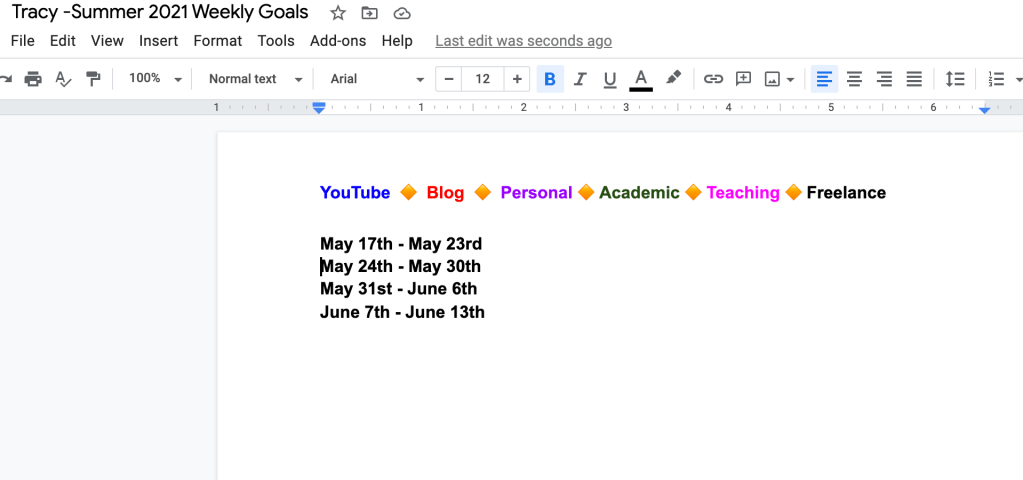
Being in school for so long has taught me to create a plan for each semester. So how exactly do I go about this? Basically, every spring, summer, and fall, I look at all of my deadlines and map it out onto a Google Doc with the weekly dates for the 12-16 weeks. I color code the main categories and have a key in the header and footer of each page. I learned this method from the National Center for Faculty Development and Diversity.

Even though I’m now graduating, I am going to continue this method of planning because it truly helps me to get a big picture overview of my goals. I can then match my big goals to subtasks by making weekly progress toward completion.

Here is a snapshot of a week from last summer (with some items removed):

Each week would have a similar format that I copy and pasted for the whole summer. In May, I go through and add in important deadlines and repeating tasks. For example, my teaching timesheet is due every two weeks. Now, I also include these repeating tasks in my Google Calendar. Some may find this process repetitive, but it actually helps me remember things by keeping it in multiple places.

So, because it’s time to think about Summer 2021, I am in the process of creating my next 12 weeks or so goals. I’m still working out what I’d like my categories to be, but I’ve started to put in my dates and then will create my outline and fill in goals. The first pass through is all the big items, and then I re-evaluate every Sunday and prioritize my week, filling in additional items as needed.

FREE Google Doc Summer 2021 Planning template!!

Here is a YouTube video showing how I go through these steps for the summer!

Posted in Goal

Creating a Helpful Seasonal Action Plan and Calendar

I think everyone needs an action plan of sorts. But, it won’t look the same for everyone.

Being in school for so long has taught me to create a plan for each semester. So how exactly do I go about this? Basically, every spring, summer, and fall, I look at all of my deadlines and map it out onto a Google Doc with the weekly dates for the 12-16 weeks. I color code the main categories and have a key in the header and footer of each page. I learned this method from the National Center for Faculty Development and Diversity.

Even though I’m now graduating, I am going to continue this method of planning because it truly helps me to get a big picture overview of my goals. I can then match my big goals to subtasks by making weekly progress toward completion.

Here is a snapshot of a week from last summer:

action plan

Each week would have a similar format that I copy and pasted for the whole summer. In May, I go through and add in important deadlines and repeating tasks. For example, my teaching timesheet is due every two weeks. Now, I also include these repeating tasks in my Google Calendar. Some may find this process repetitive, but it actually helps me remember things by keeping it in multiple places.

So, because it’s time to think about Summer 2021, I am in the process of creating my next 12 weeks or so goals. I’m still working out what I’d like my categories to be, but I’ve started to put in my dates and then will create my outline and fill in goals. The first pass through is all the big items, and then I re-evaluate every Sunday and prioritize my week, filling in additional items as needed.

Summer 2021 action plan

action plan

FREE Google Doc Summer 2021 Planning template!!

Here is a YouTube video showing how I go through these steps for the summer!

Posted in Personal Skills, Time Management, Work From Home

Ways to Create a To-Do List: Methods to Get Stuff Done!

Do you often make it through the day just putting out fires as they occur, trying to keep up? Creating and sticking to a schedule can help with managing time effectively. One helpful tool is to create a to-do list of action items that you need to get done. Over the years, I’ve tried different methods of writing a to-do list, which have worked for various purposes depending on my goals at the time.

Why is it important to make to-do lists?

Making lists and prioritizing tasks helps you become more likely to accomplish your goals and reach your dreams. It also provides a way to track your progress and keep you motivated to move forward. To-do lists are great for both personal and professional use. You can use a paper and pen notebook to track it all or there are lots of great digital apps to organize tasks by category.

I’ll share some of the methods I’ve used to create to-do lists with you here.


THE EVERYTHING LIST

I like to call this list the everything list because it’s more or less a brain dump of all that has to be done. Sometimes I make columns for personal and work action items to keep them separate, but I just get it all down on paper (or digital). I’ve seen others refer to this method as the grocery list method because it’s just basically keeping a running tab of tasks as they pop into your brain.

Top Three to Five

For me, this method is helpful when I’m feeling overwhelmed. Instead of literally writing everything down that needs to get done, I write 3-5 MANAGEABLE items at a time. Then, when I’m able to cross them all off, I write 3-5 more items to accomplish. It’s comparable to time blocking a schedule. It’s focusing me to be intentional about what I want to accomplish within a certain timeframe.

Prioritized List

This method takes the everything method and then rearranges it based on your priorities. It’s easier to do this with a digital task management system because you can easily cut and paste the items and move them up and down on your list. One way to prioritize is to use the Eisenhower matrix. Some people even recommend a simple lettering system next to your tasks with A being the most important item to tackle first.

Big and Small

This type of a to-do list breaks task into big and small tasks. You can think of them in time commitment. If it’s something like sending an email that will take 5 minutes to write, that could be considered a small task. If it’s completing an annual report, that might be a bigger task. Sometimes it’s more helpful to break up those big tasks into smaller ones and cross of those milestones as you reach them.

No matter how you organize your tasks, the best thing to do is find what works for you. The physical act of crossing something off on paper to me feels so good that even though I manage my longer term and ongoing tasks in a digital app, I still create a daily list of items that need to get done. I also try to keep it realistic so as not to get disappointed if I don’t get everything crossed off my list.

Happy to-do-ing!

Posted in Uncategorized

Ways to Create a To-Do List: Methods to Get Stuff Done Right Away!

You need to create a to-do list

Do you often make it through the day just putting out fires as they occur, trying to keep up? Creating and sticking to a schedule can help with managing time effectively. One helpful tool is to create a to-do list of action items that you need to get done. Over the years, I’ve tried different methods of writing a to-do list, which have worked for various purposes depending on my goals at the time.

A to-do list serves an important purpose in life. It keeps us from losing track of everything we have to do and helps focus our day on the things that really matter. It turns out that creating a to-do list can seem intimidating for some of us. But with a little bit of know-how, it becomes easier to create a to-do list. You won’t have to spend extra money and will be able to spend more time on the important stuff.

Why is it important to create a to-do list?

Making lists and prioritizing tasks helps you become more likely to accomplish your goals and reach your dreams. It also provides a way to track your progress and keep you motivated to move forward. To-do lists are great for both personal and professional use. You can use a paper and pen notebook to track it all or there are lots of great digital apps to organize tasks by category.

I’ll share some of the methods I’ve used to create to-do lists with you here.

create a to-do list
Photo by energepic.com on Pexels.com

THE EVERYTHING LIST

I like to call this list the everything list because it’s more or less a brain dump of all that has to be done. Sometimes I make columns for personal and work action items to keep them separate, but I just get it all down on paper (or digital). I’ve seen others refer to this method as the grocery list method because it’s just basically keeping a running tab of tasks as they pop into your brain.

Top Three to Five

For me, this method is helpful when I’m feeling overwhelmed. Instead of literally writing everything down that needs to get done, I write 3-5 MANAGEABLE items at a time. Then, when I’m able to cross them all off, I create a to-do list by writing 3-5 more items to accomplish. It’s comparable to time blocking a schedule. It’s focusing me to be intentional about what I want to accomplish within a certain timeframe.

Prioritized List

This method takes the everything method and then rearranges it based on your priorities. It’s easier to do this with a digital task management system because you can easily cut and paste the items and move them up and down on your list. One way to prioritize is to use the Eisenhower matrix. Some people even recommend a simple lettering system next to your tasks with A being the most important item to tackle first.

Big and Small

This type of to-do list breaks tasks into big and small tasks. You can think of them as time commitments. If it’s something like sending an email that will take 5 minutes to write, that could be considered a small task. If it’s completing an annual report, that might be a bigger task. Sometimes it’s more helpful to break up those big tasks into smaller ones and cross off those milestones as you reach them.

No matter how you organize your tasks and create a to-do list, the best thing to do is find what works for you. The physical act of crossing something off on paper to me feels so good that even though I manage my longer-term and ongoing tasks in a digital app, I still create a daily list of items that need to get done. I also try to keep it realistic so as not to get disappointed if I don’t get everything crossed off my list.

Happy to-do-ing!