Posted in Goal

When to use Google Sheets? Important ways to organize your life

When to use Google Sheets you ask? Over the years, I have tried so many techniques and apps to mange my time, tasks, and productivity. There are some pretty great digital apps, but lately my fall back solution is to use Google Sheets. And I’m loving it!

Sometimes simpler truly is better. Some of the features I love about Google Sheets is that I can create checkboxes, color code different categories, easily copy and paste from one area to the other, and create links between sheets to further organize a goal or task. So let’s break it down into the ways I use Google Sheets to organize my life and keep me motivated.

when to use google sheets for Health and Fitness Goals

First, let’s talk about health and fitness. Right now I don’t have access to a scale, which honestly is probably a good thing. I am walking a ton in Norway where I call home at the moment. So before that, I tracked my weight every week in a Google Sheet.

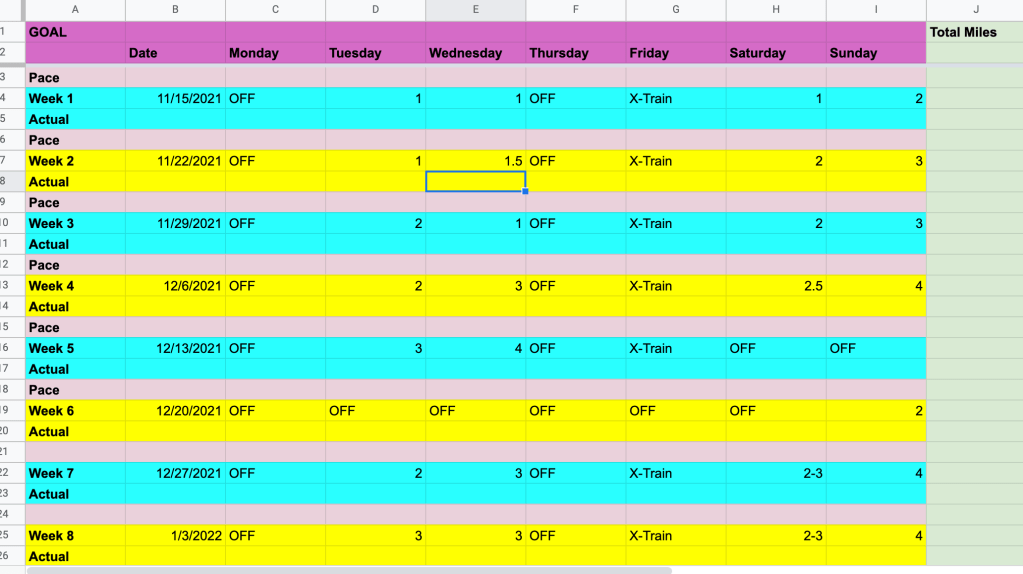
However, one of the most productive things I’ve done is create a training guide to complete a half marathon.

when to use google sheets

That method worked for me! At that time, I was already pretty in shape so I was able to start my first week with 2-3 miles.

Since it has been 5 years since I ran that race and I let running go, despite it being an excellent stress reliever, I have decided to do another one! I am planning to run the Bergen City Half Marathon at the end of April 2022.

So, of course, what did I do? I created a 20-week training plan with Google Sheets for myself! I will be on a European adventure trip for 8 days in December, so I just went ahead and blocked that week off so I don’t have to worry about being “disappointed” if I don’t meet my goals for that week. I will probably be walking a ton anyway. And since I am starting way more out of shape than last time, I’m giving myself a few slower weeks to ease back into running.
when to use google sheets

When to use google sheets for budgeting

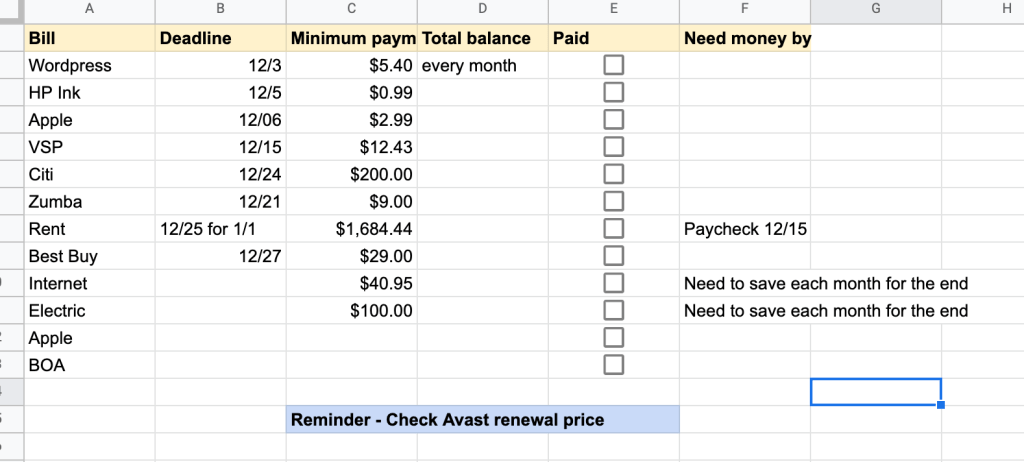
I do not have a fancy or detailed budgeting system. I mainly use Google Sheets just to make sure that all my bills are paid on time each month. It also helps remind me to have enough money in my account for automatic withdrawals.
when to use google sheets

I should probably call this a bill system and not a budget system because you can see that I don’t account for food or miscellaneous expenses. This is my checklist for December. Some of the amounts change depending on renewals and you see I also put reminders when I know annual subscriptions are coming up. You don’t see car insurance on my December bills list because I am only paying about $40 every 6 months while I am in Norway and my car is just sitting in the U.S.

I am a licensed Zumba instructor, but I just don’t have the time right now to continue classes. And most of the people that attended my virtual classes previously were in a different time zone. So, I am paying a monthly hold fee so I don’t have to redo the whole licensing process when I get back to the U.S.

when to use google sheets for Daily and Weekly Tasks

I have tried all sorts of methods of tracking daily to do lists. Now, I just simply type my tasks out in the day I would like to complete it during the week it needs to be done. I can work several weeks ahead so that reminders go in and I don’t forget about important things. Then, when the week has passed, I just hide the sheet so the current week is first. If I don’t get it done, I just cut and paste it into the next day. I go through my action items for the week every Sunday night.

when to use google sheets

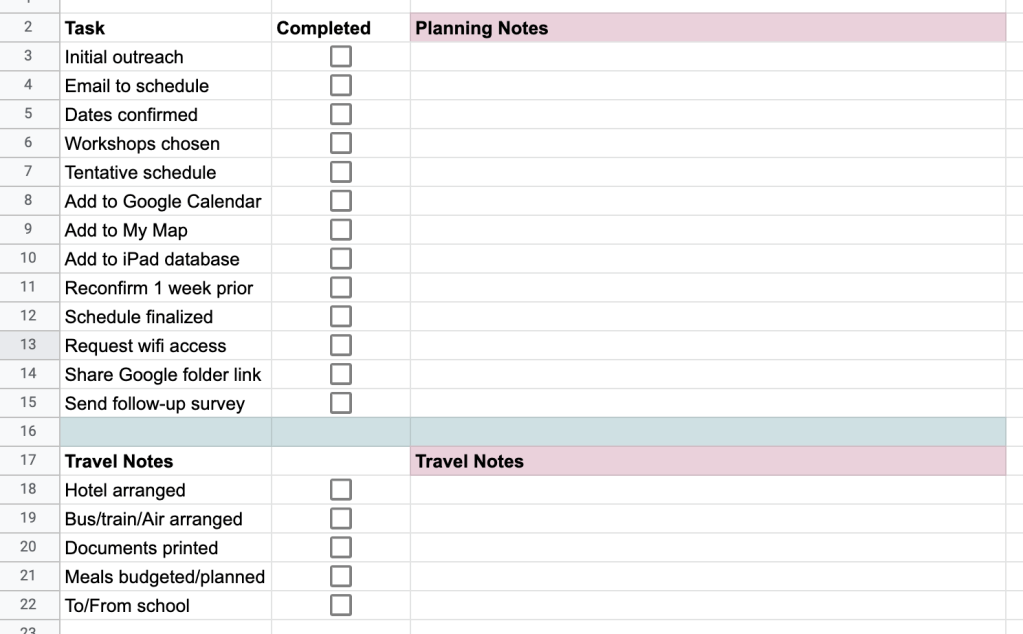
For my current job in Norway I have a lot of details to manage. I have to create a schedule for the year of places that I’m going to give workshops. Then, I have to make sure I do a bunch of things during that communication. So I created one giant Google Sheet that has the weeks of the school year listed. I put the main details in that sheet and then link to a checklist for each school visit. All the checklists are on individual tabs in a separate Google Sheet document.
when to use google sheets

when to use google sheets as a Habit Tracker

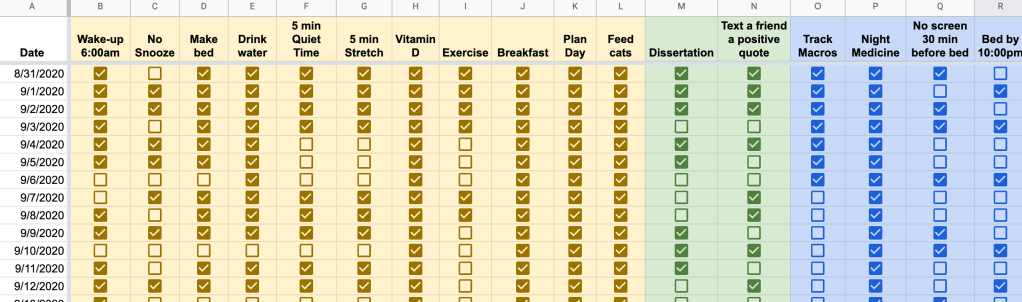
Another way I use Google Sheets to organize my life is a habit tracker. Again, I’ve tried different forms of this, and I even have a PDF habit tracker for free here on my site. Here is a screenshot of how I used it in the past. Obviously, I was still in the process of building the habits then. Now, I don’t have to think about all of them quite so much. I used this when I was trying to build a solid morning routine.
when to use google sheets

Final Thoughts for Today

There are many different ways you can use Google Sheets to organize your life. These are just some of the examples that I use to keep myself focused and organized. I’m sure if I went back through my whole Google Drive I would find even more examples. Share in the comments how you use Google Sheets for organization!

Posted in Time Management, Work From Home

To-Do List Digital Apps: 4 Free Apps to Try Out

Making to-do lists is a helpful way to organize tasks that need to be completed. While, I do use a daily paper and pen method to keep track of tasks, I currently use Tick Tick to manage my goal-related tasks. I’ve used other digital apps as well and it all comes down to preference and whatever is best suited to your individual goals at the time.


Tick Tick

This program is a website, but also can be downloaded as an app. I have it on my Macbook, but mostly use it on the browser and keep it in my Google Chrome grouping tab for calendar. It can synced across all your devices so that if you update it in one place, it will be updated everywhere.

Within Tick Tick, you can create folders and assign tasks to a date within a folder and category. I have everything organized by school, different work tasks, bills, and personal development objectives. I also include things in my list that are recurring like do the animals flea treatment every month. You can also choose to utilize the calendar view to visually see when you have lots of tasks due or happening at once.


Remember the Milk

This app has the same basic features and interface as Tick Tick. I personally like both. Similar to Tick Tick, you can view tasks for the current day, the next day, or the week. Remember the Milk has a really nice easy share function where you can share tasks with someone’s email address.


Workflowy

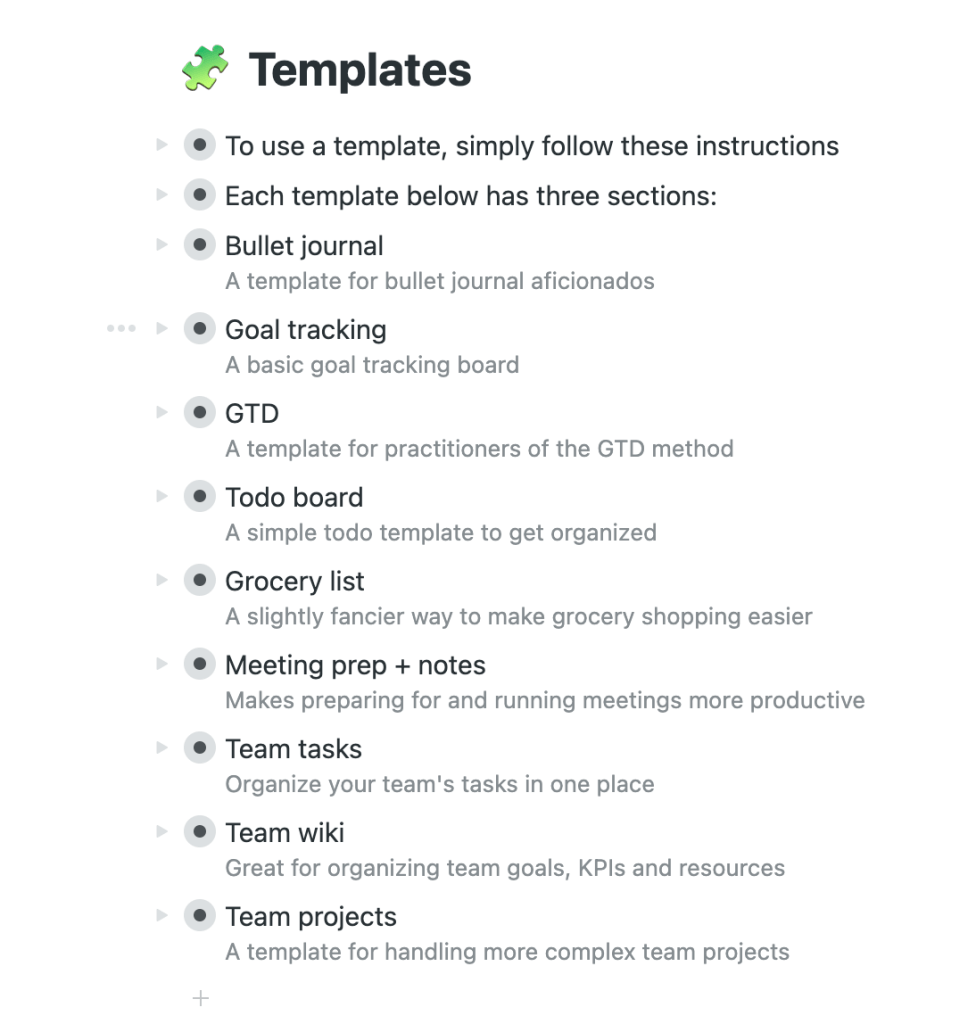
Now, this one is newer to me and I look forward to playing around with it a bit more. The cool part is that it has different templates that you can use depending on what type of list you are trying to create. It also has the option to organize it by boards or bullet points and you can go back and forth.


Google Keep

If you are an avid Google user, then Keep is for you. It integrates with your calendar and you can move it up on your waffle to keep it nice and close by when you open a new google browser tab. The neat thing about Google Keep is that you can add images to your lists and move them around. There is a lot more visual customization available than the other to-do list apps that are out there. You can add collaborators, set reminders, change the color, and copy to Google Docs. It’s definitely worth trying out!

Posted in Uncategorized

Best digital to do list: 4 free apps to try today

Are you looking for the best digital to do list?

Making to-do lists is a helpful way to organize tasks that need to be completed. While, I do use a daily paper and pen method to keep track of tasks, I currently use Tick Tick to manage my goal-related tasks. I’ve used other digital apps as well and it all comes down to preference and whatever is best suited to your individual goals at the time.


Tick Tick

This program is a website, but also can be downloaded as an app. I have it on my Macbook, but mostly use it on the browser and keep it in my Google Chrome grouping tab for calendar. It can synced across all your devices so that if you update it in one place, it will be updated everywhere.

Within Tick Tick, you can create folders and assign tasks to a date within a folder and category. I have everything organized by school, different work tasks, bills, and personal development objectives. I also include things in my list that are recurring like do the animals flea treatment every month. You can also choose to utilize the calendar view to visually see when you have lots of tasks due or happening at once.

digital to do list


Remember the Milk

This app has the same basic features and interface as Tick Tick. I personally like both. Similar to Tick Tick, you can view tasks for the current day, the next day, or the week. Remember the Milk has a really nice easy share function where you can share tasks with someone’s email address.


Workflowy

Now, this one is newer to me and I look forward to playing around with it a bit more. The cool part is that it has different templates that you can use depending on what type of list you are trying to create. It also has the option to organize it by boards or bullet points and you can go back and forth.


Google Keep

If you are an avid Google user, then Keep is for you. It integrates with your calendar and you can move it up on your waffle to keep it nice and close by when you open a new google browser tab. The neat thing about Google Keep is that you can add images to your lists and move them around. There is a lot more visual customization available than the other to-do list apps that are out there. You can add collaborators, set reminders, change the color, and copy to Google Docs. It’s definitely worth trying out!