Posted in Uncategorized

Insanely Useful SEO Based Content Writing Tips

Have you ever thought about learning SEO based content writing?

Search Engine Optimization (SEO) is the process of improving traffic to a website from search engines via un-paid (“organic”) search results. SEO aims to get your website to rank higher in search engine results pages (SERPs). Search engines use automated ranking algorithms to index websites based on relevance and popularity. This formula is known as the “search engine algorithm”.

If you’ve ever thought about blogging or marketing, then it’s good to know some SEO based content writing tips. Trust me, I’ve been learning this as a I go and having to go back to old articles to make revisions. Now, I use RankMath to help me out!

I would have done much better if I had learned this from the beginning!

Conduct Keyword research

Keyword research is the process of finding out what people are searching for online so that you can write about those topics. The primary purpose of keyword research is to ensure that you’re targeting the right audience and using SEO based content writing that speaks to their needs.

Once you have your keywords (or key phrases), it’s time to consider how they should be incorporated into your article or blog post. You want to keep things natural, so readers don’t feel like they’re reading an infomercial!

To avoid keyword stuffing, try using synonyms instead of repeating the same phrase repeatedly in your copy. This will help ensure that each instance serves a purpose instead of just being included because “it sounds good”.

There are lots of free and paid resources. But I mainly use keyword plan from Google Ads and Answer the Public.

Optimize your blog post titles to get more clicks

Optimize your blog post titles to get more clicks for SEO based content writing.

  • Use keywords in the title of your blog post (see my title!). This will help search engines find it and direct readers to the content they’re looking for.
  • Use a question in your title. This can help people click the link and make readers think about their answers.
  • Do keyword research first, then repeat that keyword in your article with a good ratio of keywords to total words for maximum effectiveness. For example, one of my keyword phrases in this article is SEO based content writing.

Write short paragraphs

Using short paragraphs is an excellent way to make your content more readable, making it more likely that people will read the entire post. It also helps with SEO based content writing since search engines can better understand what each paragraph is about and index them accordingly. Finally, short paragraphs help people share your content on social media. It makes it easy for them to click on the title of each paragraph and copy/paste it into their feeds.

person holding blue ballpoint pen writing in notebook. Making a list for SEO based content writing.

Use Bullets and Numbering in the Blog post

  • Using bullets and numbering in blog posts can help make your post more readable, organized and scannable.
  • The readers will find it easy to read the blog post’s contents if they are listed in bullet points or numbers.
  • Bullets and numbering make your blog post more organized. This is important as it will help you organize the content better to look more attractive than before when they were not organized by using bullets or numbers.
  • Using bullets and numbers makes your content scannable for readers who may need more time to read long paragraphs. They may need bits of information from each paragraph. These items should be made easily accessible by using them as headings (in other words, put them near each other)and subheadings.

Use Proper Alt Attributes for Images

An alt attribute is the text alternative for an image. It describes what you see in the image and helps screen readers identify each image on your page. It is an important part of SEO based content writing.

For example, suppose you have a company logo as an image. In that case, you should include an alt attribute with the company name so that users who are visually impaired or use screen readers can read what it is. Or, if you have images of products in your blog post, write descriptive alt attributes for each. That way, search engine bots can also read and understand what they represent.

Write Meta Descriptions for Blog Posts

A meta description is a short description that shows up in search results. It plays a vital role in helping readers understand the content of a blog post and decide whether to click on it.

For this reason, meta descriptions should be unique, compelling and relevant to the post’s topic. They should be at most 160 characters to not overwhelm users with too much text in one place. A good rule of thumb is to write them so that they can help readers understand what your content is all about. This is helpful even without prior knowledge about your product or service offering.

Someone typing on a laptop into Google. There is a coffee and an iphone on the table. This article is for SEO based content writing.
Photo by Pixabay on Pexels.com

Write a Catchy Blog Post Introduction

The introduction is the most crucial part of your blog post and should be catchy, informative and short. The introduction should grab the attention of your reader so that they want to read further. It should also provide a brief overview of what you will discuss in your blog post.

The following are some valuable tips for writing a great introductory paragraph:

  • Begin with an engaging anecdote or question that makes readers want to know more about what you have to say (e.g., “Have you ever wondered why we love dogs?”)
  • Use numbers to illustrate facts or conclusions (e.g., “Did you know that there are more than 600 million dogs worldwide?”)
  • Ensure the sentence structure is straightforward by breaking long sentences into shorter ones. Or using subheadings when appropriate (e.g., “Let’s look at this issue one question at a time…”).

Keep your URL as short as possible

Keep your URL as short as possible. It would help if you also used hyphens to separate words and avoid underscores because they are not search engine-friendly.

It’s also essential to keep any descriptive words out of your URLs, as bots can use them when they crawl through websites’ backlinks (links pointing back at them). For example: If someone links back to your site using an anchor text like “Learn more about SEO, ” it will become clear what exactly you’re talking about if you have yourwebsite.com/learnSEO.

Link Internally with other blog posts on your blog

Linking internally on your blog is one of the best ways to increase the SEO value of your content and improve user experience. It’s also an excellent way to help create new content ideas and keep your writing fresh.

In addition, internal links are an essential aspect of search engine optimization (SEO). By linking to a blog post you’ve written, you can boost its ranking in Google. That will get more people to read it and increase its authority — or how much trust Google has in your site.

If there are other posts on your website that relate directly or indirectly to what you’re writing about now, link back! Anchor text doesn’t matter as much as having a relevant link within the article itself. However, if possible, use terms that pertain specifically to this section or topic rather than generic ones like “click here”.

Do keep the above points in mind for SEO based content writing for a website.

  • Remember to optimize your content. You can easily optimize your title, heading tags and content by following the guidelines above.
  • Remember to optimize your title. The title should be descriptive enough to attract readers. Also, try using keywords relevant to the topic of discussion for search engines like Google, Yahoo! Search and Bing crawl through it and rank better on SERPs (Search Engine Result Pages).
  • Remember to optimize your heading tags. Headings are significant in SEO because they help crawlers understand what your webpage is about, thereby helping them rank higher on SERPs. Titles of articles/pages should be preceded by H2-H6 headings according to their importance on the page’s structure, so search engines can see them and users can easily find them as they navigate through pages or blog posts related to the topic under discussion – SEO based content writing tips!
Posted in Uncategorized

RankMath: The Powerful Tool That Helped Me More Than Double My Blog Traffic

Imagine if you could double or even quadruple your blog’s traffic. You’re probably thinking, “That’s so much traffic! How do I do that?” The answer to that question is simple: RankMath.

Note: links going to the RankMath website are affiliate links. I only post affiliate links to services or products that I absolutely believe in because this is not an affiliate website.

If you’re serious about blogging or running a business site, then it’s likely that you want to boost your traffic. Good for you! It’s a smart step towards creating an online business empire. However, there are so many different ways to go about doing this that it can be difficult to know where should you begin. Well, look no further, because this article is going to walk you through my experience using RankMath.

What is RankMath?

RankMath is a WordPress plugin I’ve recently started using, which has helped me more than double my blog traffic. It shows you how to write long-tail/head keywords for any given keyword. In essence, it helps you make your website as SEO-friendly as possible. For instance, if I wanted to rank for the keyword “make money blogging,” this plugin would tell me exactly what phrases to use in my content and on other relevant pages. It also walks you through all the steps to make your post more Google-friendly.

Over 1.5 million people use RankMath and I know why! It’s so user-friendly and has helped my blog traffic grow a lot even when I haven’t been posting as much. But is it free? Yes, there is a free version, but I didn’t think I could get everything I needed from the free version. So I upgraded to the PRO version, which is very affordable at only $129/year! And as you can see from the screenshot below, they are running a sale for the next 7 days (today is October 30th, 2022) for only $59. As my business grows, I will likely upgrade to the Business account.

Screenshot from the RankMath website showing the prices for each plan.

What does it do for you?

RankMath provides webmasters and content writers with powerful tools for improving their search engine optimization (SEO). Since it was first released, it has become the leading SEO plugin on the market. If you look at the ratings, it is excellent at 4.9.

Screenshot of the tools RankMath has to help you optimize your post.

It offers an easy to follow guide that lets you customize and optimize your post for maximum searchability. It’s so user friendly and colorful and I enjoy watching everything change from red to yellow to green. You enter in your keyword, keyword phrase, or multiple keywords. Here you can see that the current post is optimized at 62/100. The goal is to get as close to 100 as possible.

Once you optimize over 80, then it turns green. As you can see, there are several steps I still have to take to get myself closer to green.

As I’m typing now, the content is getting longer and the keyword density is decreasing. The last thing I do on all my posts is create my links to other content on my blog or external links.

At the end, if I think I don’t have enough media, then I’ll add another image or two and definitely make sure to have one as my thumbnail.

Content AI is super cool because it allows you to see how your post ranks compared to others using the keyword. When I use this feature, I often see a jump in my posts score through RankMath.

Another great feature is to analyze the title. For example, my original title was How I More Than Doubled my Blog Traffic Since Using RankMath. I was able to see that my title didn’t contain any strong words and didn’t have my keyword (RankMath) at the beginning.

I also used RankMath to edit and optimize my 100 old blog posts that were currently on my site. Truthfully, I still haven’t optimized everything yet, so I think I would have even more growth if I did. Here is the full transparency that you can see through the easy to use analytics dashboard. Just imagine how much traffic I would have if I optimized everything to good!

Screenshot of the Analytics dashboard showing that overall optimization is at 58.

Why I chose RankMath

Sometimes the best decisions are based on instinct. That was the case when I first encountered RankMath. I was feeling frustrated from an overall lack of growth in my site’s traffic, as well as some disappointment. I had tried using Monster Insights, but it wasn’t working so well for me.

I did some research and decided to give RankMath a try and I haven’t been disappointed. It seemed to be the easiest to use out of the different plug-ins available. And for someone who is still learning SEO, easy was what I was looking for.

Not to mention, any time I have had a question or problem, they are so quick to respond and solve the issue. They are constantly making updates to enhance user experience and make the tool even better.

My traffic since using RankMath

Since I started using RankMath in May 2022, you can see I’ve been able to consistently maintain views much higher than previous months. And if you compare that to my posting activity, that’s pretty good. I was not nearly as consistent in August – October, yet I still had higher views. Now, I feel more motivated than ever to add relevant content to continue to boost the traffic. After all, if this is a business, I have to treat it like one to see the fruits of my labor.

Chart showing my posting and traffic from February 2021 to October 2022. You can see a big increase when I started using RankMath in May 2022.

Changing my SEO strategy

I’m a fairly new blogger and only started my blog in February 2021 with relative inconsistency. The first couple of months I was struggling to get much traffic at all. I was trying to follow the normal blog marketing tips such as social networking and writing on a regular schedule. But it wasn’t really getting me anywhere until I started using RankMath.

Once I started focusing on keywords and using this tool to help me optimize my posts, I started to see growth! And it is something I want to continue. My goal is to bring all of my posts to a “green” level of optimization so they will start to rank more on Google search.

And I know a lot more now about keywords and keyword phrases so I can continue to make new content that is green from the start.

What I’ve learned from RankMath

If you’re a blogger and want to grow your traffic, I highly recommend you work with RankMath. Now I know so much more about keywords, URLs, links, titles, and so on to make my post as searchable as possible.

I still have more to learn, but I’m on a great path now to reach my ultimate goal of financial freedom!

Concluding thoughts

There is no one size fits all approach to SEO and if something doesn’t work for you, try switching it up. There are some best practices, but different ways of getting your information out into the Google universe.

Setting up your site using RankMath can boost traffic to your site and you can use a blogging calendar to boost traffic even more.

Best of luck on your blogging journey!

Posted in Uncategorized

Is Search Engine Optimization Worth It? (If You Ask Me, The Answer Is A BIG Yes)

Many people starting out new blogs or businesses ask, is search engine optimization worth it?

My opinion: Search engine optimization (SEO for short) is worth it. At the end of the day, you’re in business to make money or provide a service or information to people. And if your business or marketing model relies on free traffic, search engine optimization can propel you ahead of your competitors.

Let’s dig in!

Organic search traffic can make your business

Organic search traffic can make your business. What do I mean by that?

When you’re ranking high in Google for relevant keywords, you’ll get more traffic from people who are actively looking for what you offer. This means that they’re more likely to buy from you than if they found you through a display ad or social media post.

You can also use organic search to direct users to specific pages on your website where they can convert into newsletter sign-ups, landing page sign-ups, or even sales. For example, I get a lot of search hits for my Digital Freebies page on this website.

coffee apple iphone smartphone. is search engine optimization worth it?
Photo by Pixabay on Pexels.com

SEO is the gift that keeps on giving

If you do it right, your website will be visible at the top of search results for years to come. That’s why I’m so passionate about SEO. I truly didn’t take it seriously when I first started blogging and now I’m having to backtrack on old articles.

SEO isn’t an overnight success story. It takes time and effort, but in my experience, it gets easier over time as you learn more about your audience, keywords, and conversion rates.

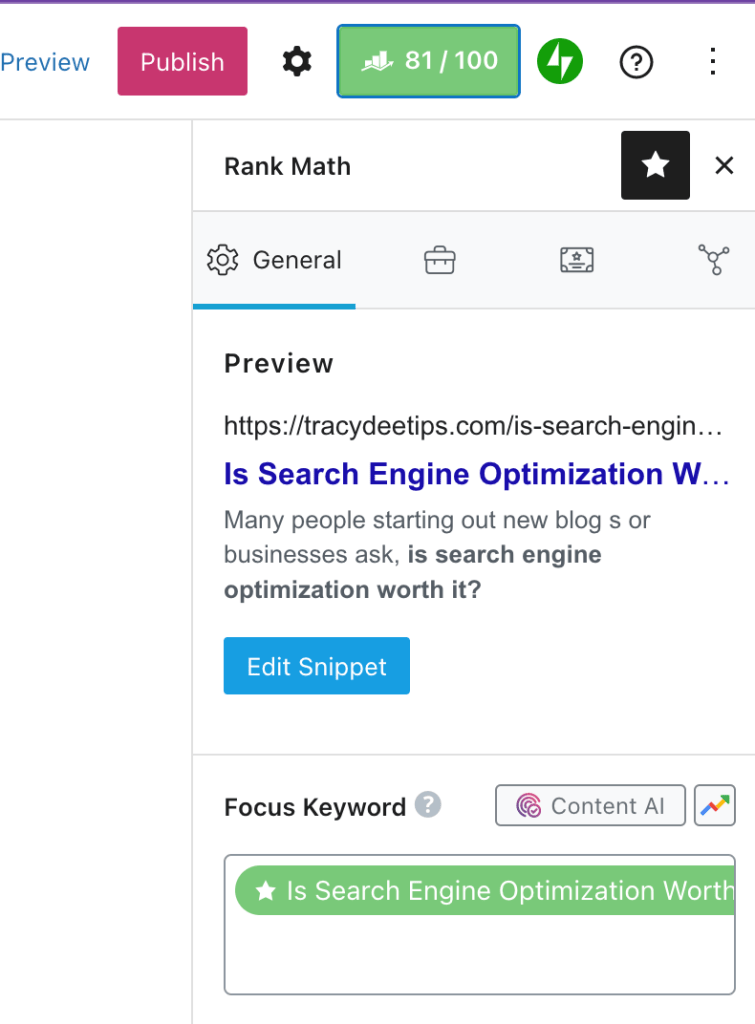
Since installing RankMath Pro, it’s much more automated and simple process for me. For example, use all the tips and strategies to try to make it as close to 100 as possible for each post. After going back and doing this for 100 old blog posts, I almost QUADRUPLED my blog traffic in one month.

screenshot of using RankMath Pro. Is search engine optimization worth it?

So, again, is search engine optimization worth it?

If you want to see results and growth over time, then yes, SEO can be worth it if you have the patience and persistence to see through it all.

SEO is a long-term strategy

Here’s the thing though: SEO is a long-term strategy. It can take months to see results, and even longer to become an authority in your niche. And sometimes years if you’re truly building up a brand and name for yourself.

But with that being said, it’s important to understand the difference between short-term and long-term results when it comes to SEO. There’s no point in spending hours on Google looking for new ways to optimize your site if you don’t have any traffic or sales coming in.

The best way to approach SEO is by taking small steps each day and building up over time. You can’t expect everything to happen overnight—that is simply not how SEO works.

SEO is about improving the overall quality of your site so Google sees it as a resource that deserves to rank in its search results. If you want to rank on Google’s first page, you need content that people will find valuable. That means writing articles that are informative and interesting, with headlines that attract attention and explain what the article is about in a few words.

For example, the keywords I chose for this post are: “Is search engine optimization worth it?” How did I find this question and why did I choose it? I went to a website called Answer the Public and typed in search engine optimization. Basically, this website tracks user searches for different words and phrases.

person working on black laptop. Is search engine optimization worth it?
Photo by EVG Kowalievska on Pexels.com

So, if you clicked on this post, then likely you were searching for something similar to: “Is search engine optimization worth it?”

You also need backlinks from other sites pointing to your content. The more quality backlinks you have, the better your chances of ranking higher in Google’s rankings (and Bing’s).

If this sounds like it requires a lot of work, it does! But like any marketing strategy, it pays off over time as long as you stay committed to improving your site and writing great content for readers.

SEO is “free” marketing (sort of)

The good news: SEO is free!

The bad news: It’s not “free.” Sure, there are some things you can do to get started with SEO that doesn’t cost anything at all… but you won’t get very far if you don’t invest some time and money into your website. At the end of the day, time is money, so if you choose to do it yourself, then it’s going to take some time.

So, is search engine optimization worth it?

Search engine optimization is worth it because it can vibrantly grow your business if done well.

And that’s why I think Search Engine Optimization is worth the trouble. It’s a strategy that has the potential to return ten times the effort you put into it. If you’re already a marketer, SEO might be right up your alley—but if you’re newer to it all, don’t be intimidated.

Now that we’ve taken care of SEO 101, it shouldn’t be too hard to get started; plenty of guides out there can help you improve your search rankings. Either way, I hope this article has helped shed some light on the hustle behind SEO, and maybe even encouraged you to get started with it today!

Posted in productivity

Learn SEO: 7 Critical Reasons Why You Should Start Today

Has someone ever mentioned that you should learn SEO?

Search engine optimization (SEO) is one of the most important skills you can learn as a website owner or content creator. It’s not a matter of if you should master SEO, but when.

When I started working online, I didn’t know the first thing about creating content. But now, I’m slowly learning and I want to help you avoid the mistakes I made.

So to help you get started with SEO, I’m sharing seven reasons why you should learn SEO as soon as possible.

SEO is more important than ever before

The fact is that if you aren’t doing SEO, then your competitors will. And they will do it better than you do.

If you have been in business for a while and have been doing some kind of marketing, then you know how important it is to be found on search engines like Google. However, if you haven’t been optimizing for search engines over the years or maybe have only done so recently, then there’s a good chance that your site has never been optimized properly before now or hasn’t been updated since its creation.

This means that if people are looking for something related to your product or service online today, then chances are good that they won’t find your website via a search engine result page (SERP).

young lady typing on keyboard of laptop in living room. learn SEO
Photo by Vlada Karpovich on Pexels.com

You don’t need to be a genius to learn SEO

Learning SEO can seem like a daunting task. You might think that you need to be a genius to understand it all. But in reality, the basics are easy to learn and anyone can do it.

The first step is to break down what it means to “learn SEO.” What does learning SEO actually mean? It means that:

  • You understand the basic principles of search engines and how they work
  • You know how search engines rank pages
  • You know how to optimize your content and site for search engine visibility

Once you’ve mastered these things, you’ll have the knowledge needed to make sure your website ranks as high as possible for your target keywords and phrases.

It can help you start your own business

If you learn SEO, it can help you start your own business by driving traffic from search engines like Google, Yahoo! or Bing. You need to ensure that people can find your website easily when they enter keywords related to what you sell or offer services for into their search engine results.

The more people who visit your site, the more likely they are going to purchase something from your company.

It’s free!

Many people are under the impression that SEO is a paid service. This is not true at all! SEO is free, and you can perform it yourself if you know what to do. You don’t need to pay anyone or use any special software either.

Although, I did decide to purchase RankMath Pro and it’s been a game-changer for me.

The only thing that might cost you money is the time spent to learn SEO and then testing your own website, but even that can be done for free by using online tools like Google Adwords’ Keyword Planner and Moz’s Open Site Explorer.

Contrary to popular belief, there are no shady tricks or black hat techniques required for successful SEO. All you need is a good understanding of how search engines work, as well as some patience, dedication, and practice.

You’ll get more traffic and leads from search engines

The primary benefit of SEO is that you get more traffic from search engines. People use search engines to find what they’re looking for online. If you rank high in searches, you’ll get more visitors to your site.

The secondary benefit is that it helps you convert those visitors into leads and sales. That’s because most people don’t have time to read long articles on their mobile devices, so if your content is easily accessible at the top of a search result page, people are more likely to click on it and read it right away.

This is something that I’m working on building out here on my current blog. I would like to continue to learn SEO and optimize my sales pages to convert more often.

It makes it easier for people to find you online

The goal of SEO is to create content that’s relevant to your target audience and ranks well on search engines, so people can find your website when they search for related keywords.

So, this is why it is important to learn SEO and understand which keywords you want to rank for in the search results. Once you are able to determine that, then you can use those keywords to make it easier for people to find your business or your content.

macbook air on grey wooden table. learn SEO
Photo by Caio on Pexels.com

It’s a fun challenge

SEO is a fun challenge for both professionals and amateurs alike, and it can be a great way to build your brand, gain more customers, and increase profits for your business.

There are many ways to optimize your site for search engines, but the most important is to create content that draws people in and keeps them coming back for more. It’s also important to make sure that all the links on your website lead back to high-quality content. This ensures that users who follow those links will be satisfied with what they find when they get there — not disappointed or confused by having been sent off track by poor navigation or poorly optimized internal pages.

Takeaway

Search engine optimization is an ever-changing practice, and the competition for search engine rankings among businesses has never been higher. If you want to stand out from the crowd and improve your website’s search ranking, you need to know SEO. The good news is that SEO isn’t difficult to learn. All it takes is a willingness to study the best practices for SEO and apply them to your business.

Posted in Uncategorized

How to Optimize Your Blog for Search Engines in 7 Simple Steps

You’ve just started a blog and are wondering how to optimize your blog for search engines. You’re in luck because this post covers some of the most important strategies you can use to optimize your blog for search engines.

Optimize your blog for search engines using these simple steps

1. Keyword Research

Search engine optimization (SEO) is the process of making your website more visible and accessible to search engines like Google, Bing, and Yahoo. Search engine optimization techniques are ways to improve your website’s ranking in search results so that more people can find your site. Keyword research is a part of SEO and allows you to identify what people search for on Google, Yahoo, etc.

You can then use this information to help optimize your web pages to rank higher in searches. Keyword research is important because it gives you insight into what people are looking for and how you can make your content more relevant to their interests.

Keyword research starts with analyzing the keyword landscape that surrounds your industry. For example, if you are a blogger who writes about business and marketing topics, you would want to see what words and phrases other popular blogs in the same space use in their titles and URLs.

You would then want to see if it makes sense for your blog’s title or URL to be different from the norm or if it makes sense for you to include something that is commonly used by your competitors. Once you have completed this step, it is time to actually conduct some keyword research.

Searching for a good tool to do keyword research? Check out Google Ads keyword planner or Answer the Public.

2. Ask Readers for Feedback

One of the best ways to improve your blog is to ask readers for feedback. You can do this in a variety of ways. The most common method is to ask them directly at the end of each post. Simply write something like “Do you have any comments or questions?” and ask people to leave their thoughts in the comments section. (So yeah, go for it here!)

You should also consider setting up a form on your website where readers can contact you directly. This could be as simple as a contact page with an email address, or something more complex like a comprehensive contact form that lets users select different categories based on why they’re contacting you.

Consider creating a survey for readers to fill out as well. This is particularly useful if you want to know whether or not your blog is meeting people’s needs, or if there are certain topics that people would like to see covered.

document on top of stationery
Photo by Lukas on Pexels.com

3. Avoid Duplication

It’s important to avoid duplicate content, not only because you’re breaking search engine rules and could face sanctions from Google, but also because duplicate content isn’t as useful to your readers as unique content. However, if you are posting on different sites, make sure to note the original source in your settings. For example, I also post my content on Medium.

When you publish the same article on multiple pages of your site, you’re wasting the time of anyone who clicks through—they’ve already read this information on one of the other pages. If the articles are about the same topic, it can be even more confusing for your visitors to be bounced around, especially if they don’t see a clear distinction between what’s in one article and what’s in another.

I usually recommend that people write a single article containing all the relevant information they want to share, but with different subheadings or tags to indicate when they’re moving onto a new subtopic. It doesn’t matter if there are some overlaps in the writing from one section to another—that’ll happen naturally when you’re just writing about one thing anyway.

The important thing is that your reader has an easy way to tell when you’re talking about something new, so they don’t have to go back and reread an entire paragraph just because it wasn’t clear which part was a continuation of where they left off. This is helpful when trying to optimize your blog for search engines.

4. Use Internal Links

Internal links are hyperlinks that connect one page on your site to another page on the same site. Since search engine algorithms favor websites with more internal links, you will increase the value of your blog by strategically including links from all relevant pages to each other.

The quality of your content will also be improved if you include more links within the content itself because they will help guide readers through the rest of the article. For example, if you’re writing a post about how to develop your cooking skills, you could include a brief overview of common cooking methods at the beginning and end of the article, linking back to full articles on those methods elsewhere on your blog.

5. Edit Your Permalinks

The first step to optimize your blog for search engines is to check its permalink structure. This refers to the way the permalinks are set up on your site — how they look and how they affect search engine optimization.

Most blogs run on a WordPress platform, which is why we’ll focus on how to edit your permalink structure in WordPress.

By default, your permalink structure might look something like this: http://mywebsite.com/p=123. The p=123 part of the URL means that the page you’re looking at is the 123rd post on the site.

This doesn’t help you in search engine optimization because it doesn’t offer any information about what your post actually is about or what keywords might be contained within it.

Instead, you can have a permalink structure like this: http://mywebsite.com/how-to-build-a-trellis-for-your-garden/ which would help with search engine optimization, as it shows that all content contained in that article is related to building a trellis for your garden.

Make sure to update your permalink structure to take out the date! I didn’t do that at first and had to add a bunch of redirects to my old pages.

photo of man using laptop, optimize your blog for search engines
Photo by Canva Studio on Pexels.com

6. Update Your Old Posts

Whenever you have a new blog post, make sure you get it out there and promote it. But don’t forget about your old posts. Search engines are always crawling the internet for content. If Google finds a related blog to yours, it will bring that blog onto your results page. So it’s important to update to continue to optimize your blog for search engines.

It’s important that you update your old content to keep it relevant and current. By doing so, every time Google crawls through your website, it will find something new to add to the search results page. This is also how you can show potential readers that they can trust the content on your blog because it’s current and up-to-date.

When updating your old content, make sure you don’t change the URL or permalink of the post. If you do change anything, Google will classify it as a duplicate page instead of an updated version of the same page. In order to avoid this problem, select all of your old posts and check them individually to see what needs updating. When updating these posts, be sure to:

  • Add new links (other blogs and websites)
  • Add new images with alt tags (that contain keywords)
  • Do a double-check for any typos or grammatical errors

7. Optimize Your Images

One of the best ways to optimize your blog for search engine rankings is with optimized images. Search engines have a hard time reading the images themselves, but they do read the data surrounding it. Here are some things you should do for image optimization:

Use keywords in the filename of your images, such as “Atlanta-dog-trainer.jpg” instead of “IMG_01234.jpg”

Always fill out the alt tag when adding an image to your blog post. This is important for accessibility for blind people and for image searches by defaulting to the alt tag text if it cannot find anything else that matches the image search query.

Takeaway: SEO is a great way for you to increase traffic to your blog so take some time to learn the basics!