

Strategies for scheduling meetings: Are you tasked with scheduling a lot of meetings or scheduling meetings with large groups of people with busy schedules? I’ve had to do both so I’ll share some of the strategies that I have used to simplify this process if possible.
I generally view these in 2 different categories. Scheduling within an organization can be a bit easier because you can utilize technology tools and systems to standardize meeting expectations.
However, this works best when everyone in the group is well-versed in the technology of the organization. Scheduling outside organizations requires clear directions so others can utilize the method you have set forth for that meeting.
Strategies for Scheduling meetings Within the organization
One of the easiest methods to schedule meetings within an organization is to share calendars through Gmail or Outlook. When I’m scheduling a meeting in Google Calendar in my organization, I can type in the guests’ names I need to meet with and view their available blocks of time to find a common time. You can change the settings to share as many or as few details as possible.
Doodle – This works for both inside and outside the organization. With Doodle, you can create a bookable calendar so people have to look at it when you’re available. You can also create events and list out dates and times so people can tell you when they’re available.

Strategies for Scheduling meetings Outside the organization
When trying to schedule outside the organization, it is also possible to utilize Google and Outlook calendars if those people use them as well. I often get Google Calendar invites from many people not in my organization.
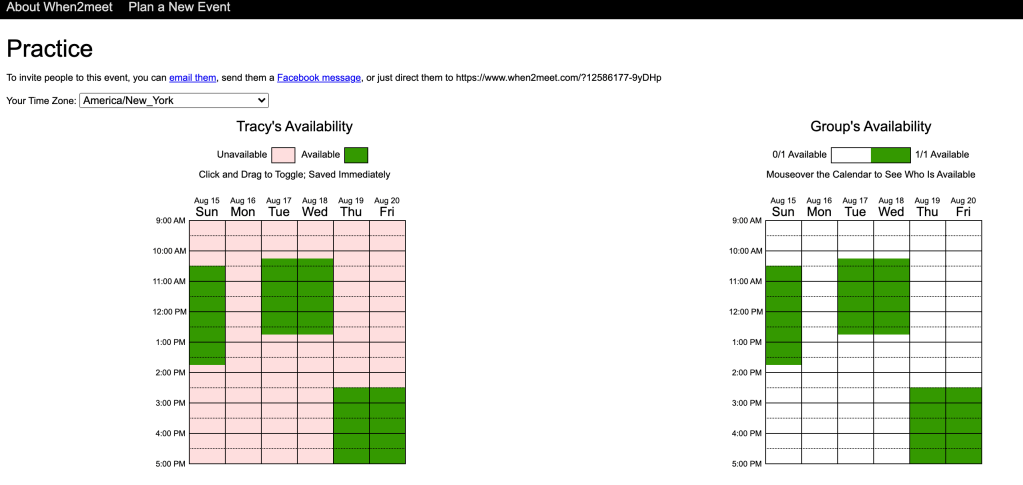
Another strategy is to use When2Meet, which allows potential meeting attendees to shade in all the blocks of time they are available. It then gets darker the more people are available at a given time indicating a better fit for a meeting. You can share the link with potential attendees and then choose the time when most people are available.
One of my colleagues just creates a Google Sheet with available times and has people put their names when they are available. It’s a similar process as When2Meet.
These are the main methods that I have used which I can personally recommend. However, there are so many other digital programs that you can use to manage your calendars and schedule meetings. This article shares the breakdown of 23 different programs you can use.
Ultimately, you want to choose the most time-efficient and user-friendly option available to you!




 Tracy Dee Tips