
Posted in Uncategorized

Morning Routine: 5 Important Things I Do Each Day

I’m curious. Do you have a morning routine? It’s something I’ve been working on for a long time. I wouldn’t say that I have a set morning routine, but I would say that I’m trying to improve whenever possible. Years ago, I got up and ran before work as I was training for a half marathon. That was a routine because I would often sleep in my running clothes or have them laid out next to me.


These days, I do a few things every morning to try and get my brain going and get organized for the day.

morning routine
Photo by Ron Lach on Pexels.com

Morning routine

  1. I make my bed. Growing up I wasn’t one of those kids that made their bed or was forced to by my parents. It’s a habit I grew into as an adult. I just like the look of having my comforter pulled up even if my sheets aren’t perfectly aligned underneath. I don’t know the science behind it, but I do feel like there is a connection between my brain and the organization of the day when I make my bed in the morning.
  2. Stretching. I haven’t progressed to full-on yoga in the morning, but I’ll stretch my neck and my body to get ready for the day. I would love to spend 20-30 minutes doing yoga, but I’m not quite there yet. I typically take a few minutes to move my head from side to side, raise my arms, and do a few lunges.
  3. Coffee. Okay. I admit I’ve tried to kick the coffee addiction in the past with no success. So for now, it’s part of my morning routine to make coffee. I just love the smell of it and the feel of the warm mug in my hands, even on a hot day.
  4. Affirmations. I like to start my day by journaling my intentions and writing down my affirmations. I repeat them to myself in the mirror a few times for good measure. I notice complete mood shifts if I got several days in a row without writing my affirmations. My anxiety creeps in more, I’m irritable, and my generally positive outlook is not as sunny.
  5. To-do list and email. After I get some breakfast (or while I’m eating breakfast), I go through my to-do list for the day and check my email. I prioritize and review my schedule to make sure I’m still on the best course for the day to achieve my goals.

While I have great ambitions to create an even better and more consistent morning routine, these are the things I do on a regular basis to get me started and going for the day. What do you do you do? What are some helpful tips you’d like to pass along?


Posted in Uncategorized

Google Chrome Extensions: 5 Awesome Ones to Try

There are so many Google Chrome extensions to choose from. I have both a Macbook Air laptop and an HP desktop computer. I use Google Chrome as my Internet browser in both places. I can sign in to my Google account and all my preferences are saved, included my chrome extensions. In this post, I want to share some of my favorite Google Chrome extensions that I use on a regular basis. I will share my top 5, ending with my favorite one!

My 5 Favorite Google Chrome Extensions

5. GIPHY for Chrome – I love this extension as a teacher because I can easily add GIF’s or emojis to Google Slides or emails just by opening the extension, searching for what I want, and then dragging it onto my page.

Google Chrome extensions

4. Grammarly – I do have the paid account for Grammarly, but this is such a helpful tool. It connects to everything I do online and checks my spelling and grammar as I go. I highly recommend the invest if you do a lot of writing. The paid version even checks your email for the tone.

3. Screencastify – This extension is great for recording screencast videos or screenshots. You can capture your web browser, whole desktop, add your video in, and edit the videos to share with others. I use this to create tutorials for my students.

2. Mercury Reader – A rocket ship icon that turns on and off serves the basis of this extension. Essentially, it helps to make websites with lots of advertisements more readable. When you turn on Mercury Reader, it reduces all that background “stuff” and just gives a clear text to scroll through and read. This is another tool I recommend to students to speed up reading online and doing research.

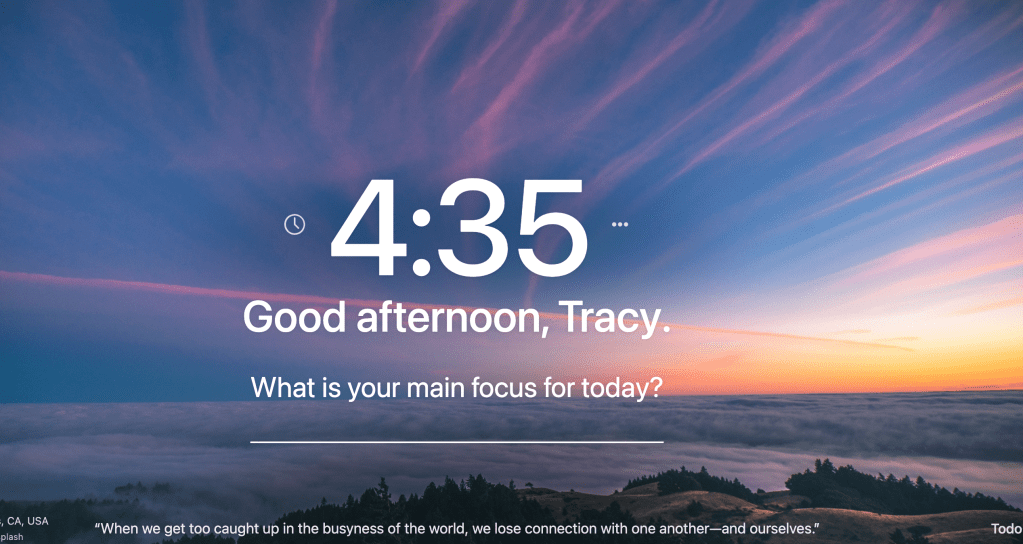
  1. 1. Momentum – And my favorite extension by far is the Momentum extension (it looks like a little green M&M). Every time I open a new tab I see a beautiful image with a quote. I can write my focus for the day and it even has a spot to add my to do list. It saves so it’s always there when I open a new tab for the day. Since the images change, it links back to the original photographer and I can view more beautiful images. I just absolutely LOVE this extension!!

I use other extensions, but these are my favorite and most frequently used. Leave a comment if you’d like to hear about others!

Posted in Uncategorized

Weekend Downtime: It’s Important to Recharge

I’m not even sure I know what weekend downtime looks like. I have been guilty of working 7 days a week on a regular basis in the past. As a full time student with a couple of part-time jobs, it’s hard to justify taking a day off. However, it’s so necessary to recharge your brain and your body.

For the last several weeks, I’ve tried to work no more than 2 hours on Saturday and Sunday. I typically don’t mind working Saturday morning until about noon and then taking the rest of the day off. And Sundays I usually work in the evening to get prepared for the week ahead so it doesn’t feel like too much work.

With the warmer weather approaching, I’d like to create a schedule where I stop work by 5:00pm on Fridays and don’t pick it back up until 8:00am on Monday mornings. I usually teach on Mondays so this means I need to make sure my lessons are done by Fridays and any grading I have to do is also done by Friday.

weekend downtime
Photo by mentatdgt on Pexels.com

Weekend Downtime When I Finish School

As for my schoolwork, it is on me to complete this final paper and graduate in the next 2 months. Perhaps it is a bit of wishful thinking that I can institute this weekend free of work rule now, but I’m going to give it a try starting next weekend. I am going to submit my paper by the end of this weekend to my advisors for their feedback and work diligently throughout the week on all of my part time job tasks.

While I wait for the paper feedback, I will plan my lessons for my class for the next 3 weeks so that I’m ahead. Since most of my work revolves around creating my own schedule, it’s up to me to make sure that I get my tasks completed during the weekday hours.

Here’s to taking back my weekends for relaxation and recharging! And more time for my hobbies such as gardening, art, and reading.

Posted in Uncategorized

So You Want to Work From Your Bed – Let’s Discuss Some Important Tips

If you work from your bed, here are some things to think about.

work from your bed
Photo by cottonbro on Pexels.com

At the beginning of the pandemic, I’m sure many of us worked from our beds because it was comfy and convenient. If you’re still doing that, it could be taking a toll on you mentally and physically.

If you work from your bed, here are some of the tips I use:

  1. Designate a specific workspace separate from where you sleep. If you’re having trouble sleeping at night and constantly use the computer or scroll through your phone, you may want to consider putting those down and making sure the bed is your sleep zone. For a long time, I didn’t have the luxury of a separate room so I had a tiny desk that I used in my bedroom. Then I used my kitchen table when I had my own one bedroom. Now, I’m fortunate to have an office and it has made a huge difference in my mental capacity to get work done and separate sleep and rest time.
  2. If you do work from your bed, use some sort of support for your laptop like a lap desk. This helps keep it flat and cushions the surface for you underneath. I use this more when I’m on the couch and watching TV in the background if I’m doing any type of mindless work. Some people even prefer to use a laptop tray to hold their work items.
  3. Use a battery-operated alarm clock and put your phone across the room at night. Resist the urge to check your phone for texts or emails when you first wake up in the morning. Most people use their phones as their alarm clock, but a simple switch to another alarm can create that barrier to get your morning started off on the right note.

*Note that links are affiliate links and provide a commission if used.

Posted in Uncategorized

5 Helpful and Quick Time Management Tips To Test Out Today

Quick time management tips can help you stay focused and on task. I rarely hear people say they’ve got too much time on their hands. It’s often more about the lack of time that frustrates most. We all get the same amount of time in a day and how we use it has important implications for the outcomes of our lives.

Time management is an area of my life where I am constantly looking to improve. I seek ways to plan and be more productive. I used to thrive on being busy thinking that that was a marker of effective time management, when in fact it is not. Now, I seek ways to engage in deep focus and practice self-care to make the most of the time I have. Here are some of the strategies that I use.

5 Quick Time Management Tips

  • Single task. In order to turn my focus to the task at hand, I close out the email tabs, turn off the notifications, and focus on one item of my to do list at a time. Each day I use a template to write tasks for the day.
  • Modified Pomodoro. Google the Pomodoro Method and you’ll find lots of articles and resources. I use it, but sometimes I modify it and use the amount of work time that fits best in my schedule. So instead of 25 minute work chunks, I might do 30 or 45 or even an hour.
quick time management tips
Photo by Andrey Grushnikov on Pexels.com
  • Prioritize. I keep my recurring tasks and upcoming to do items on a program called TickTick. Each day, I use that as my guide to prioritize what needs to be completed. I set aside 15-20 minutes each morning to start my day with prioritizing that way I’m not caught off guard as the day goes on. If something comes up, I can decide if it fits in my priorities or if it can be moved to the next day.
  • Improve technology skills. This is an important time management tip for anyone working from home. If you spend a lot of time on the computer, then finding quicker ways to complete tasks saves time. Time saved by technology can be spent on other priority areas. Utilize the free resources available to brush up on your tech skills such as keyboard shortcuts.
  • Calendar. I use Google calendar to color-code all of my meetings and tasks. I add big projects to my calendar and block off time to complete them. I also use a paper calendar because I still like to have things written down.

Even with a good system in place, time management will always be a struggle. It’s something that you have to continue to work hard at—it’s not something that you should expect to be perfect at right away.

But even though it can be difficult to maintain your focus and your high productivity over the long-term, it is essential to striving towards excellence in all areas of life. Utilize some of these quick time management tips to get you started!

Posted in Uncategorized

7 Amazing Websites for Professional Development

There are many websites for professional development available out there on the big old world wide web. One thing I’ve been focusing on for the past several years is professional growth and personal learning. I’ve done this through participation in a number of online courses.

Websites for professional development are online platforms that offer a wide range of resources and opportunities to help individuals enhance their skills, knowledge, and overall career growth. These professional development websites offer a convenient and accessible way for individuals to learn new skills, acquire knowledge, and connect with professionals and industry experts.

websites for professional development
Photo by Mikhail Nilov on Pexels.com

Websites for Professional Development

  • The Science of Well-Being: I took this free course through Coursera last summer. I enjoyed the discussions on building habits and practicing strategies to increase personal wellness. The Science of Well-Being course on Coursera, led by Yale University’s Professor Laurie Santos, delves into the latest findings in the field of happiness and well-being. The course presents a range of topics aimed at boosting one’s happiness, strengthening relationships, and fostering resilience.

    Students will learn practical and evidence-based methods to enhance their well-being, such as gratitude practices, meditation, and mindfulness techniques. This course dispels common misconceptions about happiness and examines the role of thoughts, feelings, and actions on overall well-being. The course is designed to be interactive, encouraging students to apply the concepts learned to their own lives. With its captivating approach and actionable insights, the Science of Well-Being course is a valuable resource for anyone looking to improve their well-being.
  • Alison.com: I took a free Time Management course on this website as well as a mindfulness course. Alison.com is an online platform that provides opportunities for professional development. With a vast library of courses and certifications, Alison.com offers a convenient and flexible way for individuals to build new skills, enhance their knowledge, and advance their careers.

    The courses on Alison.com are designed to be self-paced, allowing students to learn at their own speed and on their own schedule. They cover a wide range of topics, from business and technology to health and wellness, and are taught by experienced professionals in the field. In addition to the courses, Alison.com also provides interactive quizzes, practical projects, and real-world examples to reinforce the learning experience. With its comprehensive and accessible resources, Alison.com is an excellent choice for anyone looking to enhance their professional development.
  • Google SkillShop: Google has so many amazing free online tutorials and courses that you can take on many topics, making their skillshop one of the best websites for professional development. I took their educational foundations course for online learning. Next, I plan to take their skills course on Google Ads to see how I can use that for my blog.

    Google Skillshop is a training platform for individuals and organizations looking to expand their digital marketing skills. Some of the benefits of using Google Skillshop include:

    – Access to Google’s expertise: Google Skillshop offers courses and certifications developed by Google’s digital marketing experts, providing users with the latest and most comprehensive information on digital marketing.

    – Wide range of courses: Google Skillshop offers courses on a wide range of topics, including Google Ads, Google Analytics, YouTube, and more. Users can choose the courses that best fit their needs and interests.

    -Flexible learning: Google Skillshop provides self-paced learning opportunities, allowing users to study and take exams at their own pace and on their own schedule.

    -Recognition and certifications: Upon completion of a course or certification, users can receive recognition from Google and demonstrate their digital marketing expertise to employers and clients.

    -Resource center: Google Skillshop provides a resource center with a variety of tools and resources to help users stay up-to-date on digital marketing trends and best practices.

    Overall, Google Skillshop offers a comprehensive and convenient platform for individuals and organizations looking to expand their digital marketing skills and stay ahead in the industry.
marketing smartphone internet connection showing Linkedin as one of the websites for professional development
Photo by Bastian Riccardi on Pexels.com
  • LinkedIn Learning: While these courses come with a premium membership, you may be able to gain access through an organization or your company. It is worth asking about partnerships to see what is available for you to take some courses.

    LinkedIn Learning is regarded as one of the most attractive websites for professional development. Its wide range of courses and certifications provides a valuable resource for individuals looking to enhance their skills, knowledge, and career growth. LinkedIn Learning offers courses by industry experts and covers various topics, including business, technology, creative skills, and more. In addition, the platform integrates with LinkedIn, allowing users to showcase their professional development and connect with others in their field. With its comprehensive resources and convenient platform, LinkedIn Learning is considered by many to be one of the best websites for professional development.
  • TED: A platform featuring inspiring talks and videos on various topics, including professional development.
    TED (Technology, Entertainment, Design) videos can be used for professional development in several ways:

    – Inspiration: TED videos often feature innovative ideas and thought-provoking discussions on a wide range of topics. By watching these videos, individuals can be inspired to think differently and gain new perspectives on their work and industry.
    – Knowledge acquisition: TED videos are often presented by experts in their field and provide insights and knowledge on diverse topics. Individuals can use these videos to expand their understanding and stay up-to-date on the latest developments in their field.
    – Skill development: TED videos often provide practical tips and strategies for success in various areas, such as leadership, communication, and innovation. Individuals can use these videos to learn new skills and improve their performance in the workplace.
  • Codecademy: A platform offering interactive coding lessons and projects for web development and data science. I signed up just to learn app development for fun!

    Code Academy is one of the most popular websites for professional development in the field of programming and technology. One of the benefits of using Code Academy for professional development is:

    – Hands-on learning: Code Academy provides interactive lessons that allow users to practice and apply the concepts they have learned. This hands-on approach helps users build practical skills and retain the information they have learned.

    – Wide range of topics: Code Academy covers a wide range of programming languages and technologies, allowing users to choose the areas they want to focus on. Whether someone is looking to start a career in coding or simply improve their skills, Code Academy offers courses and resources to meet their needs.

    – Self-paced learning: Code Academy’s courses and projects can be completed at the user’s own pace, making it a flexible option for individuals who want to fit professional development into their busy schedules.

    – Cost-effective: Many courses and resources offered by Code Academy are free or low-cost, making it an affordable option for individuals looking to improve their skills without breaking the bank.

    Overall, Code Academy offers a convenient and practical way for individuals to enhance their programming skills and advance their careers.
  • edX: A non-profit platform offering online courses from top universities and institutions worldwide.

    EdX is a massive open online course (MOOC) provider that offers a wealth of resources for professional development. Here are a few ways to use EdX for professional development:

    – Take courses: EdX offers courses from top universities and institutions on various topics, including business, technology, and data science. Users can choose courses that align with their interests and career goals.
    – Earn certifications: Many of EdX’s courses offer the opportunity to earn a certificate upon completion. These certifications can be used to demonstrate mastery of a particular skill or subject, which can be valuable for career advancement.
    – Access to top instructors: EdX partners with some of the world’s best universities and institutions so that users can learn from leading experts in their field.
    – Interactive learning: EdX’s courses often include interactive elements, such as quizzes and assignments, to enhance the learning experience and help users retain information.
    – Flexible scheduling: EdX’s courses are self-paced, so users can learn at their own convenience and on their own schedule.
    – By taking advantage of the resources offered by EdX, individuals can expand their knowledge, improve their skills, and advance their careers.

In addition to these online platforms, YouTube has video tutorials for almost anything we want to learn. It’s how I started my Etsy shop, built this website, and started my own YouTube channel. The moral of the story is, keep learning, keep growing, and keep seeking new information!

Posted in Uncategorized

Overcoming Lack of Motivation: 3 Tips to Snap Out of It Quickly

Man, overcoming lack of motivation is tough work!

I have another post I was going to write about using Google Slides because I just made a new YouTube video (check it out here), but I’m trying to work on something much bigger and I’m just not motivated. So instead, I’m going to procrastinate a little bit longer by sharing some ways I’ve overcome lack of motivation in the past and how I’m going to use that to my benefit today.

There is a pretty important finish line waiting for me to cross in a couple of months and the closer I get to graduation, the harder it seems to motivate myself to complete everything needed to get there. Plus, it’s challenging right now being stuck at home and not feeling as inspired. That’s why the nature breaks are so important. I’ve stepped outside about 8 times already today and it’s still early afternoon.

overcoming lack of motivation
Photo by Niko Twisty on Pexels.com

Here are some tips that worked for me in the past that I plan to implement today to keep me going toward my goals:

Tips for Overcoming Lack of Motivation

1. Keep my eye on the prize and identify my why

Even though the tasks I have to do seem unimportant or boring in the moment, they are part of something bigger. Something that will take me one step closer to graduating and finally achieving a huge milestone in my life and my career. I’m going to take 10-20 minutes to list all my reasons WHY I’m doing this now and how this will benefit me in the future.

Now, if you do this exercise, and you find that it’s hard to list anything or you can’t think of any benefits, then perhaps that’s a bigger question of whether that goal is really meant for you.

2. Plan for success

When I was training for a half marathon, I knew that I wouldn’t continue if I didn’t have a plan. I mapped out 16 weeks in my calendar, wrote down how much I wanted to run each day, and set a pace goal. I didn’t always make it exactly, but it was there as a guide and always kept me moving in the right direction.

I also slept in my workout clothes so that when that 4:45am alarm went off, I was already halfway ready to get out there and run. Today, I am going to plan out the remaining tasks I have to reach until my deadline and prioritize the ones that need to get completed first.

3. Work in bursts and take breaks as needed

Taking breaks may seem counterintuitive, but sometimes we just need to step away from something to gain clarity or motivation to keep working on it. A time limit helps direct our focus on a specific task related to a larger goal and gives us a break to look forward to. One method is the Pomodoro Technique, which breaks tasks into 25-minute chunks of work followed by a 5-minute break.

There are many online timers you can use for this technique. Another way to stay motivated and focused is through a program called Focusmate. This website pairs you up with another person LIVE on video who is also working on a task for 50-minutes. You complete your individual tasks knowing someone else is working alongside you.

If you struggle with overcoming lack of motivation, just know it takes intentional effort and focus, but you can do it with practice!!

If you’d like me to write a longer post about any of the topics above, feel free to leave a comment below. Let’s continue to learn and grow together to become the best versions of ourselves!

Posted in Uncategorized

Connecting With Nature: Self Care and the Fresh Air

Connecting with nature is a great form of self care. In this digital age, we spend so much time in front of our screens, especially if we are working from home. That’s why it’s really important to get out of the house whenever possible (and do so safely).
This past week, I took a half-day to go to a nature park and spend some time breathing in the fresh air, listening to the birds, and smelling all the fresh scents of being in the woods by the water. I’ll share some pictures below and then some tips to connect with nature and stay motivated while being stuck at home more often.

Connecting With Nature and Self Care

  1. Plan your week on Sunday if you can. Look at everything you have to do and try to make sure you can get outside for a walk at least a few times a week, every day if possible. I set timers in the morning and afternoon to get outside. If I don’t have time for a walk, I try to open the door and take a deep breath of fresh air.
  2. Explore new places outdoors. The park I visited was about 45 minutes away and I had never been there before. I took my time exploring and I only saw part of it. I look forward to going back and visiting more of it. I can’t wait to get out a map and pick out some new adventures to try for my next self-care day.
  3. Don’t underestimate the power of fresh air, a cool breeze, birds singing, or green plants. I used to live in big cities so the immediate nature wasn’t always at my doorstep, but with a little walk or drive, I could find a nice quiet park to walk around and enjoy the green space. And if you don’t have time for that, research some calming plants to keep nearby in your work or home space.
Posted in Uncategorized

3 Tips for Organizing Your Workspace Right Now


Organizing your workspace for optimal performance is important. I noticed after almost a year of 100% working from home that my workspace ebbs and flows from perfectly placed paperclips to piles of notes and post-its that I’m sorting through.

Therefore, it’s important to keep your workspace organized on a regular basis. One thing I learned is to immediately file, shred, or throw away anything that was not useful to me in the next 24-48 hours. I don’t always follow this advice because I think, “What if I need that?!” Spoiler alert: If it’s that important I can digitize it on my electronic to-do list or send a mental note via email to myself by scanning it as a PDF through Evernote.

organizing your workspace
Photo by Ken Tomita on Pexels.com

So here are my top tips for organizing your workspace in 2022:

  • Keep your favorite planner and pens nearby. You don’t want to be searching for your favorite pen (and let’s be honest, you have one!) when you need to take down some important notes during a Zoom call. Here are mine.
  • Invest in a few things that make you feel good about your workspace. For me, that was ordering a pink desk mat to go over my table. Instead of a desk, I have two old tables in an L-shape. I wanted some things to brighten up my space. I also got a little fake plant from Target and a monthly desk calendar in the $1 section, which I love!
  • Make sure you research ergonomics tips. I have an external keyboard and mouse so I can use my laptop stand (which doubles as a cooling station). This helps reduce the strain on my neck when I’m staring at the screen for long periods of time.

These are some helpful tips to get started working from home. Check out the other articles on this blog with new ideas and fresh tips. And make sure to subscribe to stay updated.