Google calendar settings can set you up for success!
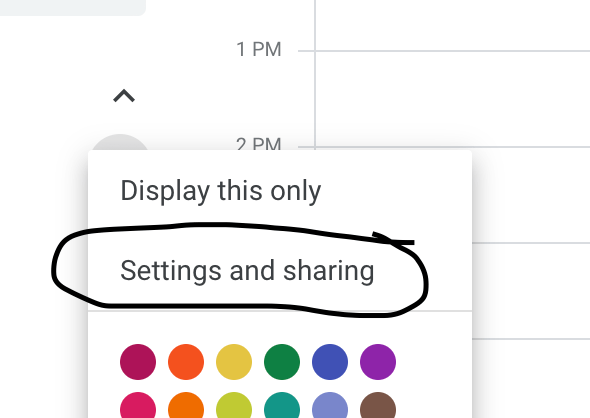
Settings and Sharing
I use my Google Calendar for all of my professional and personal tasks. So, I share it with anyone who might need to get a hold of me or schedule something. However, I do not necessarily need them to see all of the event details, so I choose the option of just Free/Busy.
Notifications
Normally, I don’t like to have a lot of notifications coming through on my email, but I do have some calendar notifications set up. If something is changed or canceled, I do like the email to come through so I’m aware of it. That way, I don’t just happen to notice it missing from my calendar at a later time. Another helpful notification is to get a daily agenda from your calendar emailed to you. This helps as you think about planning your day each morning.
Color Coding Events
Originally, I utilized the create calendar feature to make a separate calendar for each of my activities. But then I realized if I was using the share calendar feature to alert people to my availability I would have to then share all of those calendars with them. So although it takes a second longer when I create an event … After I make it on my calendar, I right click the event and then change the color to match my coding for that activity. Then, at a glance, I can see what responsibilities I have for my freelance work, my teaching, and my school.
Multiple Time Zones
Another setting you can utilize on the calendar is to have more than one time zone displayed. This is helpful if you have to coordinate meetings with people who live in a different area. I have to do this and so I have two different time zones on my calendar to make it easier for me to plan meetings with others.
Overall, I find Google Calendar simple and user friendly. I like that I can access it on all my devices and put everything in one place!
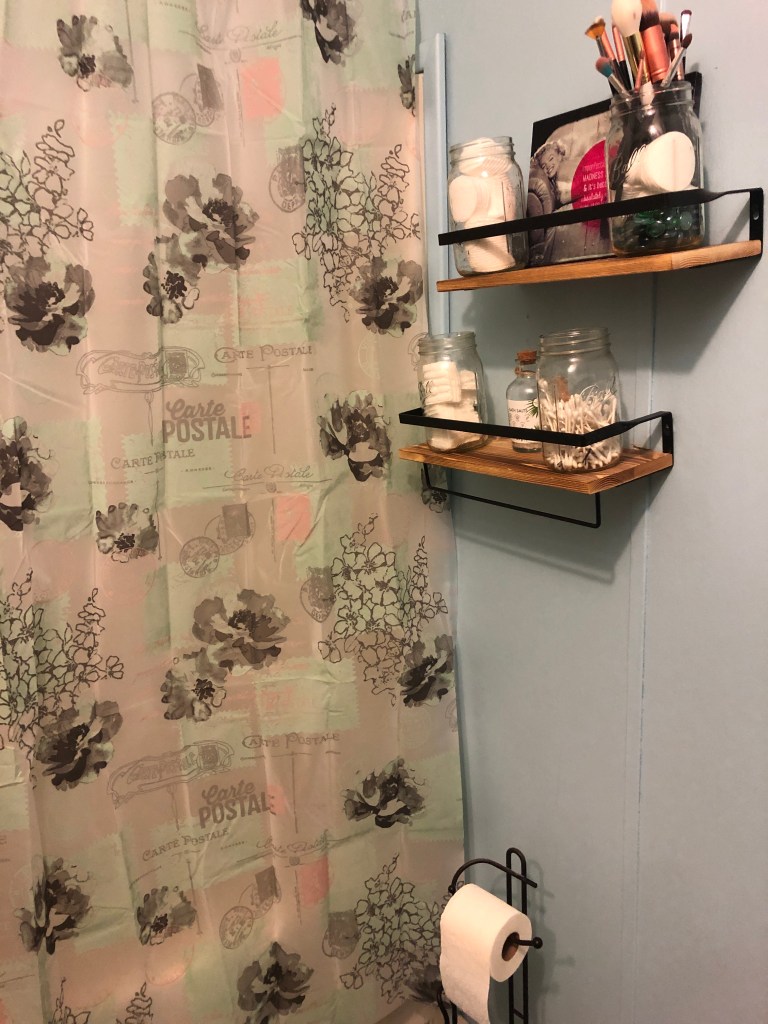
I find that my mental health and productivity is directly tied to my physical environment. When it’s cleaner and more organized, I am in a better mood and get more done. When I’m down, I’m less likely to clean or put clothes away, and the cycle may perpetuate. I thought it was time to spruce up my bathroom for spring.
My favorite addition to my bathroom for spring cleaning was my new shower curtain. I got mine at Ollie’s bargain outlet for about $3.99 so it was a great deal!
I’m loving this new vibe and I’m so excited for spring! Time to move on to the office!
If you clicked on this article, you were drawn in by the prospect of prioritizing your tasks. Maybe you don’t know what the Eisenhower Matrix is, but you liked the Matrix movies and you kind of remembered that Eisenhower was a president or something. No worries – I am here to help you out with this strategy of prioritizing the tasks to be completed.
History of the Eisenhower Matrix
Other names for this matrix include the decision matrix or important/urgent matrix, but ultimately came from a quote by President Dwight Eisenhower.
“I have two kinds of problems, the urgent and the important. The urgent are not important, and the important are never urgent.” – Dwight D. Eisenhower
From this quote, people took away the fact that there are four main categories that our tasks and activities fall into: urgent/important, urgent/not important, important/not urgent, and not important/not urgent. Although inspired by the quote from Eisenhower, the concept became popularized by Stephen Covey.
How Do We Use the Eisenhower Matrix?
Red pill or blue pill you say? Well, let’s take a look at something that could alter how you think about prioritizing your tasks. First, ask yourself if everything seems urgent and the world is constantly on fire. If you answered yes to that question, then utilizing this strategy could benefit your planning and reduce stress in your life.
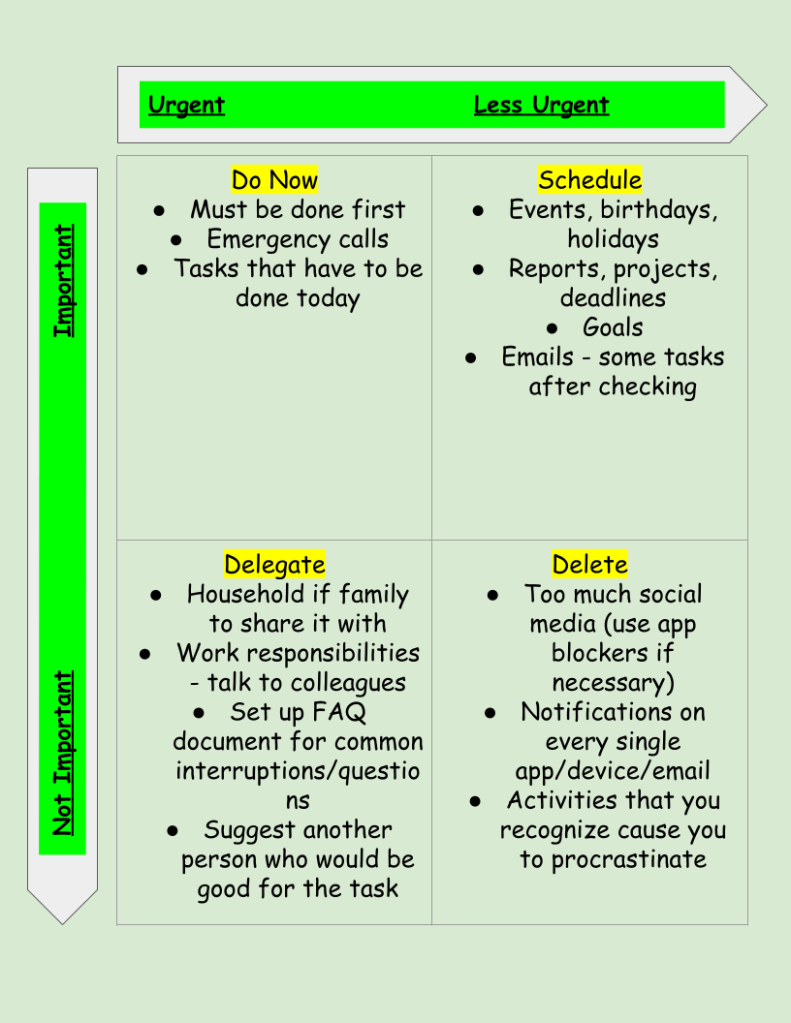
When you have a new task pop up in your personal or professional life, before acting on it, take a moment to pause and decide which of the 4 quadrants below that it belongs in. If it truly is urgent, like your kid fell outside and hit their head, then of course handle it at the moment. If it’s a work email on a Saturday morning that doesn’t really have to be handled until Monday, well … can you pause and save it for Monday?
You can do this on a daily or weekly basis, but I find it to be helpful to periodically go through my big tasks and move them to different quadrants depending on what needs to be accomplished. Here is an example of a diagram you could create to visualize your task management:
You’ll notice there is a box for the not important and not urgent tasks that says to delete. I prefer to look at this box as “in moderation” or evaluate shortcuts and strategies to become more efficient. Do I really need to get the CVS newsletter emailed to me every day? Probably not. In which case, I can delete it by unsubscribing and freeing up that inbox space and mental space. I wrote another post about email tips if you’re interested in checking that out.
So, next time someone asks you to do something or you feel that pressure that everything at work is urgent, decide if it is both urgent and important before you act. Check your 4 quadrants. If it is both urgent and important, go for it. If it’s not urgent, but still important, add it to your calendar for later in the day or in the week, but don’t forget about it. That’s why the matrix says to schedule it.
time blocking can be an effective time management strategy
There was a period of about 3-4 months when my schedule was extremely busy. I was juggling three different jobs and my own school work. Not to mention, it was the middle of a pandemic and I was packing up my personal belongings to move to a different state as well. I’m usually very good about managing my time using Google calendar and my to-do lists, but I knew I needed something extra if I was going to make sure everything got done.
I did some research on time blocking and adapted it to fit my needs. How many people approach time blocking is to keep a consistent schedule and do similar tasks in that block. For example:
7am-9am – Morning routine/family
9am-11am – Emails/meetings
11am-1pm – Lunch/ light to-do list items
1pm-3pm – Projects/deep thinking
3pm-5pm – Meetings/weekly planning
And so on. It could change daily or be a set weekly routine that someone follows.
I took this idea and combined it with keeping a calendar to schedule out everything that I had to do for the week and I did this every week. I color coded it by the job or task. Here is an example of one of my weeks.
As you can see, I worked quite a bit during that time. Thankfully, my schedule is a little bit lighter now so I don’t have to schedule so strict. However, this method really worked for me when I was juggling a lot of things all at once. The blue was my personal time to do whatever tasks or downtime I needed. I should mention I worked from home through all of this so it was easy to switch between jobs because it was often just a browser or device switch.
I certainly took breaks to get water, coffee, and use the bathroom. I followed good protocol to stand up at least once per hour and rest my eyes from the screen every 20 minutes. So while I didn’t follow this schedule every week to the exact second, I stuck to it pretty closely, and it really helped me accomplish everything without feeling overwhelmed. Every day, I prioritized the tasks that needed to be done that day and followed through on those items to the best extent possible. I had a weekly accountability call with a friend on Sundays to discuss our goals for the week and keep us focused.
Another thing that helped was scheduling times to check my email. Many days I have email open in the background and respond as messages come in if I’m not too busy. However, on days or weeks when I know I will be very busy working on projects, reports, and meetings, I schedule checking email into my calendar. That way, I have the tab closed so it’s not distracting me from my work, but I know I’ll get to it because I’ve prioritized time to deal with it.
I will definitely use this method again during busy seasons of my life!
I wanted to start this blog to share information about what I already know and what I’m learning as well as create a potential outlet for passive income in the future. What I’m finding is that I enjoy writing posts and learning about the technical side of building a website and this really could be more than a side passion if I put my mind to it.
So, one of the things I’m learning is actually how to get this blog going in the first place to build it into something meaningful. I’ve done research by watching YouTube videos and being an expert Googler, but there are still some things that I’m working on. Here are some things that I learned so far:
1. Building Traffic – difference between views and likes
I’m using WordPress premium as my hosting platform. Now that I have about 20 posts on the blog, I’m getting consistent notifications about likes on my posts, which is very exciting. I thought that would immediately translate into more views, but that is not the case. So of course, I Googled it to find out what was going on.
It turns out that most of my readers are viewing the posts through WordPress Reader and liking it there and not actually clicking on the blog itself. So even though the posts are being liked, I’m not getting very many views. Therefore, I need to figure out how to get people to click on the blog and read other content.
2. Building Traffic – Advertising
Now, I’m thinking how do I even let people know about the blog in the first place? I’ve mostly been using Pinterest and creating pins using Canva. I experimented with Pinterest Ads, but it was too expensive and I didn’t get enough clicks to make it worth my while yet. Here is an example of a pin I made for one of my blog posts. I’m considering starting a Twitter account to post tips of the day and drive traffic from there.
3. Search Engine Optimization (SEO)
This is probably the part I still have the most to learn about. The actual building of the site came pretty easily to me since I’ve had to build sites for school projects before. There are a number of websites that let you search for keywords, but the biggest piece of advice I’ve found is to search for long-tail keywords that have lower competition. This is called search engine optimization.
So, perhaps it’s being searched 1,000 times a month, but there aren’t many articles written about that particular topic. Turns out the types of things I like to write about are wildly popular and written about all the time. This is definitely an area of improvement that I’ll keep learning about it and working on for future posts. Perhaps I’ll take an SEO course to help improve my knowledge. It’s something I wish I knew earlier about starting a new blog.
4. Revenue – making money from the blog
One of the reasons of starting a new blog is to make passive income. I’ve watched tons of YouTube videos and read other blog posts to try and figure this one out. It seems you need a combination of advertising, affiliate links, sponsored ads, and even your own personalized premium content. Well, I certainly have lots of ideas and things in the works, but it’s not going to happen overnight. So, for now, I’m just utilizing the WordPress Ads that is built in to the site functions and some Amazon affiliate links.
For transparency, my site ran about 450 ads in February and it generated a revenue of $0.04 and about 1000 ads in March for a revenue of $0.01. Obviously, I was disappointed with the lower number this month even with higher views, so I searched what could be going on. It seems that advertisers might be bidding lower prices for space and my content just hasn’t had enough time to saturate. That’s okay. I actually have a 15-18 month plan in place and this is just the start.
I wanted to share some of the things I’m learning about starting a new blog here with you in this post. Feel free to drop a comment with any tips you have. Let’s help each other!
To save money, I have been trying to cut down on monthly subscription packages. Honestly, I’m quite a fan of these options because I do feel like they save me money in the long run for the things I use on a regular basis. I did cancel my subscription to Fabletics and Shoedazzle after enjoying them for years. However, I’m not yet willing to part with my subscription to Ipsy.
I used to get the glam bag every month, but now I use the every other month feature. This is helpful because I still get to enjoy the perks without having to spend the money each month. For $12 every other month I get 5 different sample items based on my beauty profile.
I’m not a huge makeup buff, and I think that’s why I love it so much. I get to try new products and see which things I like without having to invest a lot of money on makeup. So, for me, this is enough to keep my supply going for the year.
The makeup also comes in a cute little bag. I have a box of re-gift items where I store things and so I use the bags to give people and put jewelry in them or little candles for birthdays. So, not only am I getting to try out makeup, but I get a little item to gift someone else each time I order.
Another great thing about Ipsy is that you can choose which types of products you’d like to receive. You can add nail polish, perfume, and skin care items.
I will share two of my favorite recent products here. This Illamasqua foundation is one of the best ones that I’ve received in my Ipsy bags. I don’t usually wear foundation, but this was lightweight and blended in really nicely.
I love my Kiss and Smink matte creme lip crayon. I actually ordered a second one. I couldn’t believe the amazing deal I got on this for being a member of Ipsy.
So, no, I’m not a paid sponsor of Ipsy, but I do love the products and the concept and have been a loyal customer for years.
What are you waiting for? Get your Ipsy subscription today! So you can check out Ipsy here if you want to learn more!
I bought an iPad in January 2021 and I’m so excited to continue learning cool apps and features to best utilize all it has to offer. Apple’s iPad sales witnessed an impressive 57% surge in 2020, as reported by TabletFeast.com, highlighting the significance of accessories in enhancing the user experience.
I will do another post about the apps I use on the iPad, but I wanted to share some of the accessories I have and what I’m thinking about purchasing. Additionally, here is a YouTube video describing some of my favorite features of my iPad.
Cover – This cover is nice because it is lightweight, has space for the Apple Pencil, and stands up with the little triangle fold at the bottom. I chose the violet color and so far, it has worked out great for me.
Paperlike screen protector– This sticky screen protector actually makes it feel like you’re writing on paper with the Apple pencil. It still has the touchscreen capability and gives you the notebook feel.
Other iPad Pro Accessories I’m Considering
Bluetooth keyboard with iPad stand – right now I have an external keyboard and mouse that I use with my laptop stand, but I’m considering getting this all-in-one keyboard iPad stand.
Apple Pencil case – I’m not sure if I want to get the case because I don’t know if it will fit in the charging dock on the iPad without having to take the case off each time. So, I’m holding off on this purchase for now.
What are your suggestions on other helpful iPad Pro accessories? I’d love to hear them!
HP Instant Ink is really cool. I was having a conversation with my friend today and she was complaining about having to go buy ink for her printer. She needed to print some things for work but had just run out of ink. Well, I solved this issue years ago.
The great thing about HP Instant Ink is that with the subscription I never have to go to the store to buy ink. It’s connected to my wireless HP Envy printer. It knows when my ink is running low and mails it to me. I am then able to mail my blank ink cartridges back for recycling free of charge.
I started using HP Instant Ink in 2016. The first plan I chose was $9.99/month for 300 pages, which is the frequent printing plan, which is now $11.99/month. The great thing is that I’m able to monitor my usage each month and change my subscription accordingly. So, now my subscription is for $2.99/month for up to 50 pages. This is due to a concerted effort to move to digital preservation whenever possible.
The whole process is so easy and automated. If I need to print more, I can increase my subscription pages or if I need to print less, I can reduce it. My online account shows exactly how many pages a month I am printing.
I highly recommend getting an HP printer and checking out HP Instant Ink!
Note: Links are affiliate links and could earn a commission.
Self care is an essential part of staying productive and living a happy and fulfilling life.
As a lifelong student and someone who has always worked more than one job at a time, I realize that self care is a huge part of maintaining balance in my life. Yes, I work a lot, but I also need to make time to do things for myself. Sometimes that means cutting expenses in other places and splurging on myself.
So a couple of free self care things I like to do are to take walks or just simply nap for 20 minutes. Between meetings throughout the day, I judge if I need to get some energy out and get sunshine or if I need to shut my eyes and rest my mind for a bit. I try to build time into my schedule so that I can make these adjustments as needed.
Warmies! My friend got me this gift and I absolutely love it. Even while I’m working, I can heat up my unicorn neck wrap and put it around my neck to help soothe some of the neck pain that comes from looking at a computer all day.
BEACH! Now I’m fortunate that I’m within driving distance to a beach. So on days I truly need to just get away and get some peace and relax, I can grab a book or listen to a podcast on the beach. When I didn’t live by a beach, I used to find a local park where I could sit under a tree and still be in nature.
And my last self-care splurge is a massage. I don’t get them very often, but they are life-changing. I feel so relaxed and in less pain after a massage. If you can find a massage school or a Groupon, you can usually get a good deal. It’s worth it!
Keyboard shortcuts for Macs can be really helpful to staying productive and working more efficiently. I am a long-time Apple user. I do have to say that I preferred my 2013 Macbook Pro to my current 2020 Macbook Air.
However, the one thing that remains the same is my desire to do tasks quickly and efficiently. To do so, I have some settings that make switching between projects pretty easy. I also use helpful keyboard shortcuts for Macs whenever possible.
I’ll share some of my favorite features here.
Keyboard shortcuts for Macs
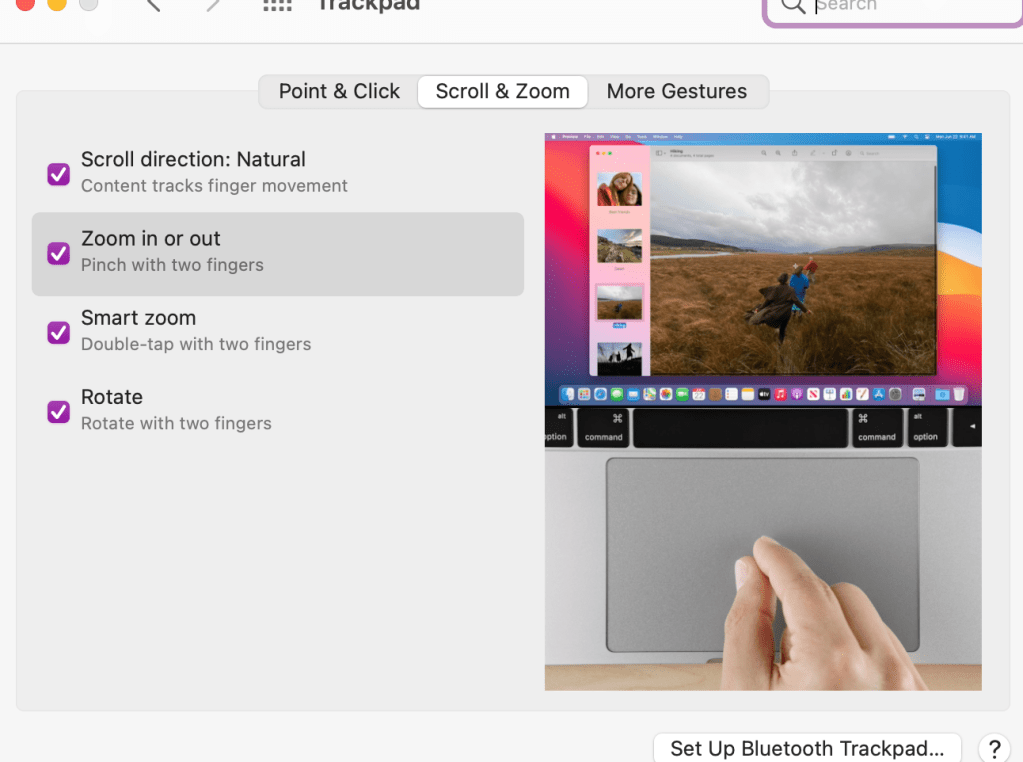
Double tap the trackpad to zoom in and out quickly. Now, to make sure you have your settings the way you want them, you should go into your settings to trackpad and choose the features you think will help you best. Here is what I have turned on:
2. Mission control – swipe up with three fingers. I use this to have multiple desktops going at one time. I can separate my work projects on different desktops and then swipe up or left or right to go between desktops.
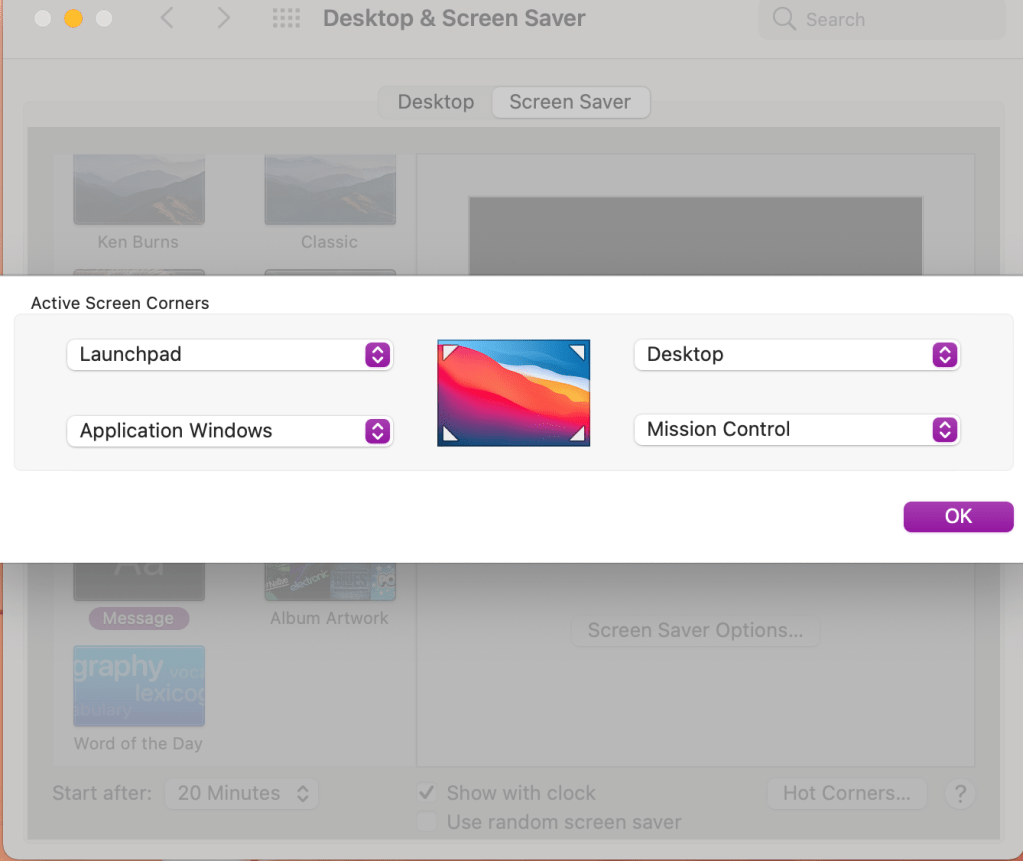
3. Setting up hot corners. Go into your desktop and screensaver settings. You can choose which shortcut you want each corner of your desktop to represent.
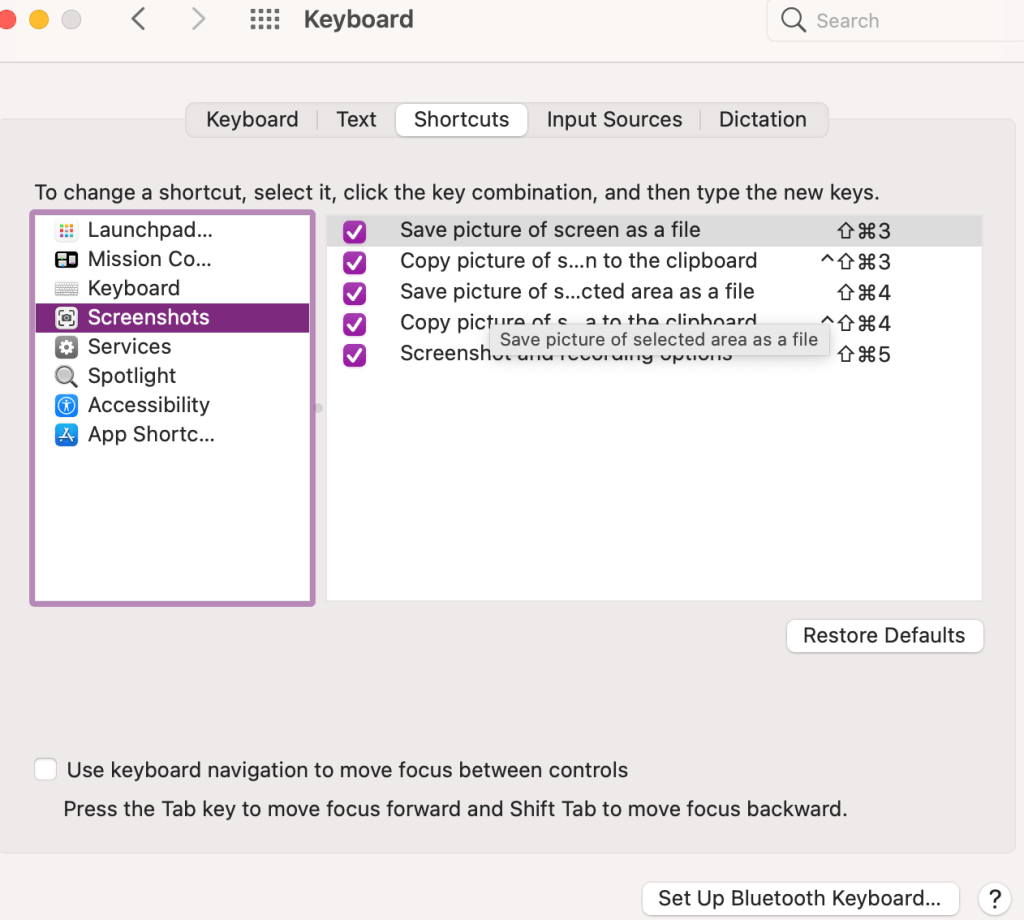
4. Take screenshots using Command + Shift + 4. I use this all the time to draw the box around whatever screenshot I’m taking. If you want to check out your other keyboard shortcuts go into your settings to keyboard and click on shortcuts.
5. And then just one favorite keyboard shortcut for good measure. Command + z. It doesn’t undo everything, but well, almost everything. I use this quite frequently for anytime I make a mistake. It’s like a quick undo button.
I hope this information was helpful! Please leave a comment on other tips and tricks you’d like to see.














 Tracy Dee Tips