Posted in Uncategorized

3 Simple Tips To Improve Productivity: Anyone Can Do It

I am constantly looking for ways to improve productivity in an efficient manner that honors the self care I’ve committed to myself. I’m on a journey of professional and personal growth and I want to share 3 tips that have helped me become more productive (when I follow them).

Now, one book that I read this past year that truly helped me to understand how habits work and why I should start small is from James Clear’s Atomic Habits. It also made me realize why I stopped running long distances after completing my half marathon.

I had a large goal that I reached, but ultimately, I didn’t keep it up because I didn’t have another goal to work towards lined up afterwards. If you haven’t read this book yet, do it, because the advice seems so simple, yet powerful at the same time. It’s really about starting with small manageable steps toward larger goals.

improve productivity
Photo by Julien Bachelet on Pexels.com

Tips to improve productivity

Create a Morning Routine

Another book that I read recently is the Miracle Morning by Hal Elrod. While I don’t do everything on his list, I try to implement the practice of being intentional when I start my day. I’ve especially been working on trying to stop snoozing my alarm clock in the morning so I can wake up a bit more refreshed.

In the book, Elrod talks about using the SAVERS method which stands for: silence, affirmations, visualization, exercise, reading, and scribing. I’ve kind of merged Atomic Habits together with this, so I don’t do the exact lengths of time he recommends. I try to get up, make my bed, stretch, make coffee, and sit to write down my daily affirmations. After that, I go over my to-do list for the day and prioritize what needs to be done first.

Time Batch Similar Tasks

One method to improve productivity is to batch like tasks together in a single time block. For example, I might set aside 7:00am – 9:00am to complete household chores or do laundry. I also recommend only checking email at set times throughout the day. When it is easily accessible on our phones or in our Internet browser tabs, we are more likely to run to do whatever comes across instead of staying focused on the thing that was in front of us in the first place.

Another strategy is to use the Pomodoro technique to work in 25 minute increments with a 5 minute break. Spend 2 hours of your time block utilizing this technique to tackle a big project or report for work or your home life. I spent several months organizing my day using the time blocking method to make sure that I was able to get to everything on my list.

Narrow Your Daily Focus

I used to create these big long to do lists because I thought it made me more productive to have long lists. What I realized was that if I didn’t get to everything on my list, I would get mad at myself for not being as productive as I could have been. When I start my morning routine, I now focus what my priorities will be for the day. I use a variety of different types of to do lists, but I try not to overload or overwhelm myself with listing everything that needs to be done.

I can be proud at the end of the day if I manage to check off the majority of things I wanted to get done.

So what can you do if you’re trying to be more productive?

  1. Get a morning routine
  2. Batch similar tasks in the same time block
  3. Narrow your daily focus

Remember it’s okay if you have off days because that’s life. Best of luck on your journey to improve productivity!

Note: Post contains affiliate links, for which I would earn a small commission if purchases are made at no extra cost to you!

Posted in Uncategorized

My Strategy for Writing Blog Posts

Everyone has their own strategy for writing blog posts. Since I just started working on my blog a few months ago, I’m still finding my groove in how to develop posts. I’ve done some research on how to write posts and what length to target. A lot of things I read actually have quite lengthy blog posts as the ideal. However, I’ve been focusing on shorter posts that get right to the point. I suppose I’ll have to invest in some longer ones and compare how they do.

Now at first, I didn’t know what I was doing (and probably still don’t know nearly enough), but I’m starting to develop some strategies for content development and ideas. My initial plan was to keep a list of running ideas in a Google Sheet and then add to them as I came up with fresh ideas. I was planning to create a whole monthly calendar, set aside a couple of days to write everything, and then schedule the posts to run.

As an organized person, I still think of that method as my ultimate content creation goal. However, as a busy person with a brain constantly filled with tasks and new knowledge, I discovered another way to write content for blog posts.


blog posts
Sparked curiosity leads to my blog posts

What do I do now for my blog posts?

Well, I found that adding headings and bullet points to my posts seems to help them track better in views. Even though I’m focusing on shorter content for now, I noticed that longer posts have more space for advertisements. In turn, that would equal more revenue if I made the effort to create longer content.

That could be financially beneficial down the line.

The method I use now is not fancy, but it’s working, so I’ll continue to use it until I’ve got a better routine. I often listen to podcasts, read news articles, and follow lots of productivity gurus.

Just like how Marie Kondo tells us to keep items that spark joy, I keep tidbits of information that spark curiosity.

As new ideas or innovations come to me, I add them to my draft posts right away. And if I don’t have access to my WordPress site at the moment, then I text or email myself the idea so I can put it there later. In my current draft post folder I have 17 different posts that I have started.

As I learn more, I continue to add to that post until it’s ready to go out into the world. Sometimes when I have designated time on my calendar to work on blog posts, I’ll pick the idea that sticks out to me the most and I’ll work on adding information to flesh it out.

In my research, I read that it takes about 8 months for blog posts to reach their highest viewer audience and after a year, I should track the posts to see which ones are most popular. Right now, I periodically review the post insights to see which topics are trending or have more likes.


For example, my original short post on time management tips actually has the most likes out of everything I’ve written. It’s simple, but shows me that there is more room to add time management content with more blog posts. Interestingly, super specific time management strategies, such as using the Eisenhower Matrix, doesn’t seem to be as popular as just a short list of ways to make a to-do list.

I’m sure my methods will evolve as I continue to grow in knowledge on how to create useful content and share it with others.

Be on the lookout for more posts because I’ve got at least 17 more ideas on the back burner!

Posted in Uncategorized

3 Ways to Respectfully Say No to New Projects or Commitments When You Want to Say Yes

So you want to say no to new projects. Do you feel guilty saying no when someone asks you to do something at work or a favor from a friend? Do you say yes even when you don’t want to so you won’t let someone down? It’s easy to say yes because you feel like you have to, but true reflection is necessary to decide which things are worth saying yes to. And sometimes you may think you’re saying no to something, but your message comes across as ambivalent and you feel it’s too late to back out at that point.

I was just having a conversation today with a friend who thought she said no to something, but still got an excited email about continuing to be part of a project. I had her read me the initial message she sent and let her know that it indeed did not come across as a no as she intended. She ran her response by me to check that it was clear and the new tone of the message was still friendly and encouraging, yet set a clear boundary on participation in the project.

Now, this blog post will focus on generic ways to respectfully say no, but I’m happy to write new posts catering to both professional and personal life boundaries. Before saying flat out “no” to an opportunity, gathering, meeting, or project, it is okay to ask clarifying questions. For example, about 6 months ago I was asked to take on a 4-5 month consulting project. It would have been an awesome learning opportunity for me, but I already had 2 part-time commitments and was completing my final semester of grad school. Part of my response included:


I feel confident in my abilities to meet the requirements of the position, but I want to make sure I have a clear understanding of the expectations and relative time commitment.

After the response became clear that this would be a 20-30 hour per week commitment, I knew that I could not add that to my workload. I really wanted to say yes and do it, but I also wanted to make sure that I could carry out the responsibilities to the level of competence I wish to display. And this comes from previous experiences where I did overload myself and not perform to the best of my abilities.

Discerning when and how to say yes and no to opportunities is a lifelong practice of finding balance in your life. There is not necessarily a one size fits all method to this. I was listening in to a conversation on Clubhouse last night and someone said that it’s easier to start with no and change to yes later than to say yes to everything and have to eventually say no.

Here are 3 ways to respectfully say no to new projects and manage your time effectively.


Say no to new projects: Ask them to check in at a later time

This strategy works if the ask is something you’re possibly interested in saying yes to, but just don’t have the time at the moment to commit or to learn more about it. Your schedule is packed and you just can’t imagine taking on one new thing. Say you are not available at this time, but they can check back in with you in XX number of weeks or months. And if the person follows up and it comes back around and you still cannot commit, clearly state that unfortunately, you will not be able to take on this project or endeavor. Here is a sample of what I would say:

Thank you so much for reaching out to me about this opportunity. I am interested in this possible partnership, but unfortunately cannot commit at this time. Will you check back with me in 3 months if you are still interested in collaborating?

say no to new projects
Photo by fauxels on Pexels.com

2.Express support in other ways

Now, this is the response that my friend used to make her no clear to the people in the email thread. She was truly excited about the project idea, which was expressed in the initial communications. However, she didn’t want to be one of the main people involved in the idea creation and the day to day of the project. This was a time she needed to say no to new projects.

So she sent a nice message back stating she was fully cheering them on in this opportunity, but could not take an active role. However, she left room for them to check back in if they had a specific task related to her area of expertise. Therefore, she was not committed in any way, but could offer support on very specific items if time permits later and there is a need.

3. Suggest an alternative

This is a great comprise “no” answer. Perhaps you don’t have the time or capacity to take something on, but you know someone who is. Check with that other person and then make the recommendation or connection. Personally, I like to check in with my contact before sending the other person to them that way I know if they are truly interested in the opportunity. It also creates a more positive interaction for everyone involved.

Maybe you want to say yes, but you can’t commit to 2 hour weekly check-in meetings. Clearly define your boundaries and say that you would be available to meet every other week or once a month. It is much better to set those boundaries up front from an overly cautious time commitment and then later decide to become move involved if you are able to do so.

In order to properly provide an alternative to whatever the ask is, it’s important to continue to build up your social and professional network. Take advantage of opportunities to meet with others in your field and areas of expertise. This way when you say no to new projects, there is a shared understanding and respect.

At the end of the day, if something is a definite no for you, make that clear in your response and wish the person well. You don’t necessarily owe an explanation and this is something I’m working on. I feel the need to justify my time by saying “oh, I already have this commitment and this commitment”, but the reality is simply saying no so you have time to take a break and protect your mental health is just as important.

Posted in Uncategorized

Does Every Meeting Really Need to be a Video Meeting?

Video meetings all day are tiring. After over a year of pandemic working, I think we can safely assume that many people are burned out from Zoom. A recent article, citing research by Dr. Jeremy Bailenson, explained why Zoom is in fact so much more tiring than meeting in person or just simply having a conference call.

I encourage you to read the article, but the short version is that we have lots of close-up eye contact, looking at ourselves more, higher cognitive load, and that mobility is reduced. The article linked above offers some solutions to these issues.

Meetings take up so much time in our work schedule, and the reality is, does everything really need to be a video meeting? The default was Zoom this past year, which grew from 4 million in revenue in 2018 to 21.7 million in 2020. And now it almost seems like people have forgotten the phone since we aren’t necessarily walking to our coworkers office.

Now the question becomes how many people are planning to go back to the office? What does the future of work look like? And if people continue to work from home, do we need to continue video meetings all the time?

Personally, I have started to ask for a phone whenever a video isn’t necessary for the communication piece. Yes, a lot of communication is nonverbal, but quick check-ins can be much more expedient through a phone call rather than waiting for everyone to log into Zoom because inevitably someone will talk and forget they are still on mute and then have to repeat themselves anyway.

Video meeting as the default

I admit, my default this past year has also been to just initiate a Zoom meeting from the get go. However, I’ve started to ask people what they prefer when scheduling meetings. A little over a month ago, someone asked for phone and it got me thinking about how automatic my response is these days to schedule a Zoom.

So now I like to give people the choice. I have found that even if you are sharing documents, you can actually do so by using Google Drive products and just use your full screen to view the shared document while having the phone on speaker.

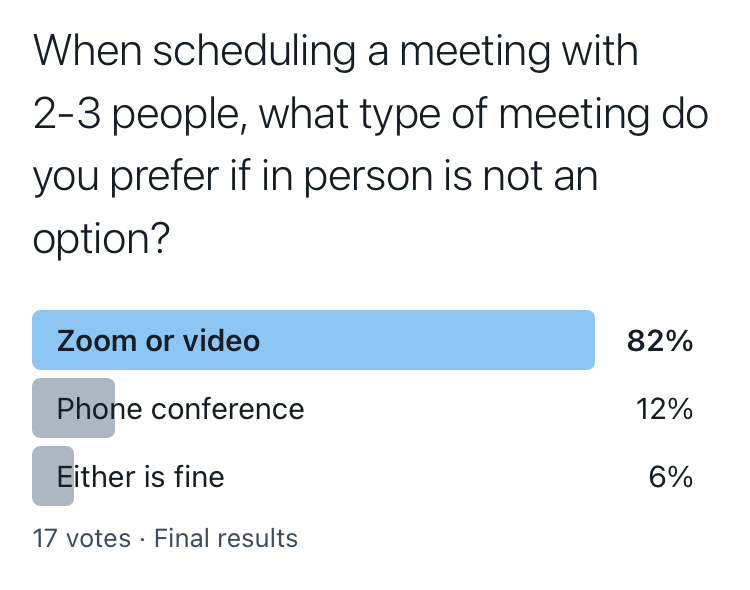
However, my very informal Twitter poll is informing me that 82% of the people voting (of my tiny sample size), do in fact still want Zoom for a meeting with 2-3 people, and someone even commented that they prefer phone for 2 people, but Zoom for 3. So perhaps there’s an advantage to Zoom with the more people you have on the call. It’s certainly easier to tell who is speaking when you can see their little square light up.

For me, I’m going to start scaling back on the video and upping my phone usage, or maybe just declining meetings in general. Perhaps it just needs to be an email. Check out this post for some email tips and this post for video tips.


Pro tip: When scheduling meetings, be empathetic to the people you’re asking to be on video. Ask them if phone would be easier. Maybe they need to do the dishes on the conference call or maybe, just maybe, like me, they are Zoomed out.

Posted in Uncategorized

My Favorite YouTubers That I Follow: Inspirational YouTube Channels to Binge Now

Since I recently started my YouTube channel and blog, I thought it would be fun to share some of the inspirational YouTube channels I watch on a regular basis that have inspired me. There are a lot of wonderful, engaging, and informative channels that can help you learn to grow your channel, build your blog, and create content as well. Or, if you’re just looking for helpful information, I will share some topic areas and suggested YouTubers to follow. I’m not going to rank them in any particular order because it’s not content to necessarily compare since each offers amazing videos and helpful advice.

Productivity and Time Management:

The YouTuber who’s video inspired me to just put myself out there and do it, whether I’m ready or not, was Ali Abdaal. He includes videos on productivity, technology, and tips and strategies for a variety of things, including staying motivated and managing your time. There are tons of other productivity inspirational YouTube channels, but Ali is my favorite.

Blogging Tips:

I love going to Nakisha Wynn for blogging tips and strategies to stay motivated and make the most of your content and marketing. She releases a video a week that provides useful information about finding a niche and ways to make money as a blogger.

If you’re interested in learning about marketing using Pinterest, my go to resource is Shruti Pangtey If you subscribe to her email list, you get access to a free webinar where she breaks down content strategy for using Pinterest to market your blog.

Interesting Information:

I love to eat good food and a great channel to get healthy and budget friendly recipes is from Fit Men Cook. And the recipes are yummy!

Now, this person is newer to YouTube, but has an amazing blog that I’ve been following for quite some time. Anne-Laure studies neuroscience and provides really interesting articles about how the brain works and how to be productive. Keep this on your inspirational YouTube channels list!

The videos on the next channel never disappoint and no wonder there is a stampede following Kelly Stamps. Whether you want to learn strategies for YouTube, follow interesting vlogs, or get general life advice, this is the channel for you.

inspirational YouTube channels
Free Mock-up | YouTube Channel Art by Gui Dellacolletta is licensed under CC-BY 4.0

Growing on YouTube:

So in order to reach my goal of 1000 subscribers by the end of 2021, I watch videos on strategies to do that. A really helpful channel is Annie Dubé. The videos are to the point, super clear, and provide actionable steps to grow your YouTube channel. She is definitely one to keep on the list of inspirational YouTube channels. Annie also has a really helpful Facebook group and community of engaged YouTubers.

Creative – Etsy and Designing:

The first YouTuber I like to watch videos from is Alissa Rose. If you are looking to sell on Etsy and open up a shop, this creator has tons of helpful tutorial videos guiding you each step of the way. There are videos on social media strategy, designing digital products, and more.

The next YouTuber I like to watch videos from is Kirstin with KDigitalStudio. I recently got an iPad and bought the digital creating program Procreate. It is an amazing program and Kirstin has excellent videos on how to create digital designs on Procreate.

Study Tips:

This channel has over 1 million subscribers and it’s easy to see why. The study tips and note-taking strategies are so helpful and the videos are easy to watch. The channel I go to for study habits and advice is StudyTee by Therese.

Another helpful channel with study information is Estella with Study To Success. One day, I hope to have as beautiful an office set up. I love all the colorful products and it’s fun to see how to making studying not so boring.

Finance:

There are tons of YouTube channels designated for the stocks and Bitcoin, but the ones I follow provide a little bit of everything. The first one I follow is SaraFinance, where you can learn about affiliate marketing, drop shipping, budgeting, and more.

The next one is Charlie Chang, who has a large following on Tik Tok as well as YouTube. This is a great channel to learn about side hustles, investing, and other ways to make passive income and become an entrepreneur.


There are lots more channels that I follow, but I wanted to share some of my favorite ones with you here. Hopefully, you can find some useful information from them like I do. If you have another suggestion, drop it in the comments below!

Posted in Uncategorized

4 Helpful Ways to Make Money Working From Home

Many people want to make money working from home.

Well, now that I’ve had the privilege of working full-time from home for over a year, the one thing I can say I have enjoyed the most is autonomy over my schedule. I did have that before, even when going into the office or teaching at my school to some extent, but more time was available to me without the commuting back and forth to different places.

Now, I’m in a bit of a 3-month limbo here between my current part-time job and my next full-time venture. I’ve utilized some of these freelancing sites before off and on to try to make a bit extra, but I’m especially interested in earning a stable income over the next couple of months from these opportunities.

I will share the two main sources of part-time WFH income I’ve used and then some of my aspirations to grow over the next couple of months.

Make money working from home

  1. Rev.com – This is a transcription company that has clients from all over the world submit interviews and meetings to be transcribed. You have to apply by completing a transcription test. There is a learning curve by getting used to their system and platform, but once you figure it out, it gets much easier. You start out at the lowest level and then if your stats are high enough after 800 minutes, you move up to the highest tier. This is better because you have access to higher paying jobs and clearer audio files. Some of the initial files can be tough in the lower category, but if you stick with it, you’ll find it’s actually pretty fun. The pay is per minute and varies by each file, and is paid out weekly.
  2. Upwork or Fiverr – So far, I’ve only completed jobs on Upwork for editing and formatting. Because of my background in education and research, this category works well for me. Upwork is what I started with about 3 years ago, but now I’m interested in setting up a profile on Fiverr as well. It’s pretty simple to set up a profile, but be prepared to answer questions when you’re bidding on jobs to show your level of experience or expertise.
make money working from home
Photo by Andrea Piacquadio on Pexels.com

New WFH goals

E-books – I have a lot of training in education and since writing is still in my routine, I was thinking about creating some e-books to sell. I made a 30-day time management journal that I posted in my Etsy shop. Another avenue is to use Amazon Kindle Direct Publishing and make sure to format designs in Canva to match their requirements.

If you google how to make money working from home, you’ll get tons of articles and websites directing you to opportunities. I know I only listed 4 different avenues here, but I prefer to start with some small, proven websites and then build from there if I still need more.

For example, if you stay consistent with transcribing on Rev.com a little each day, you could make a pretty decent monthly side hustle.

The thing that is appealing to me about the e-books is that it really turns into passive income over time. It takes effort to create everything up front, but with digital products, you only need to do it one time. I’m also taking time to market on Pinterest and of course, here on the blog and on my YouTube channel. All of that is part of committing to a goal that may take a little bit of time to get off the ground.

Whatever you choose to do, make sure to verify it is legitimate and decide if it is worth the time investment to get started.

Posted in Uncategorized

Do You Have Trouble Meditating? What Works For Me Now

I have trouble meditating.

I’ve always been one of those people who truly wanted to be able to meditate, but I struggle with turning my brain off. I am constantly thinking, processing, and planning. Focusing on the here and now almost seems impossible. I’ve been through many mindfulness trainings and I’ve truly tried to meditate for extended periods of time with limited success.

I often talk with friends and my therapist about techniques to meditate and focus in order to cut back on the anxiety brain. I’ve had to implement several practices to calm my mind, and think of meditation and mindfulness as an ongoing practice in my life. Here are some things have helped me get closer to my goal of daily meditation.


Trouble meditating? Practice intentional breathing


With intentional breathing, I breathe in through my nose and out through my mouth. I’m not quite sure where I learned this. I think it was actually from when I started training for races like 5K’s and 10K’s. It helped keep my pace when I was running and made me mindful of my breathing. Now whenever I need to take a step back and reflect, I focus on my breathing and remember to go in through my nose and out through my mouth. If I’m being extra mindful, I’ll even count to three on the inhale and then on the exhale to keep my breathing consistent.


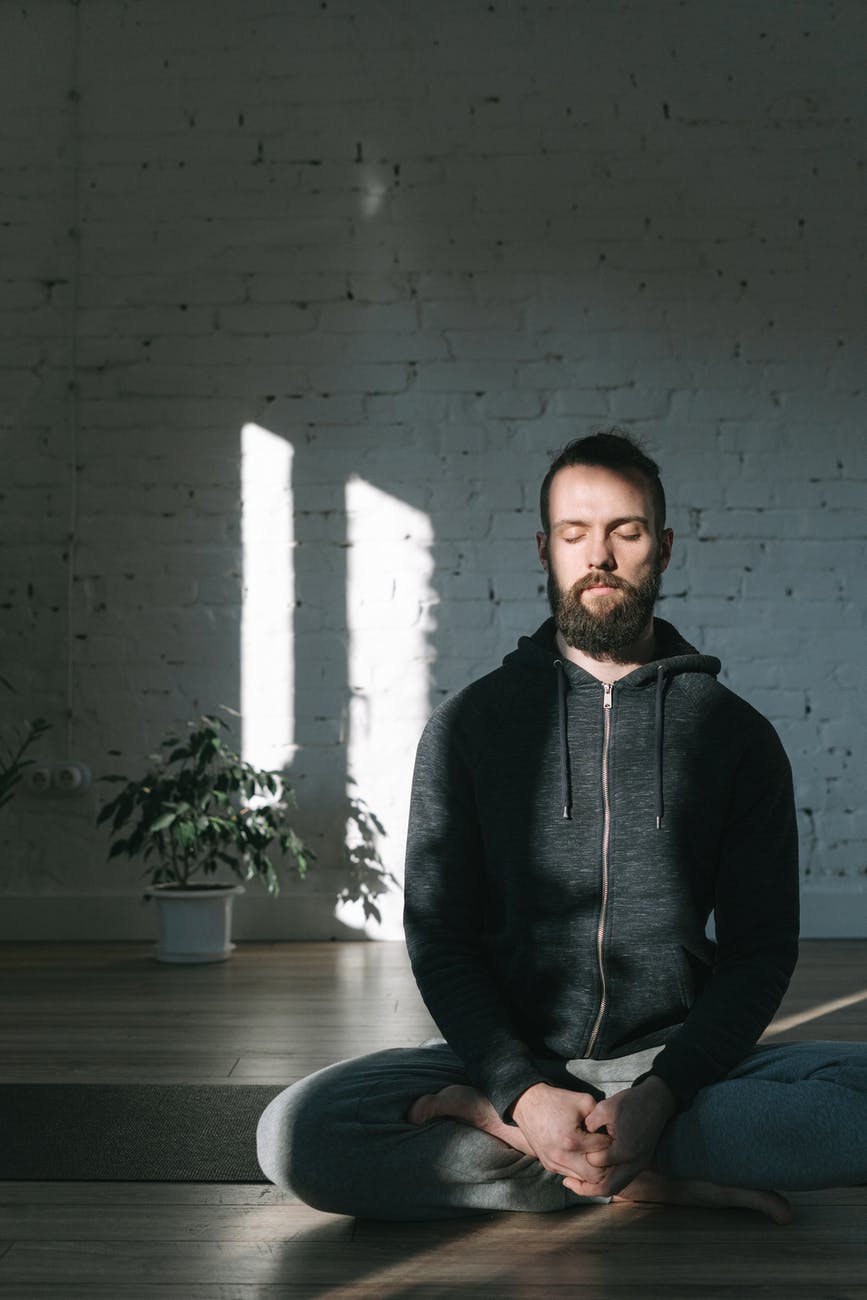
trouble meditating
Photo by Ivan Samkov on Pexels.com


Trouble meditating? Try Morning affirmations

I try to do this as many days a week as I can, but it is not every day. I don’t meditate exactly, but I spend time in reflection and focus on positive affirmations. I use the I AM app on my ipad and then I write it down in my journal. I try to pick at least 3-5 affirmations per day to focus on. The simple act of writing helps solidify it more into my subconscious.

Lately, I’ve been focusing on the wealth affirmations. I’ve been in school and a student for a long time and I’m ready to start earning more for the work and effort I have been putting in. I’m using time to research areas to build this and spending time each day manifesting this and being grateful for what I have.


Trouble meditating? Check out Yoga Nidra

I wrote about Yoga Nidra in another post as well. Honestly, this is one of the best meditation techniques I’ve found that works for me. I have done many of the YouTube videos, especially during covid, but in person works better for me. I lay down with a blanket and a rest for my head and knees and listen to the guide talk through the meditation. I always leave feeling so relaxed and the worries of the day have melted away.


Trouble meditating? download the Headspace app

I have actually been quite fortunate to get the benefits of the paid Headspace app through my university. I’m glad that they saw the value in sharing this with grad students so they have a way to limit stress and think about their day. I use it primarily for two purposes.

I load up the app and complete the short 5 minute meditations when I’m feeling overwhelmed. Anything longer than 5 minutes is really hard for me to do during the day. That’s why Yoga Nidra is so helpful because it’s a full body immersion. Then, I use their sleep stories at night to help me fall asleep.

I know I see lots of posts and books about successful people spending their morning meditating, but I’m still a work in progress. For now, these little bursts of mindfulness are helping me become more focused throughout the day.

Get 3 months of Calm free with your Prime Student membership
Posted in Uncategorized

Best digital to do list: 4 free apps to try today

Are you looking for the best digital to do list?

Making to-do lists is a helpful way to organize tasks that need to be completed. While, I do use a daily paper and pen method to keep track of tasks, I currently use Tick Tick to manage my goal-related tasks. I’ve used other digital apps as well and it all comes down to preference and whatever is best suited to your individual goals at the time.


Tick Tick

This program is a website, but also can be downloaded as an app. I have it on my Macbook, but mostly use it on the browser and keep it in my Google Chrome grouping tab for calendar. It can synced across all your devices so that if you update it in one place, it will be updated everywhere.

Within Tick Tick, you can create folders and assign tasks to a date within a folder and category. I have everything organized by school, different work tasks, bills, and personal development objectives. I also include things in my list that are recurring like do the animals flea treatment every month. You can also choose to utilize the calendar view to visually see when you have lots of tasks due or happening at once.

digital to do list


Remember the Milk

This app has the same basic features and interface as Tick Tick. I personally like both. Similar to Tick Tick, you can view tasks for the current day, the next day, or the week. Remember the Milk has a really nice easy share function where you can share tasks with someone’s email address.


Workflowy

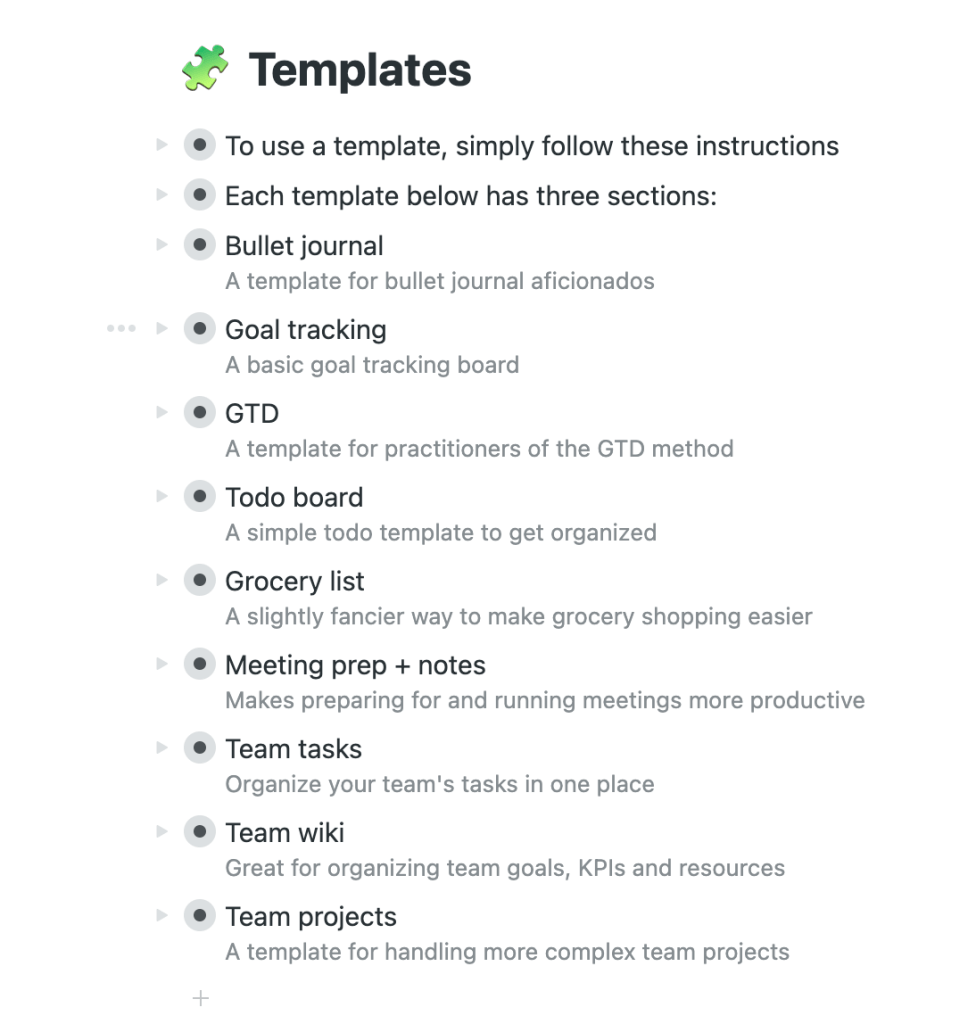
Now, this one is newer to me and I look forward to playing around with it a bit more. The cool part is that it has different templates that you can use depending on what type of list you are trying to create. It also has the option to organize it by boards or bullet points and you can go back and forth.


Google Keep

If you are an avid Google user, then Keep is for you. It integrates with your calendar and you can move it up on your waffle to keep it nice and close by when you open a new google browser tab. The neat thing about Google Keep is that you can add images to your lists and move them around. There is a lot more visual customization available than the other to-do list apps that are out there. You can add collaborators, set reminders, change the color, and copy to Google Docs. It’s definitely worth trying out!

Posted in Uncategorized

Ways to Create a To-Do List: Methods to Get Stuff Done Right Away!

You need to create a to-do list

Do you often make it through the day just putting out fires as they occur, trying to keep up? Creating and sticking to a schedule can help with managing time effectively. One helpful tool is to create a to-do list of action items that you need to get done. Over the years, I’ve tried different methods of writing a to-do list, which have worked for various purposes depending on my goals at the time.

A to-do list serves an important purpose in life. It keeps us from losing track of everything we have to do and helps focus our day on the things that really matter. It turns out that creating a to-do list can seem intimidating for some of us. But with a little bit of know-how, it becomes easier to create a to-do list. You won’t have to spend extra money and will be able to spend more time on the important stuff.

Why is it important to create a to-do list?

Making lists and prioritizing tasks helps you become more likely to accomplish your goals and reach your dreams. It also provides a way to track your progress and keep you motivated to move forward. To-do lists are great for both personal and professional use. You can use a paper and pen notebook to track it all or there are lots of great digital apps to organize tasks by category.

I’ll share some of the methods I’ve used to create to-do lists with you here.

create a to-do list
Photo by energepic.com on Pexels.com

THE EVERYTHING LIST

I like to call this list the everything list because it’s more or less a brain dump of all that has to be done. Sometimes I make columns for personal and work action items to keep them separate, but I just get it all down on paper (or digital). I’ve seen others refer to this method as the grocery list method because it’s just basically keeping a running tab of tasks as they pop into your brain.

Top Three to Five

For me, this method is helpful when I’m feeling overwhelmed. Instead of literally writing everything down that needs to get done, I write 3-5 MANAGEABLE items at a time. Then, when I’m able to cross them all off, I create a to-do list by writing 3-5 more items to accomplish. It’s comparable to time blocking a schedule. It’s focusing me to be intentional about what I want to accomplish within a certain timeframe.

Prioritized List

This method takes the everything method and then rearranges it based on your priorities. It’s easier to do this with a digital task management system because you can easily cut and paste the items and move them up and down on your list. One way to prioritize is to use the Eisenhower matrix. Some people even recommend a simple lettering system next to your tasks with A being the most important item to tackle first.

Big and Small

This type of to-do list breaks tasks into big and small tasks. You can think of them as time commitments. If it’s something like sending an email that will take 5 minutes to write, that could be considered a small task. If it’s completing an annual report, that might be a bigger task. Sometimes it’s more helpful to break up those big tasks into smaller ones and cross off those milestones as you reach them.

No matter how you organize your tasks and create a to-do list, the best thing to do is find what works for you. The physical act of crossing something off on paper to me feels so good that even though I manage my longer-term and ongoing tasks in a digital app, I still create a daily list of items that need to get done. I also try to keep it realistic so as not to get disappointed if I don’t get everything crossed off my list.

Happy to-do-ing!

Posted in Uncategorized

5 Strategies to Manage Stress You Can Use Today

I don’t know about you, but I could use some strategies to manage stress.

No matter how much I try to avoid it, stress eventually creeps into some areas of my life. It particularly occurs around deadlines or times when multiple priorities are overlapping and there’s no way around it. I try to manage it in advance with good time management skills, yet I still need to find creative solutions to let the stress out when it does start to build up.

Here are five strategies to manage stress that I use when I’m feeling the stress pile on and I need to let go of some tension:

1. Exercise

This is probably the number one go-to stress reliever. Even doctors recommend exercise as a great stress reducer. I am a Zumba instructor so I have my regular classes, which helps with a consistent schedule. However, if I just need to clear my head, a walk or jog is perfect to let go of some of the worries and tension of the day. A couple of years ago, I was feeling fatigued and it turned out that my Vitamin D was low. Now I make it a priority to take the walk outside anytime it is a sunny day to replenish that energy.

2. Breathe Deeply

This is a practice that has truly helped me to manage my anxiety much better. Any time I feel the stress building up or drifting in, I take several deep breaths. It’s also helpful to utilize meditation practices through apps or YouTube channels.

3. See a Counselor or Therapist

I have been regularly seeking therapy for about 5 years. The amount of personal growth and self reflection that has resulted from this has been tremendous. I highly recommend therapy to everyone, no matter your life circumstance. It is extremely helpful to talk through your life circumstances with an unbiased person who has training and knowledge to help you see viewpoints that you may not realize on your own. For me personally, this is one of the best strategies to manage stress.

That alone has the power to reduce stress in your life. Many jobs offer what’s called EAP, or Employee Assistance Programs. If you’re not sure what it is, contact your HR department and ask if this is a benefit that is provided. If so, take advantage of the hotline and assistance to speak with someone about whatever it is that you are going through.

strategies to manage stress
Photo by Timur Weber on Pexels.com

4. Find Something You Enjoy

This could be a hobby or creative talent that you already have or something new that you are trying. Essentially, you want to fill some of your extra time with activities that make you happy or excited. Some people like to paint or draw or express themselves artistically. Perhaps you like to make candles. Whatever it is, make sure that you’re not caught in the work, work, work loop. Your self care and happiness are a priority and you should not feel guilty about making time for that.

5. Do Yoga Nidra

A friend of mine introduced me to Yoga Nidra years ago and I could not believe how immediate the results were in my reducing my stress levels. If you’re not sure what it is, check out this post here. After my first time, I was so relaxed, I truly felt the stress leaving my body. I had tried yoga before, but with little success.

I always found myself to be a go, go, go type of person and yoga was much too slow for me. I love my Zumba and dancing, but not Yoga. However, this is much more like a meditation and I could truly find myself relaxing throughout the process. If you haven’t checked it out, there are many YouTube videos you can follow along with that will take you through the process.

Whatever you have going on, you owe it to yourself to take a step back if you can. You don’t want to get to a point where you have no choice but to take a step back. Try to use these strategies to manage stress and comment on any others that you utilize to reduce stress!