
Posted in Time Management, Work From Home

Using the Eisenhower Matrix to Prioritize Your Tasks

If you clicked on this article, you were drawn in by the prospect of prioritizing your tasks. Maybe you don’t know what the Eisenhower Matrix is, but you liked the Matrix movies and you kind of remembered that Eisenhower was a president or something. No worries – I am here to help you out with this strategy of prioritizing the tasks to be completed.

History of the Eisenhower Matrix

Other names for this matrix include the decision matrix or important/urgent matrix, but ultimately came from a quote by President Dwight Eisenhower.

I have two kinds of problems, the urgent and the important. The urgent are not important, and the important are never urgent.” – Dwight D. Eisenhower

https://woven.com/blog/the-eisenhower-matrix

From this quote, people took away the fact that there are four main categories that our tasks and activities fall into: urgent/important, urgent/not important, important/not urgent, and not important/not urgent. Although inspired by the quote from Eisenhower, the concept became popularized by Stephen Covey.

How Do We Use the Matrix?

Red pill or blue pill you say? Well, let’s take a look at something that could alter how you think about prioritizing your tasks. First, ask yourself if everything seems urgent and the world is constantly on fire. If you answered yes to that question, then utilizing this strategy could benefit your planning and reduce stress in your life.

When you have a new task pop up in your personal or professional life, before acting on it, take a moment to pause and decide which box it belongs in. If it truly is urgent, like your kid fell outside and hit their head, then of course handle it in the moment. If it’s a work email on a Saturday morning that doesn’t really have to be handled until Monday, well … can you pause and save it for Monday?

You can do this on a daily or weekly basis, but I find it to be helpful to periodically go through my big tasks and move them to different boxes depending on what needs to be accomplished. Here is an example of a diagram you could create to visualize your task management:
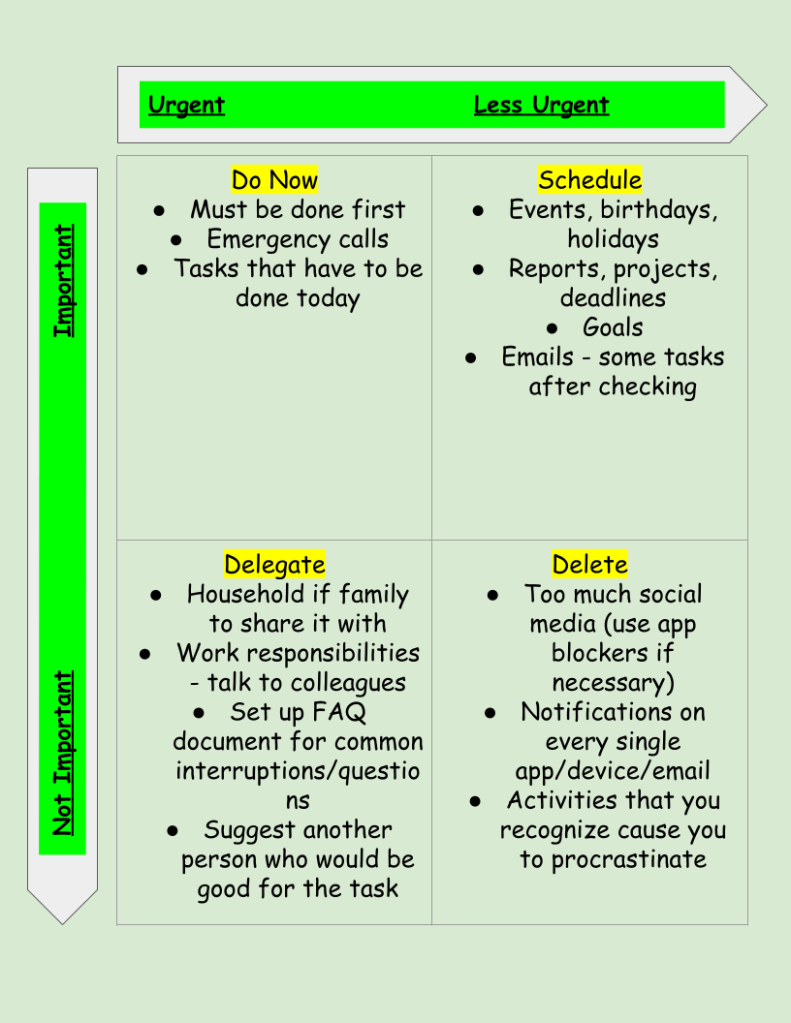
You’ll notice there is a box for the not important and not urgent tasks that says to delete. I prefer to look at this box as “in moderation” or evaluate shortcuts and strategies to become more efficient. Do I really need to get the CVS newsletter emailed to me every day? Probably not. In which case, I can delete it by unsubscribing and freeing up that inbox space and mental space. I wrote another post about email tips if you’re interested in checking that out.

So, next time someone asks you to do something or you feel that pressure that everything at work is urgent, decide if it is both urgent and important before you act. If it is, go for it. If it’s not urgent, but still important, add it to your calendar for later in the day or in the week, but don’t forget about it. That’s why the matrix says to schedule it.


You can order these super cool daily sticky notes to keep yourself organized and prioritize each day:

Sources:

https://woven.com/blog/the-eisenhower-matrix

Product Plan Glossary

*Links to products are affiliate links

Posted in Time Management, Work From Home

What I Learned From Time Blocking My Schedule

There was a period of about 3-4 months when my schedule was extremely busy. I was juggling three different jobs and my own school work. Not to mention, it was the middle of a pandemic and I was packing up my personal belongings to move to a different state as well. I’m usually very good about managing my time using Google calendar and my to-do lists, but I knew I needed something extra if I was going to make sure everything got done.

I did some research on time blocking and adapted it to fit my needs. How many people approach time blocking is to keep a consistent schedule and do similar tasks in that block. For example:

7am-9am – Morning routine/family

9am-11am – Emails/meetings

11am-1pm – Lunch/ light to-do list items

1pm-3pm – Projects/deep thinking

3pm-5pm – Meetings/weekly planning

And so on. It could change daily or be a set weekly routine that someone follows.


I took this idea and combined it with keeping a calendar to schedule out everything that I had to do for the week and I did this every week. I color coded it by the job or task. Here is an example of one of my weeks.

As you can see, I worked quite a bit during that time. Thankfully, my schedule is a little bit lighter now so I don’t have to schedule so strict. However, this method really worked for me when I was juggling a lot of things all at once. The blue was my personal time to do whatever tasks or downtime I needed. I should mention I worked from home through all of this so it was easy to switch between jobs because it was often just a browser or device switch.


I certainly took breaks to get water, coffee, and use the bathroom. I followed good protocol to stand up at least once per hour and rest my eyes from the screen every 20 minutes. So while I didn’t follow this schedule every week to the exact second, I stuck to it pretty closely, and it really helped me accomplish everything without feeling overwhelmed. Every day, I prioritized the tasks that needed to be done that day and followed through on those items to the best extent possible. I had a weekly accountability call with a friend on Sundays to discuss our goals for the week and keep us focused.

Another thing that helped was scheduling times to check my email. Many days I have email open in the background and respond as messages come in if I’m not too busy. However, on days or weeks when I know I will be very busy working on projects, reports, and meetings, I schedule checking email into my calendar. That way, I have the tab closed so it’s not distracting me from my work, but I know I’ll get to it because I’ve prioritized time to deal with it.

I will definitely use this method again during busy seasons of my life!

Posted in Personal Skills, Time Management, Work From Home

Time Management Tips

I rarely hear people say they’ve got too much time on their hands. It’s often more about the lack of time that frustrates most. We all get the same amount of time in a day and how we use it has important implications for the outcomes of our lives.

Time management is an area of my life where I am constantly looking to improve. I seek ways to plan and be more productive. I used to thrive on being busy thinking that that was a marker of effective time management, when in fact it is not. Now, I seek ways to engage in deep focus and practice self care to make the most of the time I have. Here are some of the strategies that I use.

  • Single task. In order to turn my focus to the task at hand, I close out the email tabs, turn off the notifications, and focus on one item of my to do list at a time. Each day I use a template to write tasks for the day.
  • Modified Pomodoro. Google the Pomodoro Method and you’ll find lots of articles and resources. I use it, but sometimes I modify it and use the amount of work time that fits best in my schedule. So instead of 25 minute work chunks, I might do 30 or 45 or even an hour.
  • Prioritize. I keep my recurring tasks and upcoming to do items on a program called TickTick. Each day, I use that as my guide to prioritize what needs to be completed. I set aside 15-20 minutes each morning to start my day with prioritizing that way I’m not caught off guard as the day goes on. If something comes up, I can decide if it fits in my priorities or if it can be moved to the next day.
  • Improve technology skills. This is an important time management tip for anyone working from home. If you spend a lot of time on the computer, then finding quicker ways to complete tasks saves time. Time saved by technology can be spent on other priority areas. Utilize the free resources available to brush up on your tech skills.
  • Calendar. I use Google calendar to color code all of my meetings and tasks. I add big projects to my calendar and block off time to complete them. I also use a paper calendar because I still like to have things written down.

*I get commissions for purchases made through links in this post.